
 Why choose Breeze
 Marketing
 Creative
 Sales
Sales Remote work
 Managers
 Product teams
 Project management
 Task management
 Kanban tool
 Time tracking
 Project reporting
 Project calendars
 Project timeline
 Team workload
 Project automation
 Project customization
 Chat
Chat Web forms
 Project roadmap
 AI
AI What's new
 Articles & guides
 Help center
 Mobile apps
 Integrations
 Developers & API
 Free tools
Best remote project management software in 2026

Remote teams need project management software that keeps priorities, ownership, updates, and deadlines visible across time zones. The best remote project management software reduces status-chasing by giving distributed teams one place to plan work, share context, and move projects forward asynchronously. If you are comparing lighter coordination options, also see our guides to project collaboration tools and task management software.
Disclosure: Breeze publishes this comparison and is one of the tools listed below. "Remote PM" usually means async-friendly PM — the same tools that work for co-located teams, weighted differently. We'll mark when a tool is genuinely remote-first vs. just claimed to be.
How we chose these tools
We picked candidates that hold up across time zones and async work, then ranked them on:
- Async-first communication — comments, status updates, and decisions captured in the tool, not Slack.
- Time-zone awareness — deadlines and meetings shown in the viewer's local time without manual math.
- Status visibility — "what's happening" answerable without a sync meeting.
- Video and recording integration — Loom, Tella, or native, since async video is a remote-team staple.
Quick answer: best remote project management software in 2026
- Best overall: Breeze
- Best for async documentation: Notion
- Best for flexible workflows: ClickUp
- Best for dashboard-heavy coordination: Monday.com
- Best for complex cross-team work: Wrike
| Tool | Best for |
|---|---|
| Breeze | all-around fit |
| Notion | for async documentation |
| ClickUp | for flexible workflows |
| Monday.com | for dashboard-heavy coordination |
| Wrike | for complex cross-team work |
List of remote project management software
These remote project management software options help distributed teams stay aligned, focused, and productive regardless of location:
Breeze
- Pricing: Simple pricing at $9 per user per month billed yearly, or $10 billed monthly, with all features included
- Rating: 4.4/5 on Capterra
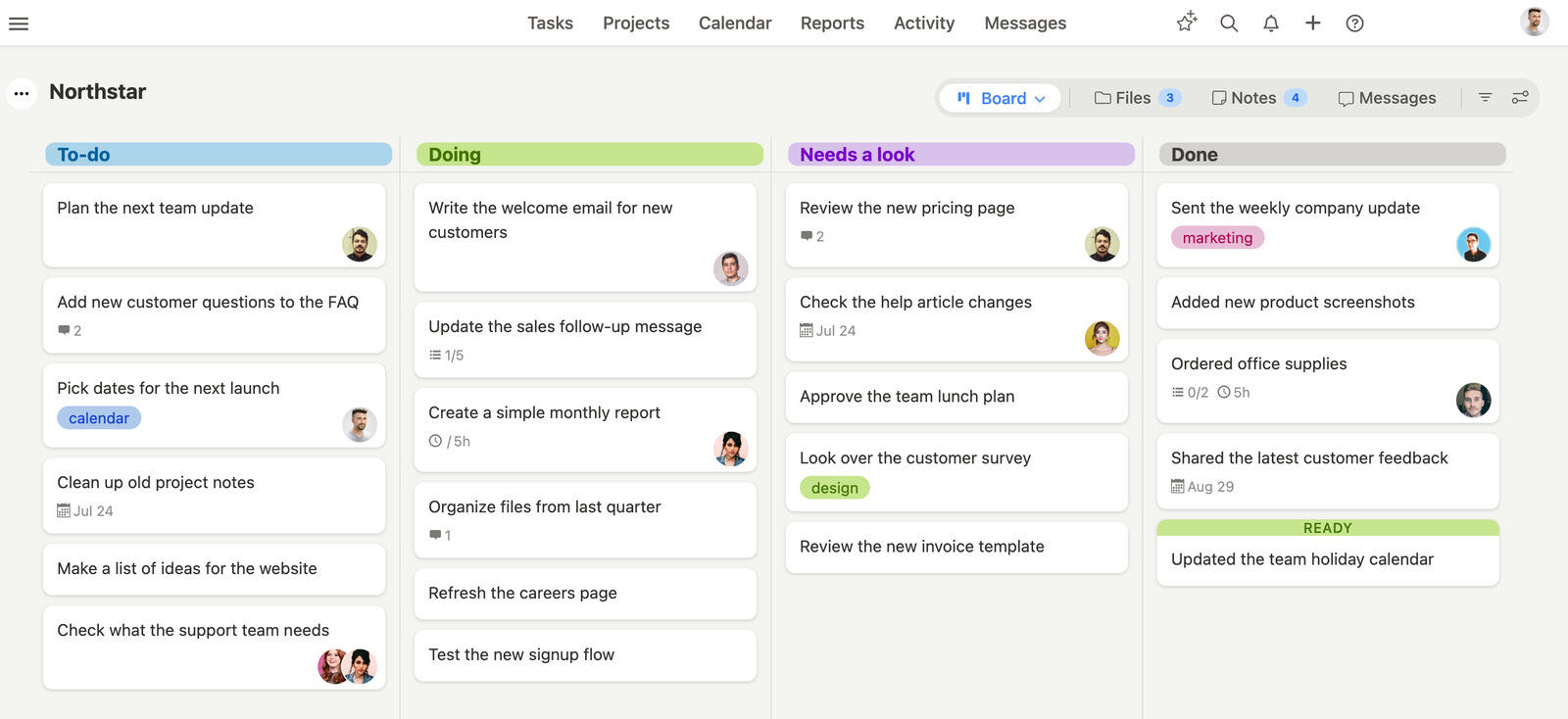
Breeze gives remote teams a clear way to plan work, share updates, and track progress across time zones. It keeps tasks, communication, and deadlines in one place so teams do not need constant meetings to stay aligned, and features like calendar integration and project status reporting make it easier to see what is moving and what needs attention.
Where Breeze fits
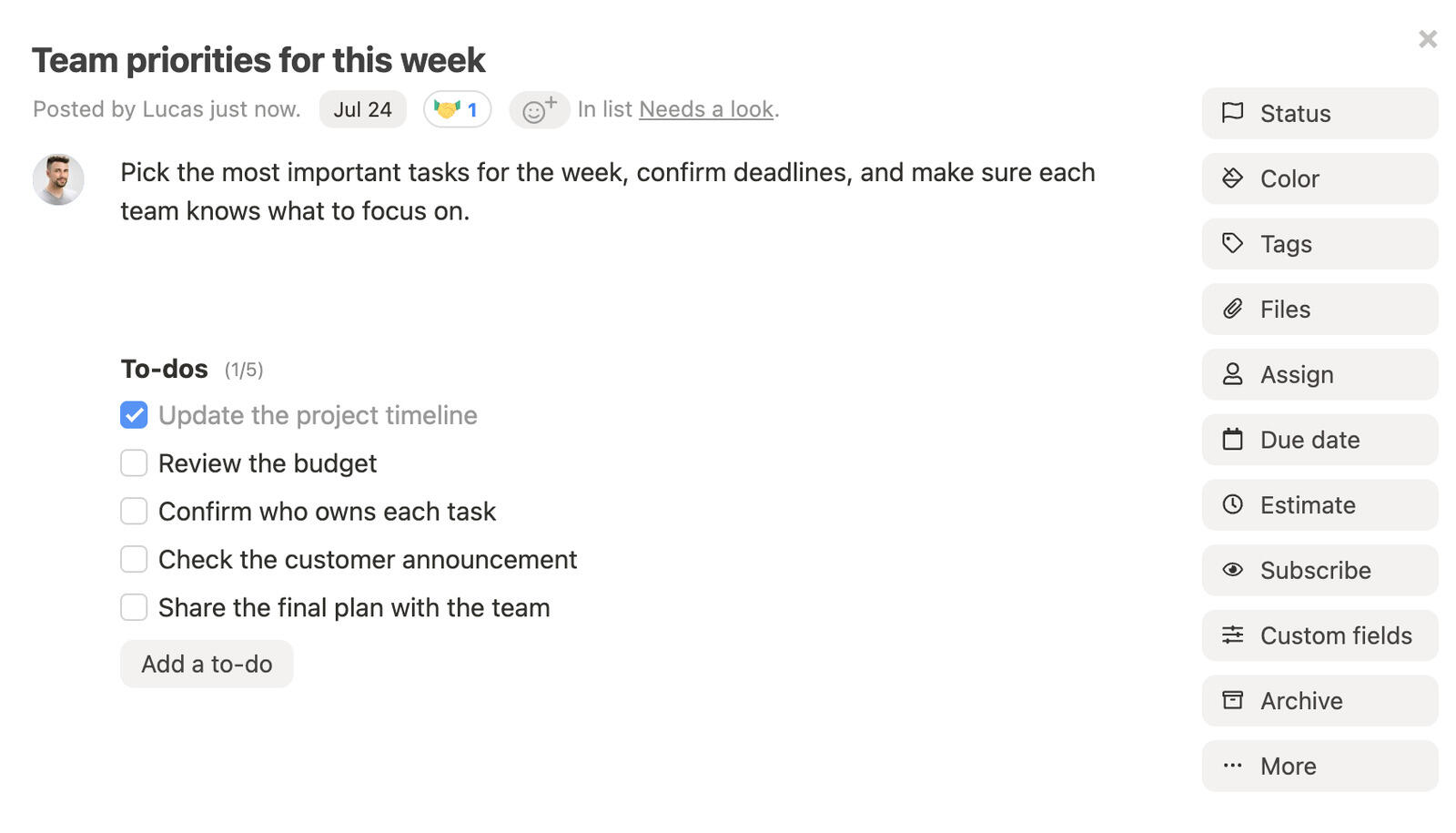
- Centralized communication: Consolidates project updates and details into an accessible platform.
- Task and progress tracking: Allows teams to prioritize and monitor tasks with ease.
- Integrated scheduling: Combines deadlines, meetings, and timelines for better coordination.
- Collaborative design: Accommodates cross-functional teams in marketing, IT, HR, and more.
- File management: Provides secure access to shared documents and resources.
- Detailed insights: Offers data-driven reporting to identify workflow improvement
Where Breeze isn't the right fit: Enterprise governance, deep agile sprint planning, complex configurable databases, or advanced portfolio management at scale — that's not where we focus.
What users say about Breeze:
“Our overall experience has been positive. I tested many project management systems and Breeze was the easiest to set up and implement. It stands out in many ways but one for sure is the ability to have chats with my team.“
Source: Capterra
Monday.com

- Pricing: Starting at $9 per user per month
- Rating: 4.6/5 on Capterra
Monday.com is another decent option for remote project management. Within its intuitive platform you can assign tasks, monitor progress, and improve collaboration. Its visual dashboards allow teams to see priorities at a glance, while automation reduces repetitive tasks like updating statuses. Additionally it has features like real-time messaging and integration with Slack or Zoom.
Where Monday.com fits
- Visual dashboards: Highlight tasks, deadlines, and team responsibilities.
- Automation features: Reduce manual effort by assigning tasks and updating statuses automatically.
- Tool integrations: Connect with Slack, Zoom, and Google Workspace for connected workflows.
- Collaborative features: Real-time messaging and file sharing keep teams aligned.
Where Monday.com isn't the right fit: Very small teams (the 3-user minimum is a tax), or anyone wanting pricing without forced tier jumps as the team grows.
If you want to compare similar tools, we also have a list of Monday.com alternatives.
What users say about Monday.com:
“The level of customization in Monday.com is awesome. You can pretty much set up your boards exactly how you need them, whether you're working on a simple to-do list or a complex project. I've added columns for deadlines, priorities, task owners, and even custom fields for specific projects. The templates are great for getting started, but once you get comfortable, the platform is flexible enough to mold it to fit your workflow perfectly. It's perfect for keeping everything organized in one place, just how you like it.”
Source: Capterra
Jira

- Pricing: Free for up to 10 users; Standard is $9.05 per user per month billed monthly for teams of up to 100 users, with lower per-user rates for larger teams.
- Rating: 4.4/5 on Capterra
Jira is a go-to solution for managing complex remote projects. Particularly in software development. Its detailed dashboards and issue-tracking capabilities make it a great choice for tracking bugs and prioritizing tasks. Jira's customizable workflows enable teams to align their processes with specific needs.
Where Jira fits
- Customizable workflows: Adapt workflows to match your team's unique issue-resolution process.
- Detailed dashboards: Provide clarity on task priorities and team progress.
- Automation tools: Handle routine notifications and updates efficiently.
- Integration options: Compatible with tools like GitHub, Slack, and Bitbucket.
- In-depth reporting: Tracks trends and identifies areas for improvement.
Where Jira isn't the right fit: Non-engineering teams (marketing, ops, design) that don't run sprints, or any team that finds the admin overhead heavier than the value.
If you want to compare similar tools, we also have a list of Jira alternatives.
What users say about Jira:
"Actually, experience with Jira is just great because it really supports powerful project management tools, flexible workflows, and the integration of other ascribed tools such as Slack or Confluence. Nonetheless, it is hard to cover its depth even for a single user, much less for new users; however, Jira is useful for projects of larger scale and cross-team collaboration."
Source: Capterra
ClickUp

- Pricing: Free for basic use; Unlimited is $7 per user per month billed yearly ($10 monthly)
- Rating: 4.6/5 on Capterra
ClickUp provides remote teams with an adaptable platform to manage tasks, track deadlines, and address project challenges. Highly customizable views allow users to create personalized dashboards for better task tracking and visualization. With built-in automation and centralized file storage, ClickUp helps teams optimize workflows and stay connected regardless of location.
Where ClickUp fits
- Custom views: Adaptable boards, lists, and timelines provide clear task organization.
- Task automation: Automates updates and notifications, saving time for the team.
- Collaboration tools: Offers task-specific discussions and real-time updates.
- Centralized resources: Stores project files and documents for quick access.
Where ClickUp isn't the right fit: Teams that want a tool that works on day one without configuration, or organizations without dedicated PM-admin ownership.
If you want to compare similar tools, we also have a list of ClickUp alternatives.
What users say about ClickUp:
“I asked a few experienced users to show me how they use ClickUp and asked for their honest assessment and they convinced me it was the right choice. Also, billing integration was critical for us and that feature was missing in other systems that strictly did project management.”
Source: Capterra
Asana

- Pricing: Free for basic use, premium features start at $10.99 per user per month
- Rating: 4.5/5 on Capterra
Asana is a reliable tool for managing remote teams. It has features like task tracking, project boards, and workflow automation. As well as flexible views, enabling teams to switch between lists, calendars, or timelines based on their needs. Asana's collaborative tools allow teams to discuss tasks, share updates, and set dependencies.
Where Asana fits
- Flexible views: Switch between boards, lists, or calendars to manage tasks effectively.
- Workflow automation: Reduces manual effort, helping teams stay focused on priorities.
- Collaborative features: Share updates, comments, and attachments directly within tasks.
- Task dependencies: Highlight relationships between tasks to avoid delays.
Where Asana isn't the right fit: Tiny teams (under 5 people) where the depth is overhead, or engineering teams that need real issue tracking — Jira fits better.
If you want to compare similar tools, we also have a list of Asana alternatives.
What users say about Asana:
“My experience with Asana has been really positive overall. I appreciate its clear, visual layou. I can set up simple to-do lists for daily tasks, but also use Gantt-style timelines for larger projects. This visual variety helps keep projects feeling manageable, no matter their complexity”
Source: Capterra
Wrike

- Pricing: Free plan with unlimited users; Team is $10 per user per month billed annually for 2 to 15 users
- Rating: 4.3/5 on Capterra
Wrike supports remote teams by offering customizable dashboards, workflow management tools, and real-time collaboration features. It caters to teams managing both small-scale tasks and larger projects. It provides teams with a clear structure to break down work into manageable steps. Wrike's scalable features make it ideal for businesses that need to adapt as they grow.
Where Wrike fits
- Workflow management: Break down tasks into actionable steps for better tracking.
- Custom dashboards: Offer tailored views for tasks, deadlines, and team responsibilities.
- Real-time collaboration: Enables immediate updates and task-based discussions.
- Scalable features: Adapts to growing teams and expanding project requirements.
Where Wrike isn't the right fit: Small teams (under 15 people) where the configuration overhead doesn't pay back.
If you want to compare similar tools, we also have a list of Wrike alternatives.
What users say about Wrike:
“Our team was able to collaborate with each other all while utilizing the A.I. LLM features within the platform to seamlessly tackle tasks without having to switch between gpt apps.”
Source: Capterra
Notion

- Pricing: Free for personal use, with team plans starting at $10 per user per month
- Rating: 4.7/5 on Capterra
Notion provides an all-in-one workspace for remote teams to manage projects, and store documents. Its flexible layouts and customization options make it adaptable to a variety of workflows. Teams can centralize their resources, track progress, and maintain clear communication in one shared environment.
Where Notion fits
- Adaptable dashboards: Create views that align with team needs for tracking tasks.
- Centralized documentation: Organize guides, reports, and lists in one location.
- Collaboration features: Shared workspaces and discussions improve team alignment.
- Integrated resource hub: Store protocols and reference materials connected to tasks.
Where Notion isn't the right fit: As a primary PM tool — native time tracking, workload, and team-scale task management aren't really there.
If you want to compare similar tools, we also have a list of Notion alternatives.
What users say about Notion:
“It is a powerful tool that has attracted a lot of attention in recent years. It gives us the ability to generate and sort different types of material, such as notes, databases, wikis, tasks and more, in a flexible way and from a customized base. I value Notion's diversity because it allows me to devise my own designs and procedures to meet my needs. The drag-and-drop interface and powerful search capability make it easy to find and navigate information quickly. The program also supports collaboration, making it possible to join and work on documents in real time with other users. This feature is particularly useful for groups and remote employees.”
Source: Capterra
Zoho Projects

- Pricing: Free for small teams, with paid plans starting at $4 per user per month
- Rating: 4.4/5 on Capterra
With Zoho Projects you can easily combine task tracking, communication tools, and customizable workflows. These features make it a reliable option for remote teams. Features like Gantt charts, task dependencies, and built-in time tracking help teams stay organized and meet deadlines without friction.
Where Zoho Projects fits
- Gantt charts and task dependencies: Visualize issue timelines and manage dependent tasks for improved efficiency.
- Time tracking: Monitor hours spent on tasks and maintain accountability.
- Built-in communication tools: Enable real-time updates and discussions.
- Customizable workflows: Adapt processes to meet unique project demands.
Where Zoho Projects isn't the right fit: Teams that want a polished, design-led PM tool — Zoho prioritizes feature breadth over UI craft.
What users say about Zoho Projects:
"Zoho Projects has been a great addition to our PM efforts company-wide. As an expanding company, it's been wonderful to have a cloud-based and easy to use system where we can manage our tasks and projects. I think it's on par, if not better in most areas compared to other project management tools out there. I wholehartedly recommend it if you're not happy wth your current PM tool"
- Source: Capterra
Basecamp

- Pricing: Flat-rate plans with no per-user fees: $25, $59 or $99 a month, or $299 a month billed annually for Unlimited. Freelancer allows 20 users; Studio and above include unlimited users
- Rating: 4.3/5 on Capterra
Basecamp's automatic check-ins gather regular updates from team members, reducing the need for status meetings. Centralized communication threads keep discussions and files in one accessible location, helping teams stay organized and focused.
Where Basecamp fits
- Centralized workspace: Combines tasks, messages, and files into one platform for smooth project management.
- Automatic updates: Provides regular check-ins to keep everyone informed without extra effort.
- Team coordination: Organized discussions minimize confusion and improve task clarity.
- Client collaboration: Allows external stakeholders to engage and share feedback.
Where Basecamp isn't the right fit: Tiny teams under 10 people (the flat fee is too expensive), or teams that need real reporting, time tracking, or scheduling features.
If you want to compare similar tools, we also have a list of Basecamp alternatives.
What users say about Basecamp:
“Basecamp helped us to rationalize our project work delivery by giving us a platform where we can simply and accurately plan, manage and manage our work. It promotes teamwork among ourselves which helps to become more productive at the project work. It also helps us to run our projects smoothly without the inconveniences of deadlines and overbudgeting.”
Source: Capterra
Trello

- Pricing: Free for basic use, with paid plans starting at $5 per user per month
- Rating: 4.5/5 on Capterra
Trello simplifies project management for remote teams with its card-based interface and drag-and-drop functionality. A visual approach to task organization is suitable for teams of all sizes. With customization options and power-ups, Trello allows teams to build workflows tailored to their needs.
Where Trello fits
- Visual task management: Use drag-and-drop cards to track progress and organize tasks easily.
- Collaboration tools: Share boards with team members to improve transparency and alignment.
- Power-up features: Add calendar views, automation, and integrations for enhanced functionality.
- Quick setup: Trello's straightforward interface makes onboarding fast and effortless.
Where Trello isn't the right fit: Teams past about 10 people, anyone needing cross-board rollup, or workflows with hierarchical project structures.
If you want to compare similar tools, we also have a list of Trello alternatives.
What users say about Trello:
“An easy and organized experience for managing my projects and tasks I was able to create boards containing lists and cards representing tasks provide me with customization and easy collaboration with colleagues using the simple user interface makes it easy for you to organize and follow up on work and I found the details of my project neat and clear”
Source: Capterra
FAQ
- What is the best remote project management software in 2026?
- Breeze fits remote teams that want async-friendly PM with time tracking and reporting in one tool. Notion is the strongest async-documentation pick. ClickUp fits when remote teams want flexibility. Monday.com works for dashboard-led status visibility across time zones.
- What should teams look for in remote project management software?
- Look for a tool that matches how your team plans work, shares updates, and reviews progress. The right tool should be easy to adopt, flexible enough for your workflow, and clear enough that important work does not get lost.
- Which tool works best for remote teams that rely heavily on shared docs and async context?
- Notion is a strong fit for remote teams that rely heavily on shared docs and async context. Breeze is better when you want a simpler daily workflow with less setup and less admin overhead.
- Should I choose a simple tool or a more customizable one?
- Choose the simpler option if speed, clarity, and fast team adoption matter most. Choose the more customizable option if your team needs deeper automation, specialized workflows, or more detailed reporting.
Takeaway
Remote project management succeeds when you choose tools that address the specific needs of distributed teams. Start by evaluating your team's priorities, such as task coordination, communication features, or secure file sharing. Look for software that simplifies scheduling, supports real-time updates to avoid delays, and integrates with tools your team already uses. Involve your team in testing different options and adopt the one that organizes workflows and encourages collaboration without adding complexity. With the right tool, your team can stay organized, meet deadlines, and work cohesively no matter where they are.




