
 Why choose Breeze
 Marketing
 Creative
 Sales
Sales Remote work
 Managers
 Product teams
 Project management
 Task management
 Kanban tool
 Time tracking
 Project reporting
 Project calendars
 Project timeline
 Team workload
 Project automation
 Project customization
 Chat
Chat Web forms
 Project roadmap
 AI
AI What's new
 Articles & guides
 Help center
 Mobile apps
 Integrations
 Developers & API
 Free tools
Best Trello alternatives in 2026 for Kanban and beyond

Trello popularized kanban boards for non-engineers and that's still its best feature: cards on a board, drag to move, done. The reasons teams leave usually aren't about Trello being bad — they're about Trello being deliberately shallow. Once you need real reporting, time tracking, multi-board rollup, or workflow automation that doesn't depend on Power-Ups, you'll fight the product. Power-Up math also adds up: a few seemingly cheap add-ons turn into a per-user-per-month bill that's not obviously cheaper than alternatives that include those features natively.
The candidates split by how much you want to keep the kanban-card model. Direct kanban replacements: Breeze, Wekan (open source), and Microsoft Planner (free with M365). General PM tools that include kanban boards alongside more depth: Asana, ClickUp, Monday.com, Zoho Projects, Basecamp, Teamwork-class options. Heavier or differently-shaped: Microsoft Project (Gantt-led), Jira (issue tracker), Airtable (DB-led), Notion (docs-led), ProofHub (flat-rate agency tool).
Disclosure: Breeze publishes this comparison. The clearest case for us versus Trello is teams that want kanban without the Power-Up grind — time tracking, comments, attachments, and reporting all included. If you genuinely love Trello's lightness and the depth doesn't bother you, you're probably better off staying. Read accordingly.
How we chose these tools
We sorted candidates by whether they keep the Trello kanban-card feel or replace it with something different. Ranking criteria:
- Native (not Power-Up) features — time tracking, custom fields, calendar, reporting all included rather than added a la carte.
- Pricing without per-feature add-ons — one bill for the tool, not the tool plus three Power-Ups.
- Hierarchy depth — real subtasks, sub-projects, or portfolios for teams that outgrew checklists-on-cards.
- Automation without monthly run caps — or transparent caps you can predict.
Review process: We compared current vendor documentation, pricing pages, published product interfaces, and the independent user reviews cited below. We evaluated each option against the migration criteria above.
Pricing and plan names checked against vendor sites on July 16, 2026. Vendors change packaging often; confirm the current total for your team before buying.
Contents
- How we chose these tools
- Why teams look for Trello alternatives
- What to look for in a Trello replacement
- Best Trello alternatives
- Comparison table
- Which alternative should you choose
- FAQ
Why teams look for Trello alternatives
The reasons cluster around Trello hitting its design ceiling:
- Reporting across multiple boards is awkward; you usually need a Power-Up or a separate tool.
- Time tracking, custom fields, calendar, dashboard, and other "obvious" PM features are Power-Ups, not core, and the Free tier limits Power-Ups per board.
- Automation (Butler) has run quotas that bite at scale.
- The Premium ($10/user/month) and Enterprise tiers add up fast for what is fundamentally a kanban tool.
- Card hierarchy is shallow — subtasks via checklists work but don't scale to real project breakdown.
What to look for in a Trello replacement
The questions that matter when comparing:
- Native (not Power-Up) features for the things you keep adding: time tracking, custom fields, calendar, reporting.
- A pricing model where you pay for the tool, not for individual feature add-ons.
- Hierarchy — do you need real subtasks, sub-projects, or portfolios? Trello assumes no.
- Automation that doesn't have a monthly run cap.
- If you love the kanban-as-primary-view feel, prioritize that — some PM tools treat kanban as one of many views, others center it.
Best Trello alternatives
The tools below cover a range of team project management needs, from simple task boards to more structured workflows, reporting, and planning.
Breeze
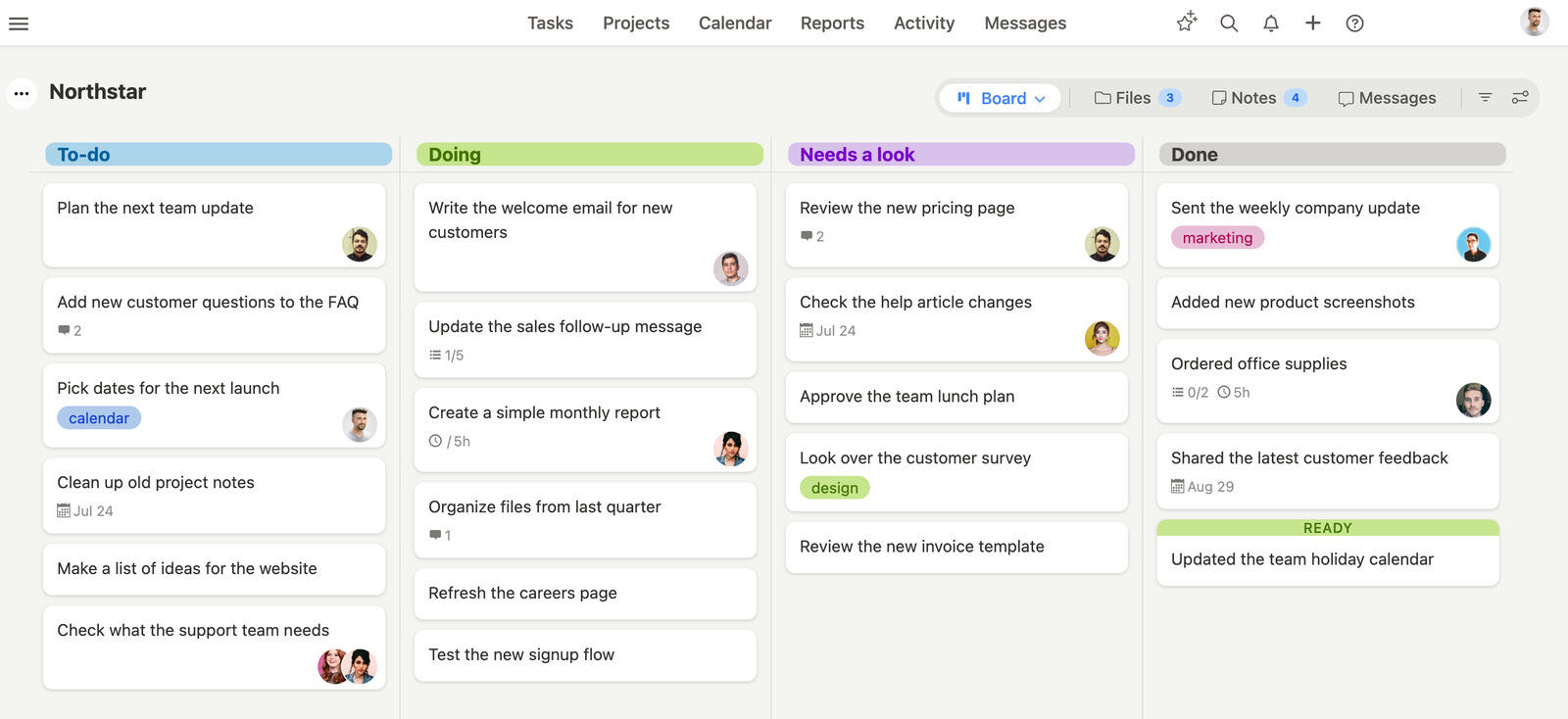
Best for: teams that want simple project management.
Breeze is a straightforward project management platform built around clear ownership, simple workflows, and fast team collaboration. If Trello no longer fits the way your team works, Breeze gives you a cleaner way to manage tasks, deadlines, comments, time, and reporting in one place.
Key features
- Visual project boards that keep work easy to scan.
- Task ownership, deadlines, and comments in one view.
- Built-in time tracking and workload visibility.
- Reporting that helps teams stay on top of delivery.
- Simple setup that is easy for non-technical teams to adopt.
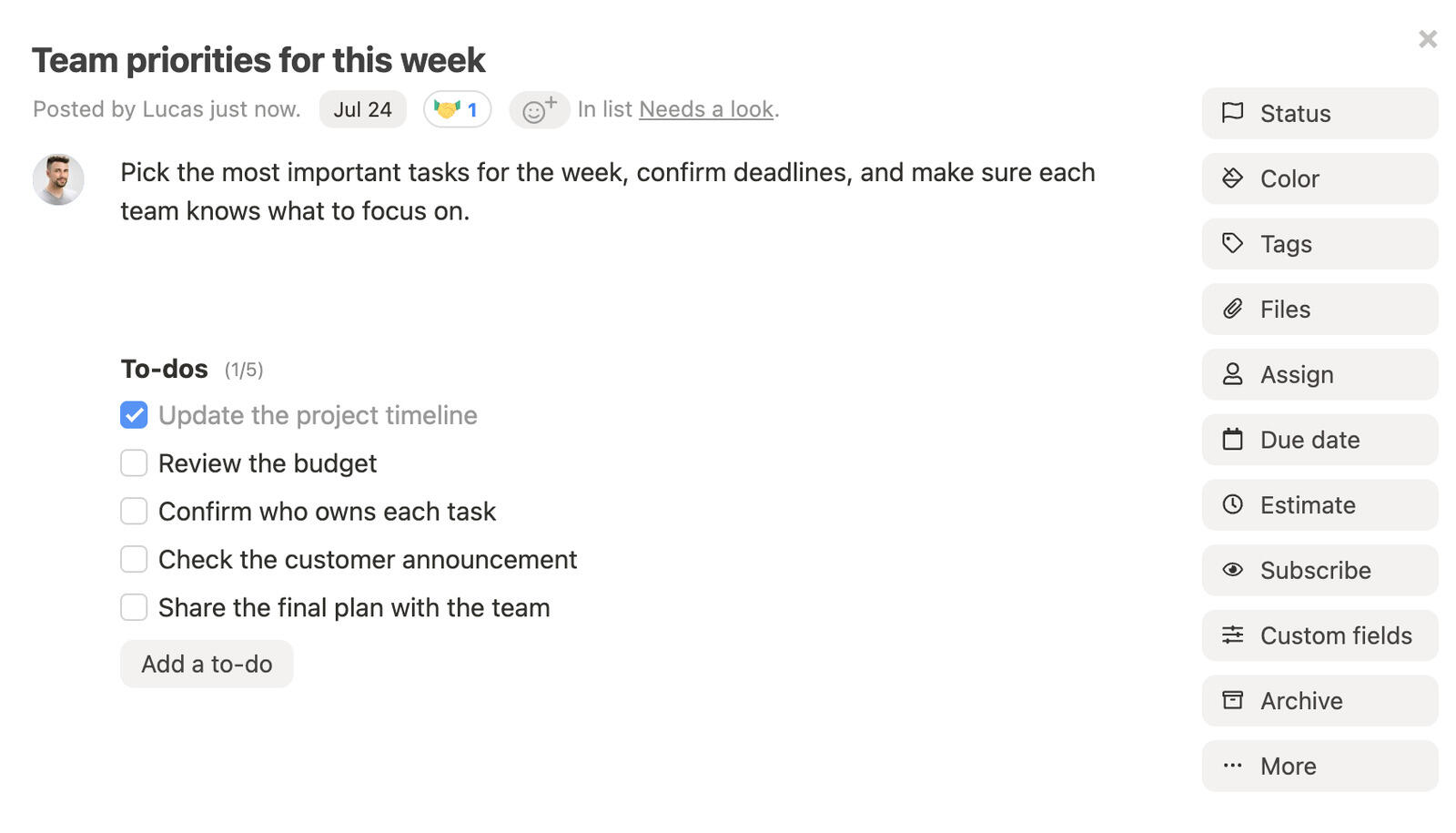
Best for: small teams, agencies, marketing teams, and organizations that want simple project management.
Pricing: Simple pricing at $10 per user per month, with all features included. You can save 10% with a yearly plan
Rating: 4.4/5 on Capterra
If you want a closer side-by-side view, compare Breeze with Breeze vs Basecamp, Breeze vs Jira, Breeze vs Airtable, and Breeze vs ClickUp.
Migration perspective from Trello
Moving from Trello to Breeze makes the most sense for teams that want simple project management. Pilot one real project first and check that boards, lists, cards, labels, custom fields, checklists, attachments, comments, and Power-Up automations map cleanly.
What users say about Breeze
Our overall experience has been positive. I tested many project management systems and Breeze was the easiest to set up and implement. It stands out in many ways but one for sure is the ability to have chats with my team.
Source: Capterra
Wekan

Best for: teams that want open-source kanban boards.
If you prioritize function over form, Wekan is a solid alternative to Trello. While it may lack a modern design, it compensates with open-source flexibility and comprehensive features. However, Wekan requires some technical knowledge to set up and maintain, and it doesn't have a dedicated mobile app, which could make on-the-go use challenging.
Pricing: Free
Rating: 4.2/5 on G2
Where Wekan fits
- Trello teams that want the same board-and-card model but running on their own servers instead of Atlassian's
- Teams leaving Trello over per-Power-Up billing — Wekan is free, with swimlanes and checklists built in
- Privacy-focused orgs that liked Trello's simplicity but need the data on-premise
Where Wekan isn't the right fit: Trello teams without an admin to run a server — Trello's hosted SaaS is genuinely simpler if on-premise isn't a hard requirement.
Migration perspective from Trello
Wekan is a practical next step from Trello for teams that want open-source kanban boards. Before moving everything, recreate a typical workflow and confirm that boards, lists, cards, labels, custom fields, checklists, attachments, comments, and Power-Up automations map cleanly.
What users say about Wekan
Ability to customize and build your own functionality. For our company and team, we need our swimlanes, checklists, etc to be custom in every scenario
Source: G2
Zoho Projects

Best for: teams that want integrated project planning.
Zoho Projects is a versatile tool for managing complex projects. It includes advanced features like Gantt charts, task dependencies, and time tracking, which help teams manage larger, more complex tasks—areas where Trello can sometimes fall short due to its simplicity.
Pricing: Free for small teams, with paid plans starting at $4 per user per month
Rating: 4.3/5 on G2
Where Zoho Projects fits
- Trello teams that hit the ceiling on timelines and dependencies — Zoho ships Gantt charts and task dependencies natively, no Power-Up required
- Teams that found Trello Premium plus a few Power-Ups added up, and want native time tracking in the base price
- Teams already using Zoho One (CRM, Books, Mail, Desk) that want their boards in the same stack
- Multi-currency, multi-region work where the Zoho stack wins on locality
Where Zoho Projects isn't the right fit: Teams that came to Trello for its polish and lightness — Zoho prioritizes feature breadth over UI craft.
Migration perspective from Trello
A switch to Zoho Projects changes the focus of the workspace; it is aimed at teams that want integrated project planning. Use a small pilot to see whether boards, lists, cards, labels, custom fields, checklists, attachments, comments, and Power-Up automations map cleanly.
What users say about Zoho Projects
It's easy to toggle between the list, Kanban, and Gantt views as you plan and track your projects. You can set up automations, customize templates, and manage time allocations, all of which make a difference when it comes to timely and cost effective delivery.
Source: G2
Basecamp

Best for: teams that prioritize communication and simplicity.
Basecamp is a great choice if you're after a simple yet powerful tool for team collaboration and communication. While Trello focuses primarily on task management, Basecamp offers an all-in-one solution with task organization, real-time messaging, file sharing, and team scheduling, making it ideal for remote or distributed teams.
Pricing: Flat rate of $299 per month for unlimited users, otherwise $15/user per month
Rating: 4.3/5 on Capterra
Where Basecamp fits
- Trello teams of 25+ where Basecamp's flat rate beats stacking per-user Trello Premium seats
- Teams that want messaging, docs, and scheduling built around the work instead of bolting Power-Ups onto a board
- Client-service work that benefits from Clientside (per-project team-vs-client visibility), which Trello has no equivalent for
- Teams that buy into Hill Charts and Shape Up methodology
Where Basecamp isn't the right fit: Tiny teams under 10 people (the flat fee costs more than Trello ever did), or teams that came to Trello specifically for the kanban board — Basecamp's to-do lists aren't card columns.
Teams considering Basecamp alternatives often also want a direct side-by-side view, and Breeze vs Basecamp covers that comparison.
Migration perspective from Trello
For teams that prioritize communication and simplicity, Basecamp may be easier to live with than Trello. Test the move with active work, not an empty demo, so you can verify that boards, lists, cards, labels, custom fields, checklists, attachments, comments, and Power-Up automations map cleanly.
What users say about Basecamp
Basecamp is an incredibly strong task management tool. Great for small teams. As far as resource management and any medium sized projects basecamp lacks behind its competitors. With all this said, I love basecamp as it is nostalgic for decades now of work that I've been able to implement easy with teams and organizations
Source: Capterra
Airtable

Best for: teams that want flexible database-style project tracking.
Airtable is a more flexible alternative to Trello, especially for teams needing a versatile data management system. While Trello focuses on task management using Kanban boards, Airtable combines the functionality of a spreadsheet with project management tools, making it suitable for a wide range of applications, from project management to CRM data organization.
Pricing: Free for basic use, with advanced features starting at $10 per user per month
Rating: 4.7/5 on Capterra
Where Airtable fits
- Trello teams whose cards were really structured records — content calendars, asset libraries, inventory — that outgrew labels and checklists
- Work that needs relational links and formulas across items, which Trello cards can't hold
- Teams comfortable building Interfaces for stakeholder-facing views instead of sharing a raw board
- A source-of-truth data layer underneath your other tools, not a primary task board
Where Airtable isn't the right fit: As a like-for-like Trello replacement — people who liked dragging cards don't want to update database rows for daily work.
Teams considering Airtable alternatives often also want a direct side-by-side view, and Breeze vs Airtable covers that comparison.
Migration perspective from Trello
Airtable takes a different approach from Trello and is best suited to teams that want flexible database-style project tracking. Start with a project your team knows well and make sure boards, lists, cards, labels, custom fields, checklists, attachments, comments, and Power-Up automations map cleanly.
What users say about Airtable
We can have many views of the same data in one place without duplicating the data. Each person can have their own view based on the data they need to see. The biggest benefit we've had is time saving and the ability to access this data anywhere, at any time.
Source: Capterra
Microsoft Planner

Best for: Microsoft 365 teams that want simple task boards.
For teams already set in the Microsoft ecosystem, Microsoft Planner is a practical alternative to Trello. While it may not offer as many features as some other tools, its seamless integration with Microsoft 365 apps—like Teams, SharePoint, and Outlook—makes it ideal for small to medium-sized teams looking for simplicity and efficiency.
Pricing: Included in Microsoft 365 plans, starting at $5 per user per month
Rating: 4.3/5 on Capterra
Where Microsoft Planner fits
- Trello teams already paying for Microsoft 365 who can get the same bucket-and-card model at no extra cost
- Simple to-do / in-progress / done tracking embedded in Teams and Outlook instead of a separate Trello tab
- Departmental work that never needed Trello's Power-Up ecosystem in the first place
- Teams that want zero additional per-seat cost on top of M365
Where Microsoft Planner isn't the right fit: Teams that left Trello for more than boards — Planner has no cross-plan reporting, Gantt timelines, or native time tracking either, and external collaborators need group-membership gymnastics.
Teams considering Microsoft Planner alternatives often also want a direct side-by-side view, and Microsoft Planner vs Asana covers that comparison.
Migration perspective from Trello
Consider Microsoft Planner when Trello no longer works well for Microsoft 365 teams that want simple task boards. Pilot one real project first and check that boards, lists, cards, labels, custom fields, checklists, attachments, comments, and Power-Up automations map cleanly.
What users say about Microsoft Planner
Microsoft Planner serves as a rudimentary tool for project management, best suited for simple tasks. It falls short in providing the necessary tools for managing larger or more complex projects, which significantly hampers its usability in more demanding scenarios.
Source: Capterra
Monday.com

Best for: teams that want visual project tracking.
Monday.com is a flexible project management tool that offers more customization options than Trello. Its colorful, user-friendly interface allows you to view tasks in various formats, like Kanban boards, Gantt charts, or timelines—providing more display options.
Pricing: Starting at $9 per user per month
Rating: 4.6/5 on Capterra
Where Monday.com fits
- Trello teams that liked working visually but needed dashboards and cross-board rollup Trello couldn't give them
- Workflows that outgrew Butler's automation run quotas and want no-code automation with higher limits
- Mid-sized organizations (5–50 users) with budget for the Pro tier or above
- Teams standardizing on a visual work-OS rather than a single board plus Power-Ups
Where Monday.com isn't the right fit: Very small teams (the 3-seat minimum is a tax Trello never charged), or anyone wanting pricing without forced tier jumps as the team grows.
Teams considering Monday.com alternatives often also want a direct side-by-side view, and Breeze vs Monday.com covers that comparison.
Migration perspective from Trello
The case for moving from Trello to Monday.com is strongest for teams that want visual project tracking. Before moving everything, recreate a typical workflow and confirm that boards, lists, cards, labels, custom fields, checklists, attachments, comments, and Power-Up automations map cleanly.
What users say about Monday.com
Monday helps to increase performance and order in tasks or when presenting a project, this platform has immediate chats, which is an advantage in case you have any questions, you can just go directly to the chat and not resort to any other means to communicate, I can also manage a board from scratch by customizing it or a default board.
Source: Capterra
ClickUp

Best for: teams that want a customizable all-in-one workspace.
ClickUp offers multiple ways to view your tasks—whether it's through Kanban boards, Gantt charts, timelines, or calendars. One of its standout features is its high level of customization. You can create custom workflows, dashboards, and task views tailored to your team's needs. Compared to Trello's basic setup, ClickUp's built-in automation tools help reduce repetitive tasks.
Pricing: Free for basic use, with premium plans starting at $9 per user per month
Rating: 4.6/5 on Capterra
Where ClickUp fits
- Trello teams that were bolting on Power-Ups one at a time and want time tracking, Gantt, and docs native instead
- Teams that genuinely use multiple views per project (board, list, Gantt, calendar), not just Trello's single board
- Organizations that want one tool to replace several, with a willing admin to own custom statuses, fields, and ClickApps
- Mid-sized teams with diverse workflows and per-team customization
Where ClickUp isn't the right fit: Teams that came to Trello for day-one simplicity — ClickUp needs configuration and dedicated PM-admin ownership Trello never asked for.
Teams considering ClickUp alternatives often also want a direct side-by-side view, and Breeze vs ClickUp covers that comparison.
Migration perspective from Trello
ClickUp is the more natural choice for teams that want a customizable all-in-one workspace. Use a small pilot to see whether boards, lists, cards, labels, custom fields, checklists, attachments, comments, and Power-Up automations map cleanly.
What users say about ClickUp
Fairly positive. Overall it is very useful, we have used it to manage our team work, track and report project progress, do planning, etc. Bear in mind that we are a multidisciplinary work, so we've tried to make it work both for delivery/ tech functions and research and strategy. The only drawbacks are the small customisations we haven't been able to make (e.g. the weekly view to start on a different day) and the syncing time / loading time.
Source: Capterra
Asana

Best for: teams that need structured workflows.
Asana is a popular project management tool and a solid alternative to Trello. While Trello focuses on basic task boards, Asana offers additional views like timelines, calendars, and workload charts, giving you more flexibility to track project progress.
Pricing: Personal is free; Starter is $10.99 per user per month, billed annually
Rating: 4.5/5 on Capterra
Where Asana fits
- Trello teams that needed cross-board rollup — Asana's Goals and Portfolios report across projects, which Trello can't do without a Power-Up
- Work that outgrew checklists-on-cards and needs real subtasks, dependencies, and multiple views
- Teams that lean on Forms, Rules, and Workflow Bundles instead of Trello's Butler automations
- A free tier with more growth runway before a paid plan becomes necessary
Where Asana isn't the right fit: Tiny teams (under 5 people) where the depth is overhead next to a Trello board, or engineering teams that need real issue tracking — Jira fits better.
Teams considering Asana alternatives often also want a direct side-by-side view, and Breeze vs Asana covers that comparison.
Migration perspective from Trello
Compared with Trello, Asana puts more emphasis on the needs of teams that need structured workflows. Test the move with active work, not an empty demo, so you can verify that boards, lists, cards, labels, custom fields, checklists, attachments, comments, and Power-Up automations map cleanly.
What users say about Asana
Asana is an excellent collaboration tool for helping teams manage all kind of tasks. Although when you start using asana its bit confusing and need time to learn features. But its flexibility and vast capabilities are well worth learning it initially to get started. As it is not a resource management tool we cannot expect it to be a traditional full scale project management platform. It is excellent tool for startups.
Source: Capterra
Notion

Best for: teams that combine docs and tasks.
Notion is a flexible all-in-one workspace that combines task management with documentation, making it a strong alternative to Trello for teams needing more than just boards. You can create detailed project docs, track tasks with databases, and view projects in multiple formats—whether it's Kanban boards, tables, or lists.
Pricing: Free for personal use, with team plans starting at $10 per user per month
Rating: 4.7/5 on Capterra
Where Notion fits
- Trello teams that wanted docs, wikis, and runbooks living next to the board rather than in a separate tool
- Work that fits Notion's board and table views while adding the long-form notes Trello cards couldn't hold
- Teams that want structure they can build themselves with databases and templates
- Internal knowledge bases with bi-directional linking and search
Where Notion isn't the right fit: As a straight Trello replacement for task tracking — native time tracking, workload, and team-scale task management aren't really there.
Teams considering Notion alternatives often also want a direct side-by-side view, and Breeze vs Notion covers that comparison.
Migration perspective from Trello
A move from Trello to Notion is less about copying the old setup and more about supporting teams that combine docs and tasks. Start with a project your team knows well and make sure boards, lists, cards, labels, custom fields, checklists, attachments, comments, and Power-Up automations map cleanly.
What users say about Notion
The way we used it at the startup I was working remotely at was kind of like a complete workplace with all the documents and various functions and projects loaded on there. I think this works well for a small team, but I don't think its super scalable without some serious forethought and planning, and likely some kind of "Notion Consultant" to help organise things.
Source: Capterra
Trello alternatives comparison
| Tool | Best for | Complexity | Pricing |
|---|---|---|---|
| Breeze | teams that want simple project management | Low | Simple pricing at $10 per user per month, with all features included. You can save 10% with a yearly plan |
| Wekan | teams that want open-source kanban boards | Medium | Free |
| Zoho Projects | teams that want integrated project planning | Medium | Free for small teams, with paid plans starting at $4 per user per month |
| Basecamp | teams that prioritize communication and simplicity | Low | Flat rate of $299 per month for unlimited users, otherwise $15/user per month |
| Airtable | teams that want flexible database-style project tracking | Medium | Free for basic use, with advanced features starting at $10 per user per month |
| Microsoft Planner | Microsoft 365 teams that want simple task boards | Low | Included in Microsoft 365 plans, starting at $5 per user per month |
| Monday.com | teams that want visual project tracking | Medium | Starting at $9 per user per month |
| ClickUp | teams that want a customizable all-in-one workspace | High | Free for basic use, with premium plans starting at $9 per user per month |
| Asana | teams that need structured workflows | Medium | Personal is free; Starter is $10.99 per user per month, billed annually |
| Notion | teams that combine docs and tasks | Medium | Free for personal use, with team plans starting at $10 per user per month |
Which Trello alternative should you choose?
- Choose Breeze if you want simple project management.
- Choose Wekan if you want Trello's card boards open-source and self-hosted.
- Choose Zoho Projects if you outgrew Trello and want Gantt, dependencies, and time tracking built in.
- Choose Basecamp if you want messaging and docs around the work instead of more Trello Power-Ups.
- Choose Airtable if your Trello cards were really database records that needed fields and relations.
- Choose Microsoft Planner if you're on Microsoft 365 and want Trello-style boards at no extra cost.
- Choose Monday.com if you liked Trello's visual boards but need dashboards and rollup reporting.
- Choose ClickUp if you were stacking Trello Power-Ups and want those features native in one tool.
- Choose Asana if you outgrew Trello's single board and need cross-project rollup and structure.
- Choose Notion if you want Trello-style boards with docs and wikis in the same workspace.
FAQ
What is the best alternative to Trello?
The best alternative depends on your team workflow. Tools like Breeze, Wekan, Zoho Projects, and Basecamp provide similar project management features with different levels of complexity.
Why are teams switching from Trello?
Teams usually look for alternatives when they want simpler project management, better pricing, clearer project visibility, or tools that fit their workflow better.
What tool is most similar to Trello?
The closest match depends on what your team values most, but tools like Breeze and Wekan often cover similar task management and collaboration needs.
Conclusion
If you genuinely love Trello, the right answer is often "stay on Trello and pay for the right tier." The product is good at what it does. The case for leaving is when you're paying Premium plus several Power-Ups and realizing you've reconstructed a more expensive version of a more capable PM tool.
For teams that hit that point, Breeze, Asana, and ClickUp are the most common landing spots — each gives you boards plus the things you were stitching in via Power-Ups. If you wanted Trello but free and self-hostable, Wekan is the only honest answer. If your real workflow is engineering, Jira; if it's docs-and-tasks, Notion; if you want bigger reporting and structure, Monday.com or Microsoft Project depending on how heavyweight you want to go.




