
 Why choose Breeze
 Marketing
 Creative
 Sales
Sales Remote work
 Managers
 Product teams
 Project management
 Task management
 Kanban tool
 Time tracking
 Project reporting
 Project calendars
 Project timeline
 Team workload
 Project automation
 Project customization
 Chat
Chat Web forms
 Project roadmap
 AI
AI What's new
 Articles & guides
 Help center
 Mobile apps
 Integrations
 Developers & API
 Free tools
Best Monday.com alternatives in 2026 for flexible workflows

Monday.com is gorgeous in demos and expensive once you scale. Teams typically come for the colorful, customizable boards and leave because of the seat math: minimum 3 users, then 5, then forced jumps to higher tiers to unlock features that should arguably be in the cheaper plan (time tracking, Gantt, automations beyond the monthly run cap). The product itself works well; the pricing structure does most of the alienation.
The list below covers the alternatives we see teams move to most. If you want the same colorful-board feel but cheaper or simpler: Breeze, Trello, Asana, Basecamp, Zoho Projects, nTask. If your Monday use was really a CRM in disguise: Pipedrive. If it was really a database in disguise: Airtable. If you need workflow automation as the centerpiece: Pneumatic. Nuclino, Todoist, and Jira are here as honest off-ramps for teams whose actual job was wikis, personal tasks, or engineering tickets.
Disclosure: Breeze publishes this comparison. The clearest case for us versus Monday is small to mid-sized teams that don't want per-seat pricing pressure and don't need the deep customization. If you love Monday's flexibility and only want it cheaper, you may be happier on Asana or Zoho than on Breeze — we're more opinionated than they are. Bias acknowledged.
How we chose these tools
We sorted candidates against Monday's specific pain points rather than feature-for-feature parity. Ranking criteria:
- Pricing without minimums or jumps — no 3-user floor, no forced step-ups when you add a 4th or 11th seat.
- Time tracking and Gantt at the same plan — not gated to a higher tier the way Monday does.
- Predictable automation — either no monthly run cap or a usage model you can predict.
- Task model honesty — can it express ownership and dependencies without you encoding them as columns.
Review process: We compared current vendor documentation, pricing pages, published product interfaces, and the independent user reviews cited below. We evaluated each option against the migration criteria above.
Pricing and plan names checked against vendor sites on July 16, 2026. Vendors change packaging often; confirm the current total for your team before buying.
Contents
- How we chose these tools
- Why teams look for Monday.com alternatives
- What to look for in an Monday.com replacement
- Best Monday.com alternatives
- Comparison table
- Which alternative should you choose
- FAQ
Why teams look for Monday.com alternatives
The Monday-specific complaints that come up over and over:
- The 3-user minimum (and the jumps to 5, 10, 25) make pricing feel coercive at small team sizes.
- Time tracking, Gantt, and granular permissions sit on higher tiers than most teams expect.
- Automation runs are capped per month per workspace, and the limits hit production workflows quietly.
- Onboarding a 4th or 11th user retroactively raises everyone's tier price — the bill jumps in steps, not smoothly.
- Boards can encode workflows poorly when statuses, owners, and dependencies all need their own column.
What to look for in a Monday.com replacement
The shopping list when shopping around for a Monday replacement:
- Pricing without minimum-seat thresholds and without forced tier jumps as the team grows.
- Time tracking and Gantt at the same plan level — not one upgrade away.
- Automations with a usage model you can predict (or none, if you don't need them).
- A task model that doesn't require columns to express ownership and dependencies.
- A clear migration path from Monday boards to whatever the new tool's primitive is.
Best Monday.com alternatives
The tools below cover a range of team project management needs, from simple task boards to more structured workflows, reporting, and planning.
Breeze
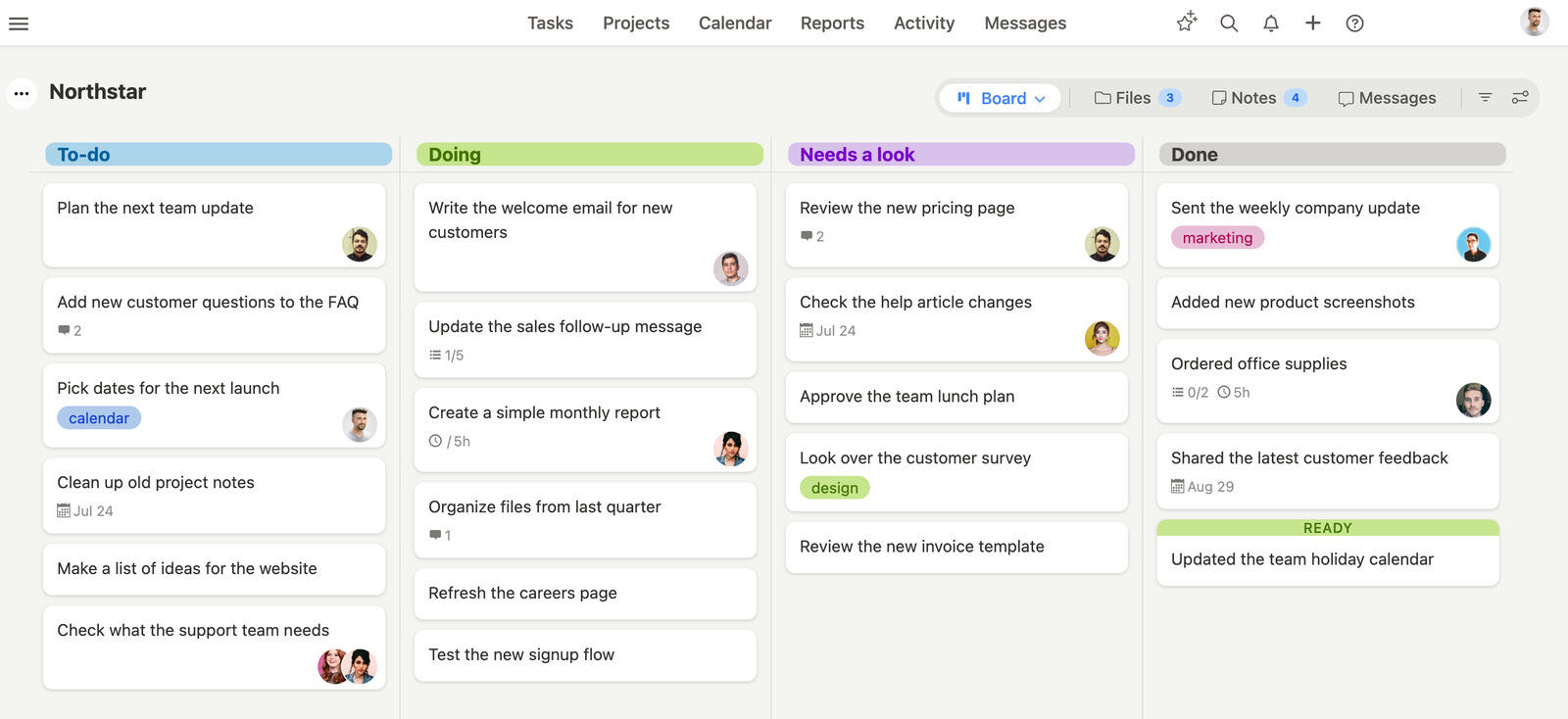
Best for: teams that want simple project management.
Breeze is the focused option in this comparison for teams that want boards, tasks, deadlines, comments, time tracking, and reporting without building a heavily customized workspace first. For a team leaving Monday.com, choosing Breeze means trading Monday.com's highly configurable work-OS model for a workflow that may need less setup or administration.
Key features
- Visual project boards that keep work easy to scan.
- Task ownership, deadlines, and comments in one view.
- Built-in time tracking and workload visibility.
- Reporting that helps teams stay on top of delivery.
- Simple setup that is easy for non-technical teams to adopt.
Migration perspective from Monday.com
Rebuild one representative project before moving everything. Check boards, statuses, formulas, dashboards, automations, integrations, and the vendor's minimum-seat billing; the useful test is whether the simpler setup preserves the work your team actually needs. Metered extras belong on that list too, since AI credits are bought separately from seats.
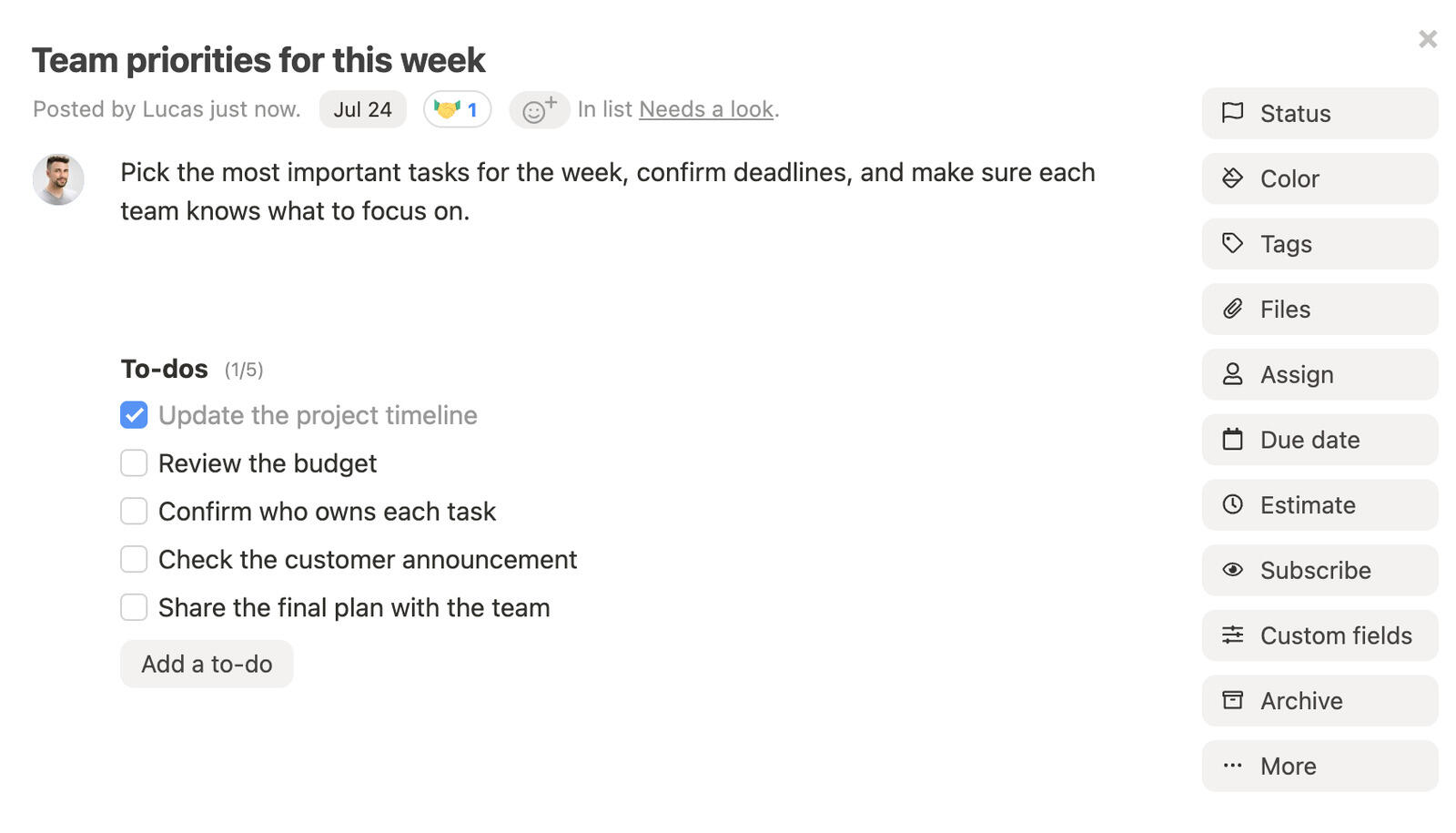
Best for: small teams, agencies, marketing teams, and organizations that want simple project management.
Pricing: Simple pricing at $10 per user per month, with all features included. You can save 10% with a yearly plan
Rating: 4.4/5 on Capterra
If you want a closer side-by-side view, compare Breeze with Breeze vs Airtable, Breeze vs Jira, Breeze vs Wrike, and Breeze vs Trello.
What users say about Breeze
We're a client to a company that manages their workflow and breeze. the best feature is the visualization of "to-Do" items on the dashboard in different columns. This is a big help to manage our workflow with multiple teams.
Source: Capterra
Zoho Projects

Best for: teams that want integrated project planning.
Zoho Projects offers project management features that rival Monday.com. With features like Gantt charts, task dependencies, and integrated time tracking, it makes complex project management easier to handle. Compared to Monday.com, Zoho Projects is affordable and has robust time tracking capabilities.
Pricing: Free for small teams, with paid plans starting at $4 per user per month
Rating: 4.4/5 on Capterra
Where Zoho Projects fits
- Teams that hit Monday's seat math and want native Gantt and time tracking at $4/user, not a higher tier
- Organizations already in Zoho One (CRM, Books, Mail, Desk) that don't need a separate work-OS
- Multi-currency, multi-region work where the Zoho stack wins on locality
- Cost-conscious teams willing to standardize on one vendor instead of Monday plus add-ons
Where Zoho Projects isn't the right fit: Teams that came to Monday for the colorful, design-led boards — Zoho prioritizes feature breadth over UI craft, so it will feel like a step down visually.
Migration perspective from Monday.com
Consider Zoho Projects if you want integrated project planning. For a team leaving Monday.com, this means trading Monday.com's highly configurable work-OS model for a workflow that may need less setup or administration. Before committing, test boards, statuses, formulas, dashboards, automations, integrations, and the vendor's minimum-seat billing with one real project and the people who will use it every day.
What users say about Zoho Projects
Reviewers report that Zoho Projects makes task creation, assignment, and project planning straightforward, with clear visibility into project status and progress.
Airtable

Best for: teams that want flexible database-style project tracking.
Airtable is another strong contender if you're looking for a Monday.com alternative. It blends the flexibility of spreadsheets with powerful project management features. Unlike Monday.com, which focuses heavily on visual workflows, Airtable shines when dealing with complex datasets and offers different views like Kanban, calendar, and grid to help manage projects from various angles.
Pricing: Free for basic use, with advanced features starting at $10 per user per month
Rating: 4.7/5 on Capterra
Where Airtable fits
- Teams whose Monday boards were really a database — relational tables, formulas, and automations
- Asset libraries, content calendars, talent rosters, and inventory tracking that Monday columns strained to hold
- Teams comfortable building Interfaces for stakeholder-facing views
- A source-of-truth layer underneath other tools, not a primary PM tracker
Where Airtable isn't the right fit: As a direct Monday replacement for daily task tracking — without Monday's board polish, operators won't want to update database rows for routine work.
Teams considering Airtable alternatives often also want a direct side-by-side view, and Breeze vs Airtable covers that comparison.
Migration perspective from Monday.com
Consider Airtable if you want flexible database-style project tracking. For a team leaving Monday.com, this means trading Monday.com's highly configurable work-OS model for a workflow that may need less setup or administration. Before committing, test boards, statuses, formulas, dashboards, automations, integrations, and the vendor's minimum-seat billing with one real project and the people who will use it every day.
What users say about Airtable
Overall, I've found Airtable to be a powerful and flexible platform that has greatly improved my productivity as a small business owner. Its customizable fields and views, integration with other tools, and collaboration features have all been invaluable in helping me manage my work and stay organized.
Source: Capterra
Jira

Best for: software and technical teams managing complex workflows.
If your team leans towards Agile methodologies, Jira could be the Monday.com alternative you need. It offers specialized features like sprint planning, backlog prioritization, and velocity tracking that are specifically designed for development teams. While Monday.com provides broad project management features, Jira's Agile tools are more focused and suitable for software development.
Pricing: Free for up to 10 users, with advanced features starting at $7.91 per user per month when billed monthly
Rating: 4.4/5 on Capterra
Where Jira fits
- Engineering teams that ended up on Monday boards but need real sprints, story points, and burndown
- Teams that encoded issue tracking into Monday columns and want the native model (releases, components, JQL)
- Organizations already on Atlassian (Confluence, Bitbucket) where Monday was the outlier
- Dev workflows where Monday's visual boards never replaced backlog and sprint management
Where Jira isn't the right fit: The marketing, ops, and design teams who liked Monday's boards — they don't run sprints, and Jira's setup is heavier than Monday's.
Teams considering Jira alternatives often also want a direct side-by-side view, and Breeze vs Jira covers that comparison.
Migration perspective from Monday.com
Consider Jira if you manage software or technical teams with complex workflows. For a team leaving Monday.com, this means trading Monday.com's highly configurable work-OS model for a workflow that may need less setup or administration. Before committing, test boards, statuses, formulas, dashboards, automations, integrations, and the vendor's minimum-seat billing with one real project and the people who will use it every day.
What users say about Jira
Jira enabled us to build a special workflow plan for each of our products as well as the projects we work on, which helped keep the workflow on track and enabled us to manage production rates and adhere to agreed delivery dates and increased our ability to make the appropriate modifications to plans appropriate to the actual situation of the project
Source: Capterra
Wrike

Best for: teams that need reporting and cross-project visibility.
Wrike offers a good balance between traditional and Agile project management methods, making it a solid Monday.com alternative. Especially for teams that need structured, detailed reporting. With Wrike, you can take advantage of features like Gantt charts, Kanban boards, and resource management tools.
Pricing: Check vendor for current pricing
Where Wrike fits
- Teams that used Monday as a work-OS and want deeper reporting, approvals, and resource management
- Creative ops that outgrew Monday's forms and want native proofing and approvals (Wrike for Marketers/Creative)
- Cross-functional enterprises replacing Monday automations with Blueprints, Custom Item Types, and request forms
- Organizations with a dedicated PM-admin who owned the Monday setup and can own Wrike's
Where Wrike isn't the right fit: Small teams (under 15) who left Monday to escape cost and setup — Wrike is at least as much to configure and won't pay back at that size.
Teams considering Wrike alternatives often also want a direct side-by-side view, and Breeze vs Wrike covers that comparison.
Migration perspective from Monday.com
Consider Wrike if you need reporting and cross-project visibility. For a team leaving Monday.com, this means trading Monday.com's highly configurable work-OS model for a workflow that may need less setup or administration. Before committing, test boards, statuses, formulas, dashboards, automations, integrations, and the vendor's minimum-seat billing with one real project and the people who will use it every day.
What users say about Wrike
Wrike has increased transparency of tasks across the company and defined workflows to free up employees' time for strategic work. It has simplified internal and external communications by becoming the official platform for all company-wide deliberations and approvals.
Source: Capterra
Trello

Best for: teams that prefer visual kanban boards.
While Monday.com is known for its broad features and customization, Trello keeps it simple with Kanban boards that let users visualize tasks easily. The drag-and-drop interface allows you to keep tasks organized effortlessly, making Trello particularly appealing to small teams or freelancers who want a lightweight solution.
Pricing: Check vendor for current pricing
Where Trello fits
- Small teams that just want cards moving and don't need Monday's dashboards or automations
- Single-board work where Monday's columns for status, owner, and dependency were overkill
- Teams that balked at Monday's 3-user minimum — Trello's free tier has no seat floor
- Cases where a couple of Power-Ups replace the specific Monday features you actually used
Where Trello isn't the right fit: Teams that relied on Monday's cross-board dashboards or automations — Trello is single-board by nature and strains past about 10 people.
Teams considering Trello alternatives often also want a direct side-by-side view, and Breeze vs Trello covers that comparison.
Migration perspective from Monday.com
Consider Trello if you prefer visual kanban boards. For a team leaving Monday.com, this means trading Monday.com's highly configurable work-OS model for a workflow that may need less setup or administration. Before committing, test boards, statuses, formulas, dashboards, automations, integrations, and the vendor's minimum-seat billing with one real project and the people who will use it every day.
What users say about Trello
Trello is helping us to solve the issue of collaboration and time tracking on our projects. We can now easily see work being done by each individual and even the time they spend. It has also solved our communication challenges by automating email notifications.
Source: Capterra
Asana

Best for: teams that need structured workflows.
Asana provides a clean interface and focuses on task management and workflow automation. Unlike Monday.com, which can get feature-heavy with customization and varied views, Asana keeps things straightforward for teams that want to get organized without overcomplicating. It's suited for teams looking for an easy way to manage tasks, automate workflows, and track progress.
Pricing: Personal is free; Starter is $10.99 per user per month, billed annually
Rating: 4.5/5 on Capterra
Where Asana fits
- Teams tired of encoding ownership and dependencies as Monday columns — Asana has a real task model
- Cross-functional teams that will use Goals and Portfolios for the rollup Monday dashboards gave them
- Teams that lean on Forms, Rules, and Workflow Bundles instead of Monday automations (no monthly run cap)
- Mid-sized to large organizations (50+ users) where the per-seat math pays back
Where Asana isn't the right fit: Tiny teams (under 5) who found Monday too much already — Asana has similar depth; or engineering teams that need real issue tracking, where Jira fits better.
Teams considering Asana alternatives often also want a direct side-by-side view, and Breeze vs Asana covers that comparison.
Migration perspective from Monday.com
Consider Asana if you need structured workflows. For a team leaving Monday.com, this means trading Monday.com's highly configurable work-OS model for a workflow that may need less setup or administration. Before committing, test boards, statuses, formulas, dashboards, automations, integrations, and the vendor's minimum-seat billing with one real project and the people who will use it every day.
What users say about Asana
Overall, Asana is a great option for individuals or teams looking for a powerful project management tool that allows for collaboration, task prioritization, and multiple views. However, it may not be the best choice for users who need a highly customized or cost-effective solution, or who are looking for a tool with fewer notifications
Source: Capterra
Basecamp

Best for: teams that prioritize communication and simplicity.
Basecamp focuses on communication and coordination rather than detailed task tracking or advanced features. Unlike Monday.com, which offers a range of views and heavy customization options, Basecamp sticks to the basics with features like to-do lists, file sharing, and team messaging. This makes Basecamp ideal for teams that want to avoid complex setups and focus instead on clear communication and straightforward project coordination.
Pricing: Flat-rate plans: $25, $59, $99 or $299 per month, billed annually. Freelancer allows 20 users; Studio and above include unlimited users
Rating: 4.3/5 on Capterra
Where Basecamp fits
- Teams of 25+ where Basecamp's flat rate beats Monday's per-seat, tier-jumping bill
- Teams that want to drop Monday's boards, columns, and automations for a communication-first toolset
- Client-service work that benefits from Clientside (per-project team-vs-client visibility)
- Organizations that never used the time tracking or Gantt that Monday gated to higher tiers
Where Basecamp isn't the right fit: Tiny teams under 10 (the flat fee costs more than Monday's entry tier), or teams that want the visual boards, dashboards, and timelines Monday is built around — Basecamp has none of them.
Teams considering Basecamp alternatives often also want a direct side-by-side view, and Breeze vs Basecamp covers that comparison.
Migration perspective from Monday.com
Consider Basecamp if you prioritize communication and simplicity. For a team leaving Monday.com, this means trading Monday.com's highly configurable work-OS model for a workflow that may need less setup or administration. Before committing, test boards, statuses, formulas, dashboards, automations, integrations, and the vendor's minimum-seat billing with one real project and the people who will use it every day.
What users say about Basecamp
Overall, I love the way it feels like a virtual headquarters for your company where employees can chat, stay up to date with projects, and post all related docs and files, and integrate schedules, but in order to get the best experience with running an office remotely there is such limitation and little customization available. This is a great start, but you still need to use other tools to get a comprehensive set of tools to run and operate your business.
Source: Capterra
nTask

Best for: teams that want affordable task tracking.
nTask is built to simplify task management and project collaboration while still offering advanced features. Unlike Monday.com, which can feel complicated or require extra setup, nTask provides useful tools like meeting management and risk tracking right from the start. It's also cheaper, making it better for smaller teams that need more features without spending a lot.
Pricing: Free, advanced features starting at $3 per user per month
Rating: 4.2/5 on Capterra
Where nTask fits
- Small teams that wanted Monday's breadth but not its 3-user minimum or tier jumps
- Budget-conscious teams — nTask bundles meetings, risks, and timesheets at $3/user, below Monday's entry price
- Project, meeting, and issue tracking in one tool, with time tracking included rather than gated
- Smaller teams under 20 users where the all-in-one bundle is the appeal
Where nTask isn't the right fit: Teams that came to Monday for its polish and integration depth — nTask is lighter on both, and it strains past 30+ users.
Teams considering nTask alternatives often also want a direct side-by-side view, and nTask vs Asana covers that comparison.
Migration perspective from Monday.com
Consider nTask if you want affordable task tracking. For a team leaving Monday.com, this means trading Monday.com's highly configurable work-OS model for a workflow that may need less setup or administration. Before committing, test boards, statuses, formulas, dashboards, automations, integrations, and the vendor's minimum-seat billing with one real project and the people who will use it every day.
What users say about nTask
Very good software for the tasks it even offers a free version and also a paid version the free version also does a good job. and with several features of task management
Source: Capterra
Nuclino

Best for: teams that want a lightweight wiki and task hub.
Pricing : Basic use is free, with paid plans starting at $8 per user per month Rating : 4.7/5 on Capterra
Pricing: Basic use is free, with paid plans starting at $8 per user per month
Rating: 4.7/5 on Capterra
Where Nuclino fits
- Teams whose Monday boards were really a knowledge base — a lightweight wiki with simple task tracking layered on
- Teams that found Monday (like Notion) too configurable for what was mostly documentation
- Real-time collaborative editing without Monday's board-and-column overhead
- Internal docs that connect to lightweight task lists instead of a work-OS
Where Nuclino isn't the right fit: Teams that actually used Monday's PM features — workload, capacity, time tracking, and structured reporting aren't in Nuclino.
Migration perspective from Monday.com
Consider Nuclino if you want a lightweight wiki and task hub. For a team leaving Monday.com, this means trading Monday.com's highly configurable work-OS model for a workflow that may need less setup or administration. Before committing, test boards, statuses, formulas, dashboards, automations, integrations, and the vendor's minimum-seat billing with one real project and the people who will use it every day.
What users say about Nuclino
It has been an overall really good experience. I would highly recommend this software.
Source: Capterra
Monday.com alternatives comparison
| Tool | Best for | Complexity | Pricing |
|---|---|---|---|
| Breeze | teams that want simple project management | Low | Simple pricing at $10 per user per month, with all features included. You can save 10% with a yearly plan |
| Airtable | teams that want flexible database-style project tracking | Medium | Free for basic use, with advanced features starting at $10 per user per month |
| Jira | software and technical teams managing complex workflows | High | Free for up to 10 users, with advanced features starting at $7.91 per user per month when billed monthly |
| Wrike | teams that need reporting and cross-project visibility | High | Check vendor for current pricing |
| Trello | teams that prefer visual kanban boards | Low | Check vendor for current pricing |
| Asana | teams that need structured workflows | Medium | Personal is free; Starter is $10.99 per user per month, billed annually |
| Basecamp | teams that prioritize communication and simplicity | Low | Flat-rate plans: $25, $59, $99 or $299 per month, billed annually. Freelancer allows 20 users; Studio and above include unlimited users |
| nTask | teams that want affordable task tracking | Medium | Free, advanced features starting at $3 per user per month |
| Nuclino | teams that want a lightweight wiki and task hub | Low | Basic use is free, with paid plans starting at $8 per user per month |
Which Monday.com alternative should you choose?
- Choose Breeze if you want simple project management.
- Choose Airtable if your Monday boards were really a database in disguise.
- Choose Jira if the engineering team that ended up on Monday boards needs real sprints and issue tracking.
- Choose Wrike if you used Monday as a work-OS and want deeper reporting and approvals.
- Choose Trello if Monday's dashboards and automations were overkill and you just want cards moving.
- Choose Asana if you're tired of encoding ownership and dependencies as Monday columns.
- Choose Basecamp if you want Monday's all-in-one feel but flat pricing and a communication-first setup.
- Choose nTask if you wanted Monday's breadth without its seat minimum or price.
- Choose Nuclino if your Monday boards were really a knowledge base.
FAQ
What is the best alternative to Monday.com?
The best alternative depends on your team workflow. Tools like Breeze, Zoho Projects, Airtable, and Jira provide similar project management features with different levels of complexity.
Why are teams switching from Monday.com?
Teams usually look for alternatives when they want simpler project management, better pricing, clearer project visibility, or tools that fit their workflow better.
What tool is most similar to Monday.com?
The closest match depends on what your team values most, but tools like Breeze and Zoho Projects often cover similar task management and collaboration needs.
Conclusion
The Monday-leaving decision is mostly about which thing pushed you out. If it was the price math at small team sizes, almost anything here is cheaper — Breeze, Trello, Asana free tier, or Basecamp at scale. If it was board-as-everything fatigue, picking a tool with a real task model (Breeze, Asana, ClickUp, Jira) helps more than picking another board-style tool.
If you genuinely loved Monday's customizability and only wanted it cheaper or with a different bill structure, Asana or Zoho Projects are closer matches than Breeze. We're more opinionated than Monday is — that's the point for some teams and the wrong fit for others.




