
 Why choose Breeze
 Marketing
 Creative
 Sales
Sales Remote work
 Managers
 Product teams
 Project management
 Task management
 Kanban tool
 Time tracking
 Project reporting
 Project calendars
 Project timeline
 Team workload
 Project automation
 Project customization
 Chat
Chat Web forms
 Project roadmap
 AI
AI What's new
 Articles & guides
 Help center
 Mobile apps
 Integrations
 Developers & API
 Free tools
Best project management software for consultants in 2026

Choose a project tool with time tracking if your main problem is keeping deliverables and hours within the agreed budget. If you also need role-based rates, resource forecasts and invoices generated from time, shortlist a professional services automation (PSA) tool. The difference is how much of the business you need the software to manage.
This comparison is for small consultancies delivering fixed-scope advisory work, such as strategy reviews, HR diagnostics and IT assessments. It compares the tools needed to coordinate the engagement with those needed to manage its finances.
Disclosure: We make Breeze, which is included below. This comparison draws on vendor documentation and public reviews.
Do you need a PSA, or is project management with time tracking enough?
A project tool with time tracking can be enough when fees are fixed, invoices come from accounting software and one person reviews the hours each week. A PSA becomes useful when role-based billing, resource forecasts or repeated transfers between systems create work that the project tool cannot remove.
PSA stands for professional services automation. The idea is that the sale, the plan, the people, the hours and the invoice live in one record, so a quote becomes a budget, logged time burns it down in money as well as hours, and the invoice is drafted from what was delivered. That can reduce duplicate entry. It also means somebody has to set up rate cards, services and billing rules, and keep them right, before the first task is assigned.
Project management with time tracking is usually enough when:
- Fees are fixed per engagement: the proposal names a price and an allowance of hours, and the invoice follows milestones rather than timesheets.
- Accounting already handles the money: invoices, payments and revenue live in your accounting software and your accountant is happy with that.
- Staffing is easy to review: the team can resolve allocations and clashes in a short weekly discussion.
- One blended rate is sufficient: you think about an engagement in hours, and one hourly figure is close enough to what an hour of the team costs.
A PSA is worth the setup when:
- Invoices come from timesheets: you bill hourly or monthly from approved time across many clients, and re-keying hours into invoices has become a job.
- Rates differ by role: a partner hour and an analyst hour are billed differently, and margin per engagement matters in money, not just hours.
- Staffing needs a forecast: overlapping engagements require a shared view of availability and utilization targets.
- The pipeline feeds delivery: quotes should turn into project budgets without anyone copying numbers across.
Price follows the same line. For an eight-person consultancy paying annually where the vendor offers it, the monthly bill for a plan that includes time tracking looks like this:
| Tool and plan | Monthly cost for 8 people | What to know |
|---|---|---|
| Breeze | $72.00 | 8 seats at $9 on yearly billing; client users free |
| Teamwork.com Basics | $79.92 | billable time included, budgets and invoices need Accelerate at $199.92 |
| Productive Essential | $80 | rate cards and billable time approvals need Professional at $200 |
| ClickUp Business | $96 | marking time billable is capped below the top plan |
| Basecamp Pro | $99 | flat price, up to 25 active projects |
| monday.com Pro | $190 | sold as a 10-seat bucket, and new accounts also buy AI credits |
| Asana Advanced | $199.92 | time tracking only, budgets need an Enterprise add-on |
| Scoro Quote to Cash | $232 | 5-user minimum, quotes to invoices included |
| Accelo and Kantata | by quote | no published rate |
The cheap end of that table is not automatically the right answer, and the expensive end is not automatically overkill. What matters is whether the tool answers the question you ask on a Friday afternoon. For most fixed-scope practices that question is "how many of the hours we sold are gone, and where did they go", and the next section shows what answering it looks like.
How do you keep a fixed-fee engagement within its hours?
Consider an illustrative six-week operating model review, sold for a fixed fee with a budget of 120 consultant hours. An engagement lead, a senior consultant and an analyst deliver it. This Breeze example shows how the weekly hours check supports the decision above.
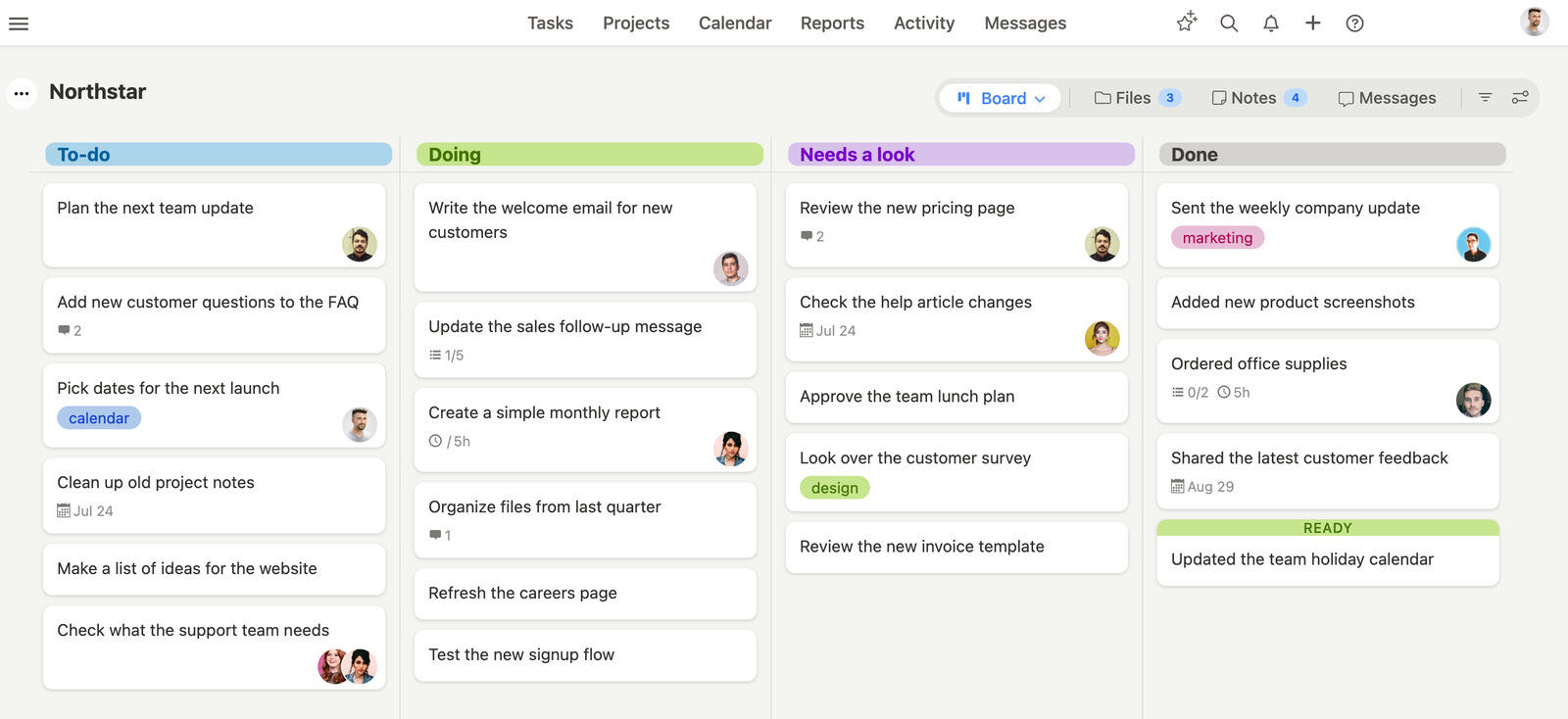
Set up the engagement as one project
Create one project for the engagement and add a list for each stage: Discovery, Workshops, Analysis, Deliverable, Client revisions and Done. Each deliverable becomes a task with an owner and a due date: the data request and the stakeholder interviews in discovery, the two workshops, the cost model and the options analysis, the draft report, the steering group presentation, and the one round of revisions the proposal included. Add an estimate to each task so the plan adds up to roughly the 120 hours you sold.
Then open the project settings and set the budget: 120 hours at the rate the fee implies, say $175 an hour, and Breeze fills in the $21,000 total. That number is the yardstick for everything that follows.
Let the client in, but not everywhere
Invite the client's project lead as a client user. They see only this project, can comment on tasks and upload the files you asked for in the data request, and cost you nothing. Internal work, such as the pricing of the options or the partner's review notes, can be hidden from clients task by task and comment by comment, and the project budget can be hidden from them too.
The steering group rarely wants another login. For them, run a report and share it as a public link. It runs with client permissions, so anything hidden from clients stays hidden.
Record time on the task, not in a spreadsheet
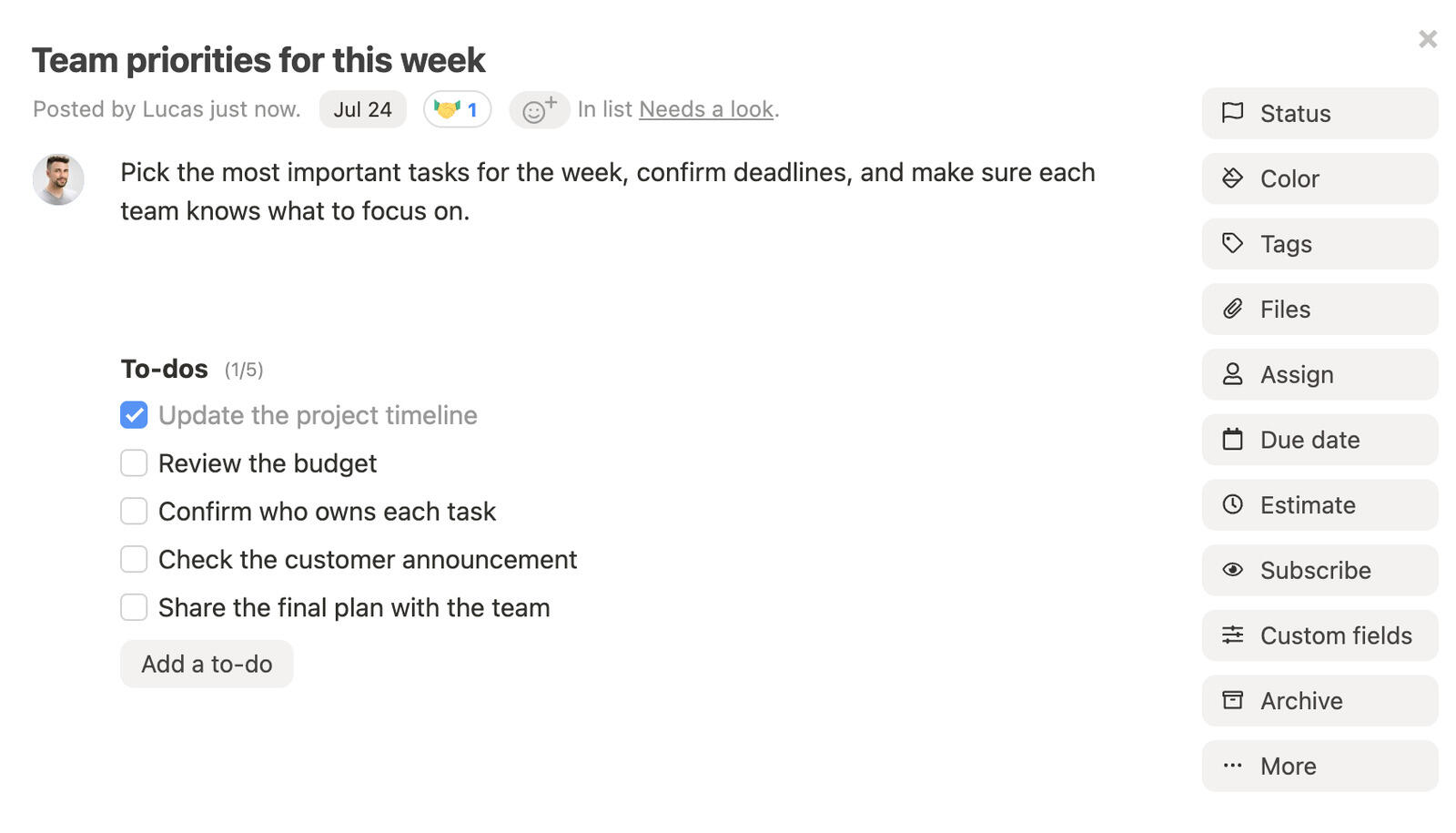
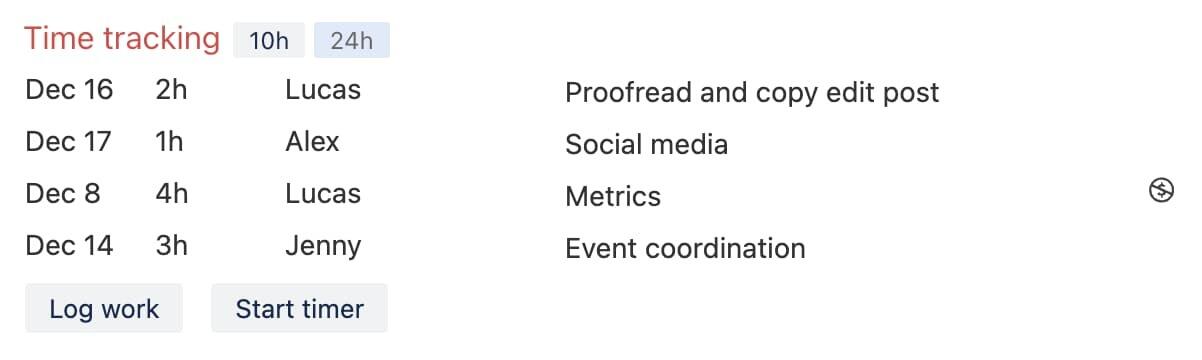
Each consultant starts the timer from the task they are working on, or types the hours in afterwards, where 45m, 2h and 1d all work. Internal time, such as a partner review or a proposal tweak, gets marked non-billable with the dollar icon, so the billable figure reflects what the client is paying for. Because the time is logged on the task, nobody has to remember an engagement code on Friday, and the hours already know which stage they belong to.
Check the hours against the budget every Friday
The review is a five-minute habit, not a report somebody builds. Open the project overview: budgeted hours shows the 120 hours with a bar for how much has been tracked, estimated hours compares tracked time with the sum of the task estimates, and billable and non-billable hours sit underneath. Then run the time tracking report for the project, grouped by task, to see which stage the hours went into. A partner with five engagements running can also read worked, estimated and budgeted hours on each project card without opening any of them.

Say it is the end of week three. The budget bar reads 62 percent, 74 of the 120 hours, which does not look alarming at the halfway point. The task report tells a different story: 58 of those hours went into discovery and workshops, which were estimated at 40, and the analysis has barely started. That is the moment to act, while three weeks are left. You can trim the options analysis, move the analyst onto the cost model, or raise a change request for the extra interviews the client asked for.

Breeze will not make that call for you, and it does not forecast where the hours will land. It puts the numbers in front of the person who has to decide, early enough to matter. When the engagement closes, export the time report to CSV for your records or your accountant, and reuse the project as a template for the next engagement of the same shape.
What should consulting firms look for in project software?
We compared engagement structure, hours against project budgets, client permissions and billing features. Prices are in US dollars and include the stated billing interval and seat minimums. Vendor documentation establishes advertised features; the linked G2 and Capterra reviews provide examples of day-to-day use, not a representative survey.
Which tool suits which consultancy?
The first split is simple. Productive, Scoro, Accelo and Kantata are PSA tools and want to own budgets, rates and invoicing. Breeze, Teamwork.com, monday.com, ClickUp, Basecamp and Asana are project tools with varying amounts of time tracking attached, and your accounting software keeps the money.
| Tool | Best for | Starting price |
|---|---|---|
| Productive | budgets, time, resourcing and invoicing in one PSA | $10 per user per month billed yearly, 3-seat minimum |
| Breeze | engagement boards, time tracking and free client users | $9 per user per month, all features |
| Teamwork.com | client projects with billable time | free for 5 users, then $9.99 per user per month billed yearly, 3-user minimum |
| Scoro | quotes, delivery, time and invoices in one flow | from $17 per user per month billed annually, 5-user minimum |
| Accelo | CRM, projects, retainers and a client portal | quote-based |
| monday.com | dashboards and visual status | free for 2 seats, then $9 per seat per month billed annually, 3-seat minimum |
| ClickUp | a configurable all-in-one workspace | free plan, then $7 per user per month billed yearly |
| Basecamp | client communication at a flat price | $25 per month flat, time tracking from $99 per month |
| Asana | planning with dependencies | free for 2 users, then $10.99 per user per month billed annually |
| Kantata | PSA for larger consulting firms | quote-based |
Which tools are worth shortlisting for a consultancy?
Compare each tool against the workflow you need: coordinating engagements, checking project budgets or managing delivery and finances together. The list includes both PSA systems and project tools with time tracking.
Productive
- Pricing: Essential is $10 per user per month billed yearly or $12 billed monthly. Professional is $25 billed yearly or $29 monthly. Ultimate is priced after a demo. Every plan needs at least 3 seats. Clients are free, while contractors who log time pay the same as employees. 14-day free trial, no card required.
- Rating: 4.6/5 on Capterra from 109 reviews, 4.6/5 on G2 from 76 reviews.
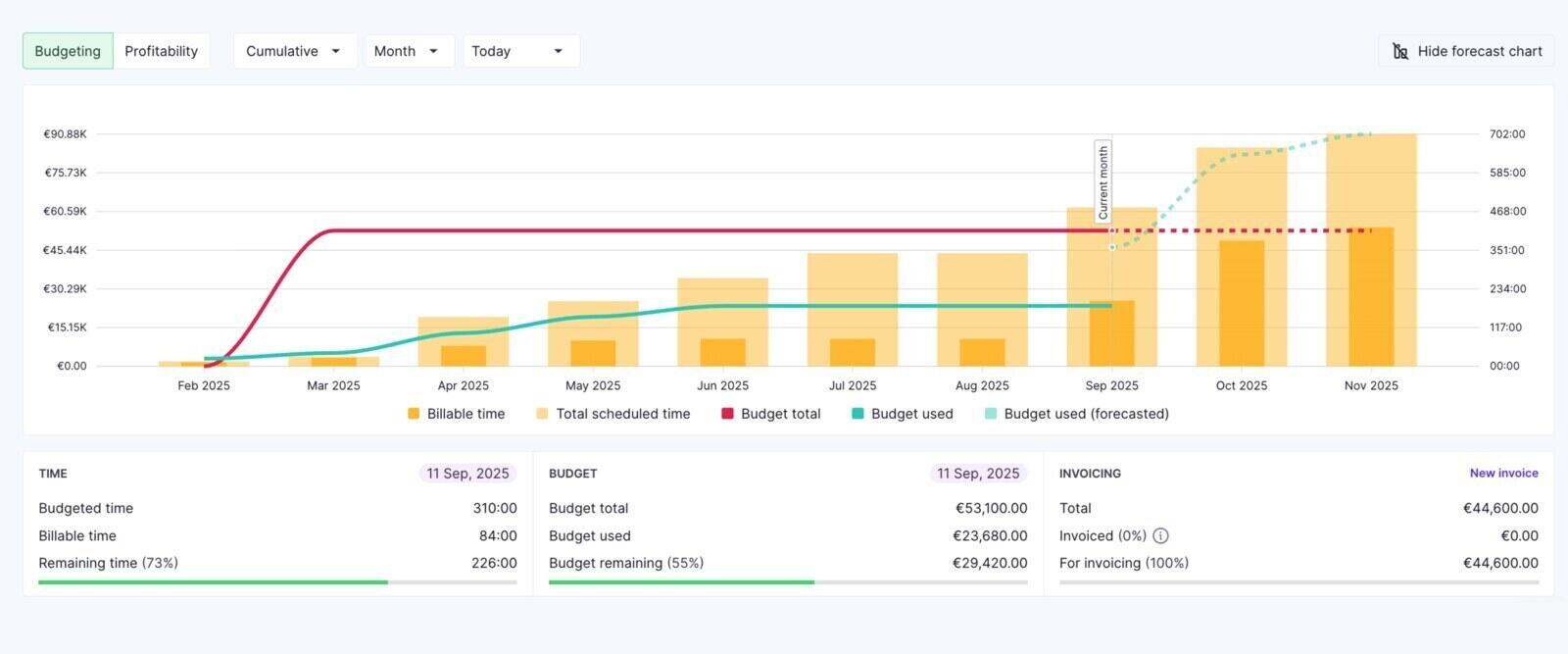
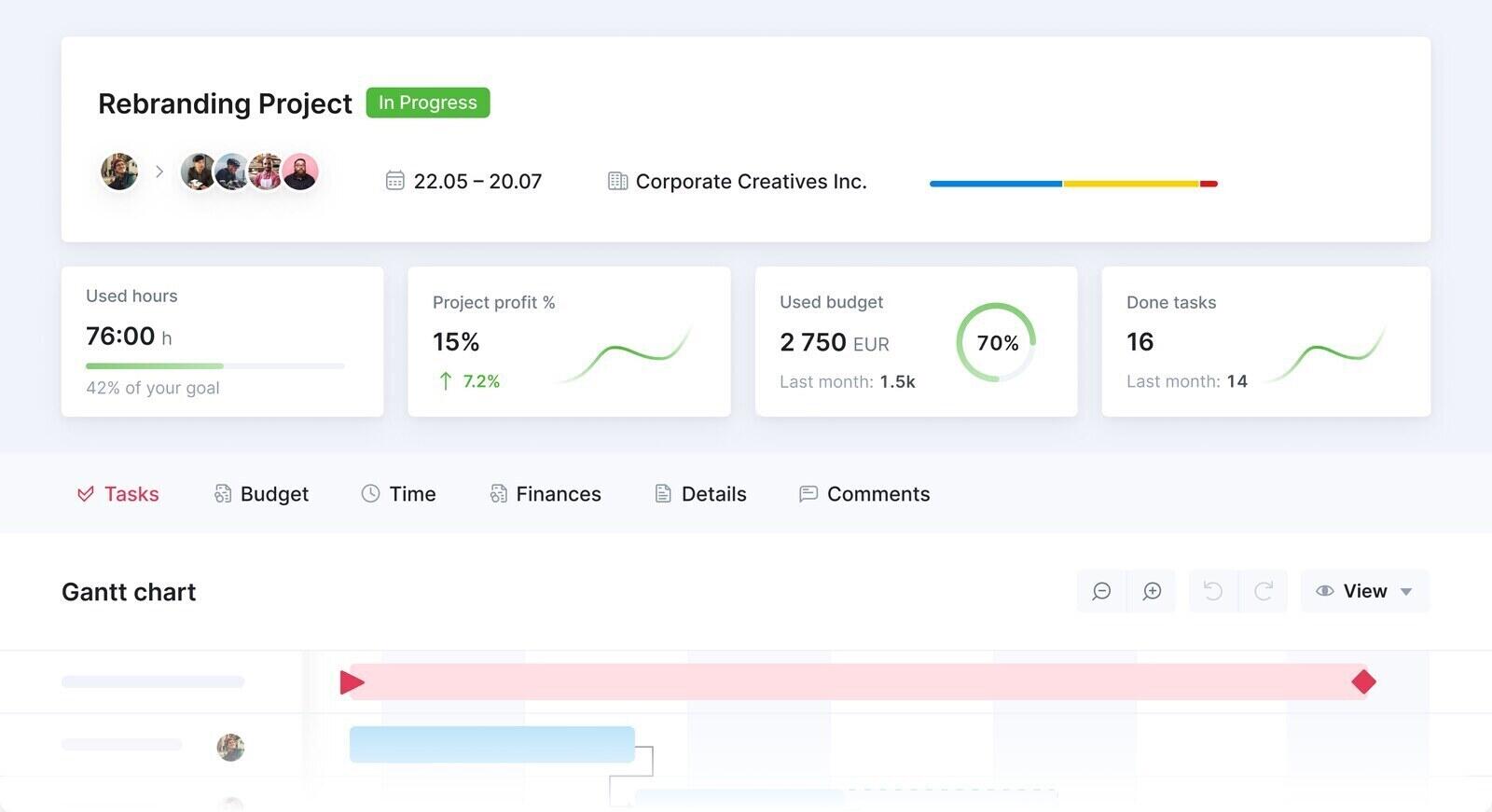
Productive (productive.io) is the PSA in this list most likely to suit a consultancy of five to thirty people, because it covers budgets, time, resourcing and invoicing without an enterprise sales process. Each engagement gets a budget, time logged against its services burns it down in hours and money, and the overview in the screenshot shows budgeted time, time used, budget remaining and the amount still to invoice. Invoices can be drafted straight from a budget's unbilled time and expenses.
The trade-off is that Productive asks you to think in services, budgets and rates from day one. That is exactly right for a firm that bills from time. A practice with one fixed fee per engagement and invoices already coming out of accounting software will use a fraction of it, and rate cards, billable time approvals and accounting integrations sit on Professional rather than Essential.
Where Productive isn't the right fit: Two-person practices paying the three-seat minimum, firms whose fees and invoices already live comfortably in accounting software, and anyone who wants to be running in an afternoon rather than after a week or two of setup.
What reviewers say about Productive
Reviews in the linked samples describe replacing separate budgeting, planning and tracking tools. Setup and report configuration draw criticism. Both listings are small, so read examples that match your firm’s workflow.
Breeze

- Pricing: $9 per user per month billed yearly, or $10 billed monthly, with every feature included. A single-user Solo plan is $14 per month. Client users are free and unlimited. 14-day free trial, no card required.
- Rating: 4.4/5 on Capterra from 45 reviews, 4.1/5 on G2 from 22 reviews.
Breeze is the simple option in this list, and for a fixed-scope advisory practice that is often the point. An engagement is a project, its stages are task lists you name yourself, and every task carries an owner, a due date, an estimate and the time logged against it. The project budget is set in hours and a rate, and the project overview shows how much of the budget has been tracked, tracked time against estimates, and the billable and non-billable split. The walkthrough above shows the whole loop on one engagement.
Clients come in as client users at no charge, see only the projects they are invited to, and never see tasks or comments you have hidden from clients. Reports can be shared as public links for people who will not log in, any project can be reused as a template, and anyone on the team can turn a client's email into a task by forwarding it to the project's address. The time tracking in Breeze is part of the same plan rather than an add-on.
Where Breeze isn't the right fit: Breeze does not create invoices, hold rate cards per role, approve timesheets or forecast fees. The budget is one pool of hours at one rate per project, so a firm that bills roles at different rates, invoices from timesheets every month or plans utilization across a large team should look at Productive, Scoro or Accelo first. Time exports to CSV or goes to FreshBooks, but invoicing happens in your accounting tool.
What reviewers say about Breeze
The linked reviews describe quick adoption, including by clients. Requests for deeper reporting and more support for complex projects also appear. Both samples are small; check that a review refers to this Breeze product.
Teamwork.com

- Pricing: Free for up to 5 users and 5 projects. Basics is $9.99 per user per month billed yearly or $13.99 monthly, with a 3-user minimum. Accelerate is $24.99 billed yearly or $29.99 monthly, with a 5-user minimum. Optimize and Enterprise are quote-based. Teamwork AI is included on paid plans for an introductory period, and the pricing page says usage-based AI credits launch in September 2026 without publishing a rate. 14-day free trial.
- Rating: 4.5/5 on Capterra from 941 reviews, 4.4/5 on G2 from 1,214 reviews.
Teamwork.com sits between a project tool and a PSA, and it is built around client work. Basics covers projects with Gantt, table, list and board views and billable time reporting. Accelerate adds timesheets, time budgets and retainers, billable rates and invoices built from logged time. Optimize adds timesheet approval, cost budgets and profitability reporting. Client users do not count toward the subscription.
The catch for a small firm is the seat floor and the step between plans. The features a consultancy usually wants from it, budgets and invoices from time, start on Accelerate at five seats or more, which is a real jump from Basics. For a firm that expects to grow into those features, starting on Basics and moving up later is a reasonable path.
Where Teamwork.com isn't the right fit: Two- or three-person practices paying for seats nobody uses, firms that want budgets and invoices on the entry plan, and anyone who needs profitability reporting without a sales conversation, since that sits on Optimize.
What reviewers say about Teamwork.com
Agency reviewers describe using time, budgets and client projects together. Other reviews mention onboarding effort and a weaker mobile experience. Check the plan and review date before treating an older limitation as current.
Scoro
- Pricing: Sold as combinations of eight apps. Time-billing starts at $17 per user per month, Projects & Resources and Quote to Cash are $29, and End-to-end is $57, all billed annually. The standard platform with two apps of your choice is $17 per user per month billed annually or $20 monthly. Annual billing saves 13 to 17 percent depending on currency and combination. Minimum 5 users. 14-day free trial, no card required.
- Rating: 4.5/5 on Capterra from 263 reviews, 4.5/5 on G2 from 503 reviews.
Scoro is built around the path from quote to invoice. A quote becomes a project with a budget, time and costs are logged against it, and the invoice is drafted from what was delivered, while dashboards show how the whole firm is doing rather than one project. It is sold as eight apps, Sell, Estimate, Do, Deliver, Track, Resource, Spend and Invoice, on a platform that includes two of them, and you add the rest as needed.
For a consultancy the relevant combination is usually Quote to Cash, which connects estimating, delivery, time and invoicing. The five-user minimum and the per-app model make it a better fit from about ten people upward, and reviewers are consistent that the financial side is stronger than the task side.
Where Scoro isn't the right fit: Practices under five people, firms whose main problem is coordinating tasks rather than money, and teams that want task management to be the strongest part of the tool.
What reviewers say about Scoro
The linked reviews value the quote-to-invoice workflow and firm-level reporting. They also describe a learning curve and task management that can feel cumbersome. Trial the task workflow as well as the financial reports.
Accelo
- Pricing: Quote-based. Accelo sets the price by team size and growth goals, and says plans include implementation guidance, onboarding support and access to the full platform. No published per-user rate or self-serve trial on the pricing page.
- Rating: 4.5/5 on Capterra from 178 reviews, 4.3/5 on G2 from 685 reviews.
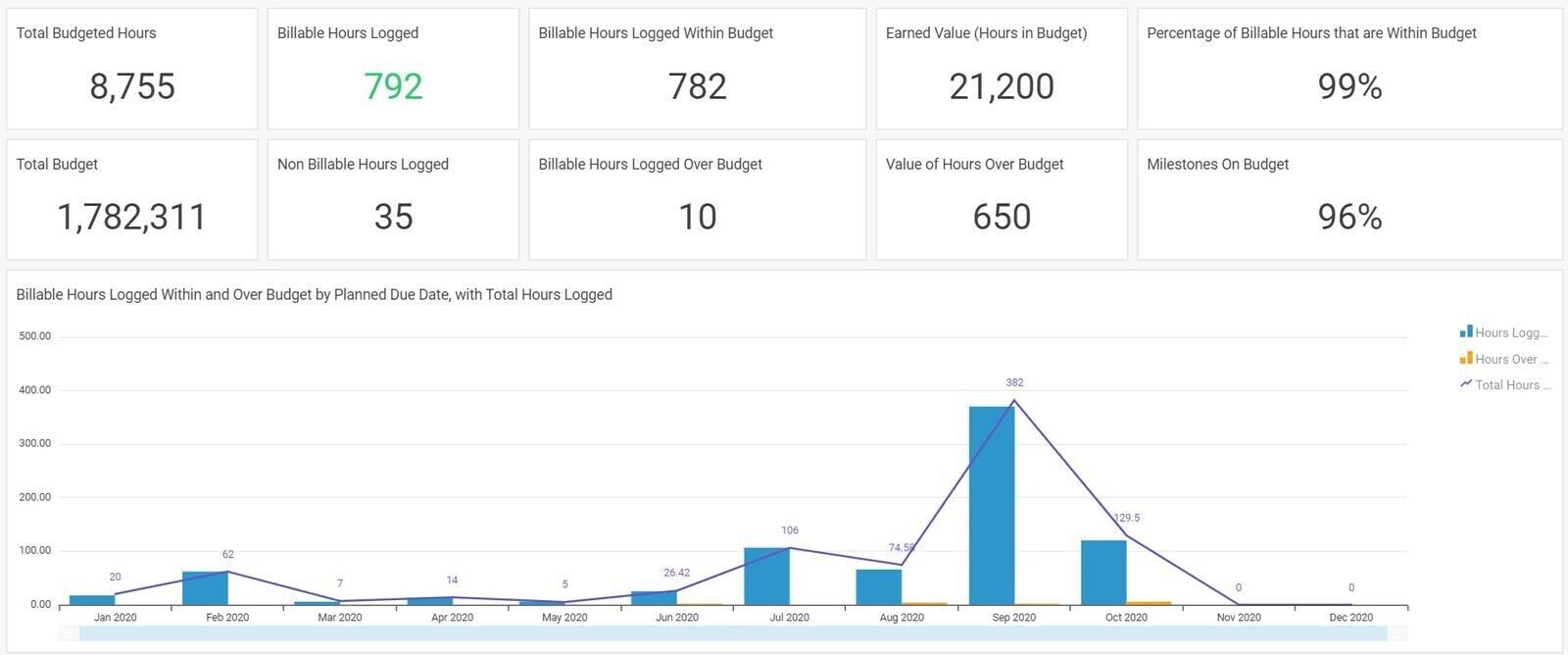
Accelo is a full PSA for service firms: CRM and sales, quotes, projects, retainers, tickets, timesheets and invoicing in one system. Its project view tracks logged time against budgeted hours by milestone and task, and a client portal lets clients follow their projects, accept quotes and view and pay invoices. Reviewers single out its automatic capture of client emails against the right client and piece of work.
For a small consultancy the question is weight. Onboarding is measured in weeks, and reviewers repeatedly describe the setup as a project in itself. It pays off for a firm that runs retainers, hourly work and projects for the same clients and wants the sale, the delivery and the invoice in one record.
Where Accelo isn't the right fit: Small practices with simple fixed-fee engagements, anyone who wants to try the product before talking to sales, and teams put off by a dense interface.
What reviewers say about Accelo
Reviews describe the benefit of keeping client history, delivery and billing together, alongside substantial setup work and interface complaints. Much of the Capterra sample is older, so check recent examples too.
monday.com

- Pricing: Free for up to 2 seats. Basic is $9 per seat per month billed annually or $12 monthly, Standard $12 or $14, and Pro $19 or $24. Enterprise is quote-based. Paid plans start at 3 seats and are sold in seat buckets, so a team of six pays for ten. Accounts created on or after May 6, 2026 must buy AI credits alongside their seats.
- Rating: 4.6/5 on Capterra from 6,116 reviews, 4.7/5 on G2 from 17,221 reviews.
monday.com suits a consultancy where a partner wants to glance at a dashboard and know where every engagement stands. Boards are flexible enough to model an engagement's stages as groups, status columns make progress obvious on a client call, and automations handle the reminders nobody wants to send.
For consulting work the plan that matters is Pro. The time tracking column is only on Pro and Enterprise, and Pro is also where guests become unlimited. Standard counts every four guests as one billed seat, and Basic has no guests at all.
Where monday.com isn't the right fit: Small firms paying for empty seats in a bucket, and anyone who wants hours against an agreed allowance without building it from columns and formulas.
What reviewers say about monday.com
The sampled reviews praise readable boards and automations. They also mention seat costs, setup effort and slow large boards. Some listings include other monday products, so focus on reviews of project work.
ClickUp

- Pricing: Free Forever plan. Unlimited is $7 per user per month billed yearly or $10 monthly. Business is $12 billed yearly or $19 monthly. Enterprise is quote-based. AI is sold as a separate per-user add-on.
- Rating: 4.6/5 on Capterra from 4,631 reviews, 4.6/5 on G2 from 14,333 reviews.
ClickUp is the most configurable tool here, and the one that most needs an owner. A consultancy can model clients as spaces, engagements as folders and stages as lists, then switch between list, board, Gantt and workload views on the same data. Creating and editing time entries is unlimited from the Unlimited plan.
The detail that matters for consultants is in ClickUp's own help centre. Marking time entries as billable, adding descriptions to them and working from timesheets count as advanced time tracking, capped at 40 uses on Free and Unlimited and 100 on Business, with no cap only on the top plans. Timesheet approvals start on Business, also capped. A firm that marks most of its hours billable will hit those limits quickly.
Where ClickUp isn't the right fit: Consultancies that want to mark most hours billable on a mid-tier plan, and teams without someone willing to design and maintain the setup.
Check ClickUp’s time tracking limits before buying: the help page also notes temporary unlimited access to some timesheet features.
What reviewers say about ClickUp
The sampled reviews value flexible fields, views and workflows, but also describe a learning curve, crowded screens and slow large workspaces. Test the setup your team would use rather than an empty workspace.
Basecamp

- Pricing: Free for one project and up to 5 users. Freelancer is $25 per month for up to 3 active projects and 20 users. Studio is $59 per month for up to 10 active projects with unlimited users. Pro is $99 per month for up to 25 active projects and adds time tracking. Unlimited is $299 per month billed annually. Clients count as users, but Studio and above have no user limit. 30-day free trial, 45 days on Unlimited.
- Rating: 4.4/5 on Capterra from 14,448 reviews, 4.1/5 on G2 from 5,488 reviews.
Basecamp is the calmest tool in this list for client-facing work. Each engagement is a project with a message board, to-dos, a schedule, files and chat, so the conversation with the client and the list of what is due live side by side. The price is a flat monthly fee rather than per seat, which makes it cheap for a firm that invites a lot of client staff.
Hours are the weak spot. Time tracking is only on Pro and Unlimited, and Basecamp describes it simply as tracking time spent on projects. Its pricing page lists no budgets or estimates to compare those hours with, so a firm that likes Basecamp for communication usually keeps the allowance in a separate tracker or a spreadsheet.
Where Basecamp isn't the right fit: Firms that need hours against a budget, task estimates, dependencies or Gantt charts, and anyone on Freelancer or Studio who assumed time tracking was included.
What reviewers say about Basecamp
The linked reviews describe straightforward client communication and predictable account pricing. They also mention limited planning and reporting depth. Reviews of older versions may not reflect the current plans.
Asana

- Pricing: Personal is free for up to 2 users. Starter is $10.99 per user per month billed annually or $13.49 monthly. Advanced is $24.99 annually or $30.49 monthly. Enterprise is quote-based. Every paid plan includes AI Teammates and Asana Dash with 5 requests per user per month, up to 50 per account, and extra requests cost $0.50 prepaid or $0.60 on demand.
- Rating: 4.5/5 on Capterra from 13,699 reviews, 4.4/5 on G2 from 13,979 reviews.
Asana is the strongest general tool here for planning. Dependencies tie your final report to the client's data delivery, the timeline shows the knock-on effect when that delivery slips, portfolios on Advanced roll every live engagement into one view, and forms turn client requests into structured tasks. Unlimited free guests from Starter make client collaboration cheap.
For hours, the picture is weaker than the price suggests. Native time tracking, estimated and actual time on tasks, sits on Advanced at $24.99 a seat. The Timesheets and Budgets add-on, which brings budget tracking and rate cards, is available only on Enterprise. A small consultancy gets planning at a mid-range price and hours at a high one.
Where Asana isn't the right fit: Small firms that want hours against a budget without an Enterprise contract, and teams that do not want to spend time tuning notifications.
What reviewers say about Asana
Reviews in the linked samples value visible ownership and deadlines. Setup, notifications and plan restrictions also draw criticism. Check whether the features discussed belong to the plan you intend to buy.
Kantata
- Pricing: Quote-based. Kantata tailors plans to company size, goals and ways of working after a call with one of its PSA advisors. No published per-user rate or free trial on the pricing page.
- Rating: 4.2/5 on Capterra from 629 reviews, 4.2/5 on G2 from 1,572 reviews.
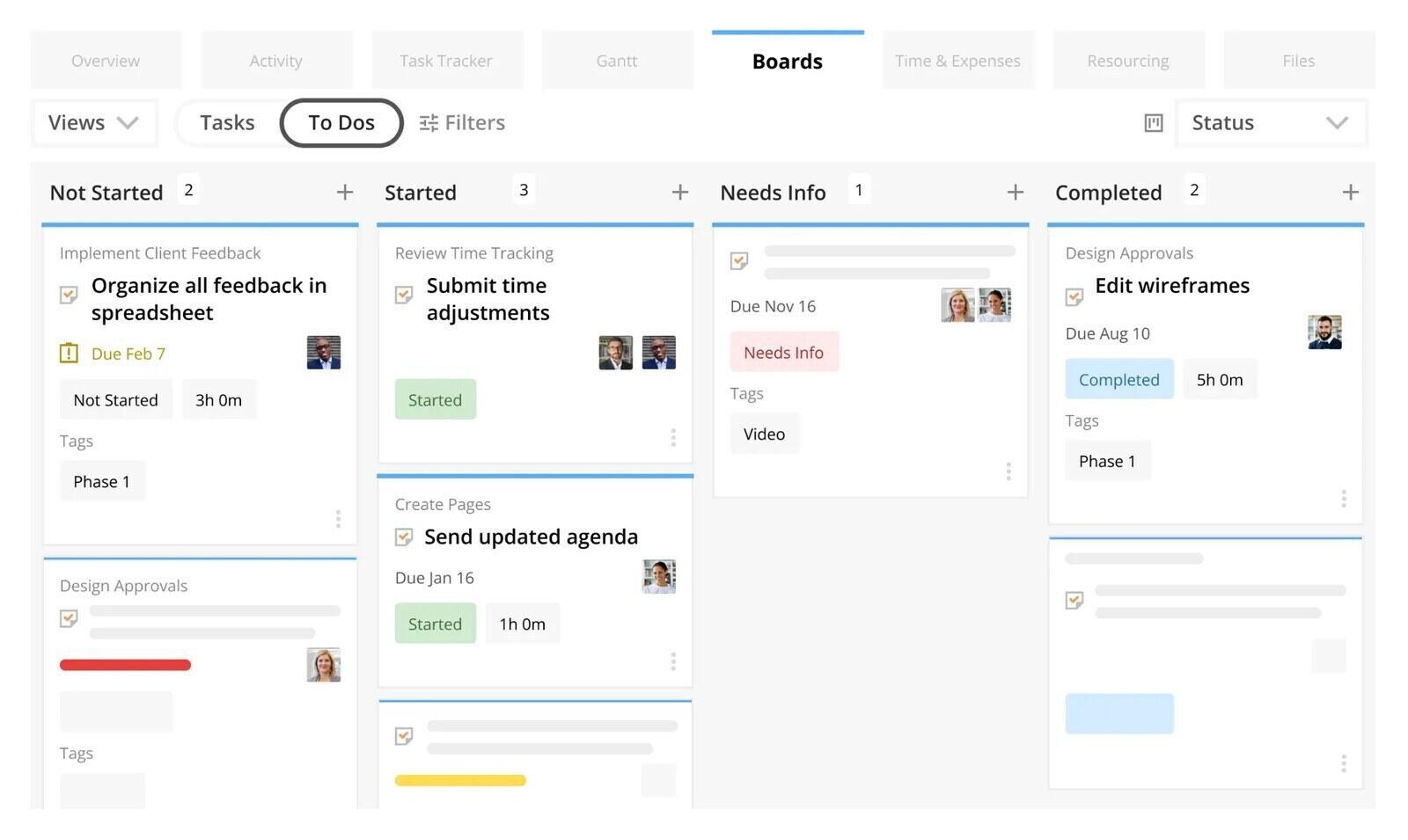
Kantata is the PSA that large consulting firms run on, and its consulting page features firms such as West Monroe and RSM. It models engagement teams by role, skills and cost before the work is sold, forecasts demand and hiring, plans hiring around billable utilization targets, and keeps budgets, time and financials next to the project plan, with time and expenses and resourcing a tab away from the board in the screenshot.
Kantata is worth considering when staffing forecasts, role-based costs and utilization need to connect across engagements. If your team can manage those decisions with a weekly review, its setup may be more than you need. Firms coordinating several departments may also want the comparison of tools for larger companies.
Where Kantata isn't the right fit: Firms that only need task coordination and basic hours reporting, or lack someone to own the configuration.
What reviewers say about Kantata
The linked reviews value combined delivery, staffing and finance records, while describing setup effort and occasional slowness. The listings include older Mavenlink and Kimble experiences, so compare the product and dates carefully.
If you work alone, the freelancer-focused comparison fits better, because one person needs far less structure. If your firm behaves more like an agency, with one shared team serving many ongoing client accounts rather than discrete engagements, the agency tool comparison weighs the right things. And if your consultants work inside the client's own systems and all you need to run yourself is the hours, a separate tracker is enough. Timen, our sister product, is free for that, and its roundup of hours-only tracking tools compares the alternatives.
Where should a small consultancy start?
Choose between the two workflows first. If rates, staffing forecasts and invoices need to share the same records, trial a PSA with a current engagement. If accounting handles invoices and a weekly hours check is enough, trial a project tool with time tracking.
For the second group, the test is small. Create the engagement you are running now as a project in Breeze, add its stages and deliverables with an owner on each, set the hours you sold as the budget, and record time on the first task. After one Friday review you will know whether the tool answers the question you actually ask.




