Why choose Breeze
 Marketing
 Creative
 Sales
Sales Remote work
 Managers
 Product teams
 Project management
 Task management
 Kanban tool
 Time tracking
 Project reporting
 Project calendars
 Project timeline
 Team workload
 Project automation
 Project customization
 Chat
Chat Web forms
 Project roadmap
 AI
AI What's new
 Articles & guides
 Help center
 Mobile apps
 Integrations
 Developers & API
 Free tools
Should a small team use Jira, Trello, or something simpler?

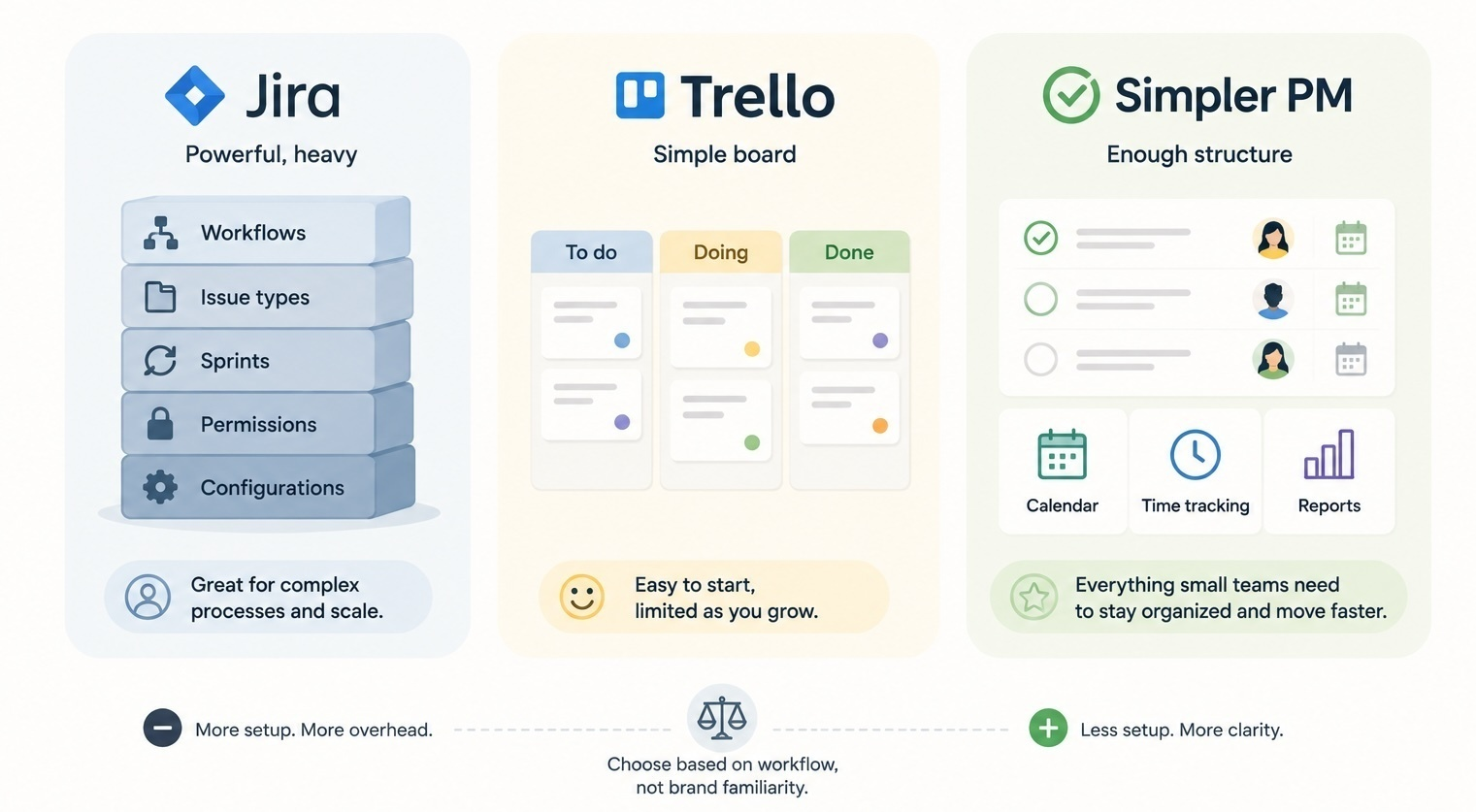
For most small teams, the honest answer is: probably not Jira, sometimes Trello, often something simpler. Jira is built for software teams that genuinely benefit from configurable workflows. Trello is great for one-board work but thin once you need projects, deadlines, and reporting. The middle ground - a lightweight project management tool like Breeze - tends to be the best fit for non-technical small teams that need more than a board without paying for Jira-level configuration.
The decision is less about features and more about how much process your team can carry. Pick the lightest tool that solves the actual problem and leave room to grow.
What is Jira actually built for, and why that matters for small teams?
Jira is built for software teams that need configurable workflows, issue types, sprints, and process control. That is a real need for engineering groups. It is also a steep price for a small non-technical team to pay if all they want is to track tasks and deadlines.
The cost of Jira is felt mostly in setup and daily use. Projects start with issue types, workflows, statuses, screens, and permissions to decide. Once running, even simple tasks have a Jira-flavored shape: epics, stories, sub-tasks, custom fields, and transitions. Engineering teams find that helpful because it matches how software work is actually structured. For non-technical teams, that same structure feels like extra weight on top of work that does not need it.
The "small teams should use Jira" argument usually comes from two places. The first is companies where engineering already uses Jira and everyone else is asked to join. The second is the assumption that powerful equals better. Neither is a great reason on its own. If a small marketing team, ops group, or agency tries to run their work in Jira, the system often becomes the work.
What does Trello do well, and where does it stop?
Trello does one thing extremely well: it gives a team a clean, shared board with no setup overhead. Cards, lists, comments, due dates, and labels are intuitive enough that a new person can use the board within minutes. For small teams running one workflow, that simplicity is the whole point.
Where Trello stops is usually predictable. The single-board model gets crowded once a team has multiple parallel projects. Reporting is light. Time tracking is not native. Calendar and timeline views are limited unless you stack on Power-Ups, and Power-Ups can quickly turn a clean board into a configuration project. The exact thing teams chose Trello to avoid starts coming back through the side door.
Trello also struggles when accountability needs to be more structured. Cards can have owners and due dates, but the tool does not push you to fill them in. A messy Trello board with vague cards and unclear ownership ends up looking a lot like the chat thread it replaced.
The other thing worth saying about Trello is that it scales sideways better than it scales upward. Adding a second or third board for a different team is fine. Stacking more responsibility onto one board, like running multiple client projects through the same columns, is where it falls apart. Teams that hit this point sometimes blame Trello when the real signal is that the work has grown into something a board alone cannot represent. That is the natural moment to consider a simpler PM tool rather than jumping to Jira.
How do Jira, Trello, and a simpler PM tool compare for small teams?
The table below is a small-team view. It compares the tools on the things that actually affect daily life: setup, learning curve, daily use, reporting, and fit for non-technical work.
| Area | Jira | Trello | Simpler PM (Breeze) |
|---|---|---|---|
| Setup | Heavy: projects, issue types, workflows, permissions | Very light: a board, lists, cards | Light: projects with built-in boards and views |
| Learning curve | Steepest for non-technical users | Lowest of the three | Low, similar to Trello on the board view |
| Daily use | Optimized for software workflows | Great for one workflow, thin across many | Designed for everyday team work |
| Reporting | Strong, but requires configuration | Basic, often needs add-ons | Built-in reports without setup |
| Time tracking | Available, configurable | Not native | Native |
| Fit for non-technical teams | Usually a poor fit | Good for simple work, limited beyond | Strong fit for small non-technical teams |
The pattern is clear. Jira is heaviest. Trello is lightest. A simpler PM tool sits between them, but closer to Trello on setup and closer to Jira on what is included. That is usually the spot small non-technical teams need.
If the simpler option is already ruled out and the choice is only between the two Atlassian tools, the full Jira vs Trello comparison goes further on plan pricing, feature limits, and how much setup each one expects.
Who should pick Jira, who should pick Trello, who should pick something simpler?
Pick Jira when software workflow is the work
Jira is the right call when your team is actually a software team and the process control matters - releases, bug tracking, sprints, structured backlogs, integrations with engineering tools. Even then, very small engineering teams sometimes do better with something lighter. For non-technical teams, Jira is usually overkill.
Pick Trello when one shared board is enough
Trello is the right call when your team's work fits on one board with simple stages. Small support queues, content calendars, design request flows, and lightweight intake processes all run well on Trello. The moment work spans multiple projects, deadlines, or reporting, Trello starts to feel limiting. A single Kanban board has clear edges, and Trello inherits them.
Pick something simpler when you want a real team PM tool without the weight
This is where most small non-technical teams should look. The need is real - projects, calendars, time tracking, reports, multiple workstreams - but the tolerance for setup is low. Breeze is built for that exact spot. It keeps board-style work as the default, adds the rest around it, and does not ask the team to design a workspace first. For small teams that care about setup overhead, this is usually the strongest combination.
If you are already burned by an overbuilt tool
Some teams arrive at this question from the other side. They tried ClickUp or Jira, ended up in a configuration spiral, and want to start over. The instinct is to drop all the way to Trello. That can work, but if the limits of a single board are part of why the team grew out of the lighter tool first, you will be back here in a year. A simpler tool that is still a real PM tool is usually the more durable choice.
Quick decision summary: choose Jira only if you genuinely need its software process strength, choose Trello if a single board covers the work, and choose a simpler PM tool when the team needs structure without configuration.
Common questions small teams ask before picking a tool
- Is Jira too much for a small non-technical team?
- Usually yes. Jira's strength is configurable software workflow. For a non-technical small team, that strength shows up mostly as setup time and daily friction.
- Is Trello enough for project management?
- It can be, for one team running one workflow. Once you have multiple projects, deadlines, time tracking, or reporting needs, Trello starts to feel limited.
- What is a good middle ground between Jira and Trello?
- A simple project management tool that keeps board-style work but adds projects, calendars, time tracking, and reports. Breeze, Asana, and similar tools sit in this space, with Breeze closer to the lightweight end.
- Can the same team use Jira for engineering and something else for the rest?
- Yes, and many companies do. Engineering stays on Jira because it fits their work. Marketing, ops, and client teams use a simpler PM tool because it fits theirs.
- What should a five-person team pick if they have never used a PM tool?
- Start with a Kanban board if the work is one workflow. Start with a simple PM tool if there are several projects, deadlines, or clients. Skip Jira unless the work is software development.
Bottom line
Jira is rarely the right answer for a small non-technical team. Trello is a great starting point but has clear limits once work grows beyond a single board. The most durable choice for many small teams is something simpler than Jira and a step up from Trello: a tool that gives projects, boards, calendars, time tracking, and reports without asking the team to configure a workflow first.
A good next step is to list the workflows your team actually runs this month - support, content, client work, internal projects - and pick the tool that supports all of them without forcing more structure than you need.