Why choose Breeze
 Marketing
 Creative
 Sales
Sales Remote work
 Managers
 Product teams
 Project management
 Task management
 Kanban tool
 Time tracking
 Project reporting
 Project calendars
 Project timeline
 Team workload
 Project automation
 Project customization
 Chat
Chat Web forms
 Project roadmap
 AI
AI What's new
 Articles & guides
 Help center
 Mobile apps
 Integrations
 Developers & API
 Free tools
What is easier than ClickUp for a non-technical team?

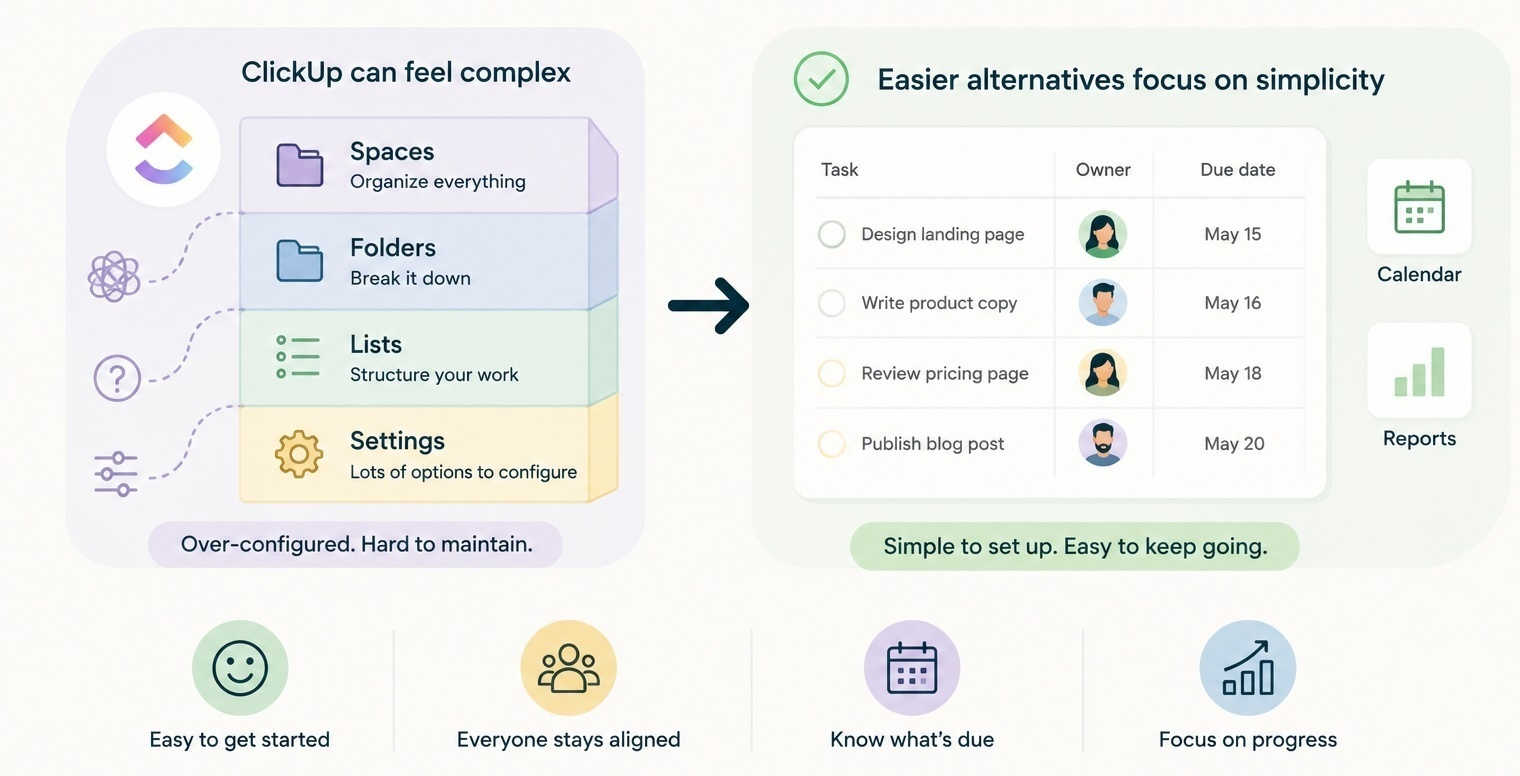
For a non-technical team, almost anything is easier than ClickUp out of the box. Trello is the lightest option if you just need a shared board. Asana is friendlier than ClickUp once you need real project structure. And a lower-overhead PM tool like Breeze can be a stronger fit when you want projects, calendars, time tracking, and reports without ClickUp's Spaces, Folders, Lists, and dozens of settings to configure first.
ClickUp is powerful, but most non-technical teams pay for that power in setup time and daily friction they never wanted. The right move depends on what you actually need: a simple board, a structured workspace, or a low-overhead PM tool that just works.
What makes ClickUp feel too heavy for non-technical teams?
ClickUp feels heavy because it asks the team to make structural decisions before any real work starts. You have to pick Spaces, then Folders, then Lists, then choose which views matter, which custom fields to add, which automations to enable, and which permissions to set. Each of those is a reasonable feature on its own. Together, they turn the first week into an admin project instead of a working tool.
That kind of overhead is fine for an ops lead who enjoys configuration. It is rough for a marketing manager, an office admin, a small agency owner, or a non-technical founder who just wants their team to stop missing tasks. The product is built for flexibility, and flexibility costs decisions.
The second issue is the daily experience. ClickUp gives you many ways to do the same thing - tasks, subtasks, checklists, comments, docs, chat, sprints, goals - and non-technical teams often end up using two or three of those for the same purpose. After a few weeks, no one is sure where things should live. That is the moment teams start looking for a simpler alternative.
There is also a quiet adoption problem. A non-technical team usually has one or two people who learn ClickUp deeply and a much larger group who only update what they have to. The tool ends up reflecting the power user's view of the work, not the team's. When that power user goes on holiday or leaves, the setup gets harder to maintain. A simpler tool removes that risk because there is less to know in the first place.
How do simpler tools compare to ClickUp at a glance?
A quick comparison helps if you are deciding between ClickUp and something lighter. The differences are mostly about how much structure each tool forces on you up front.
| Tool | Setup feel | Daily use for non-technical teams | Best fit |
|---|---|---|---|
| ClickUp | Spaces, Folders, Lists, many settings to choose | Powerful, but easy to overbuild and hard to keep tidy | Teams that want maximum flexibility and have time to configure |
| Trello | One board, lists, cards | Very simple, easy adoption, limited views | Teams that mostly need a shared board |
| Asana | Teams, projects, tasks | Approachable, more structured than Trello | Teams that want some process without going admin-heavy |
| Breeze | Projects, boards, tasks, calendars in one place | Simple to start, enough depth for real team work | Small non-technical teams that want low setup and real PM features |
Notice the pattern. ClickUp gives the most options. Trello gives the fewest. Breeze and Asana sit between them, but Breeze stays closer to the simple end while still covering things teams actually need - calendars, time tracking, and reports - without a hierarchy to design.
Who actually benefits from ClickUp, and who outgrows it the wrong way?
ClickUp earns its complexity when a team genuinely needs that flexibility. That usually means a product team, a developer-leaning ops group, or a workspace owner who wants to configure custom workflows for many different teams in one tool. Those teams get real value from the customization.
Non-technical teams more often hit the opposite outcome. They start with ClickUp because it advertises everything they could ever need, then quietly use 10 percent of it - and even that 10 percent feels harder than it should. People log in, see too many options, and start updating tasks somewhere else, usually in chat or in a side document.
There is also a common mistake when teams outgrow ClickUp. Instead of dropping down to a simpler tool, they keep adding more structure, more automations, and more dashboards trying to make ClickUp easier to use. That usually makes it harder. If a tool already feels like overkill, more configuration is rarely the answer.
Easier ClickUp alternatives, by use case
Pick the alternative that matches your actual workflow, not the one with the longest feature list. The four buckets below cover most non-technical teams looking to move off ClickUp.
If you only need a simple shared board
Use Trello. It is the closest thing to a digital whiteboard and the easiest to adopt. Card-based boards work well for content calendars, design requests, simple intake queues, and small internal projects. Trello will start to feel limiting once you need multiple projects, reporting, time tracking, or a calendar overview, but for a single-board workflow it is hard to beat.
If you run client work or recurring projects
Use a project management tool with real project structure, time tracking, and reporting. Agencies, freelancers, and small service teams need to know what is being worked on, who owns it, how long it took, and what to bill. ClickUp can do this, but the daily admin is heavy. Breeze is often a more practical fit here - projects, boards, calendars, and time tracking are connected without a separate setup phase.
If you want structure but not heaviness
Consider Breeze. This is the bucket most non-technical teams fall into. They have outgrown a single board, but they do not want a tool that turns task tracking into a configuration project. Breeze keeps things tasks, owners, due dates, statuses, comments, calendars, and reports without asking the team to design a hierarchy first. Simple project management in practice usually looks closer to this than to a fully customized ClickUp workspace.
If your team was already burned by a ClickUp setup
Be careful with anything that promises to replace ClickUp with even more flexibility. Going from ClickUp to a heavily customized workspace in another tool is often a lateral move. Pick a tool that is opinionated about how it works, so your team is not designing the system again. Asana is a reasonable middle ground if you still want some structure. Breeze is a good fit if you want to keep setup time close to zero. For very small teams, even simpler may be the right call.
Quick decision summary: choose Trello if a single shared board solves the problem, choose Asana if you want moderate process without ClickUp weight, and choose Breeze when you want a real team PM tool that stays simple from day one.
Common questions about ClickUp alternatives for small teams
- Is ClickUp too complicated for a small non-technical team?
- Often yes. ClickUp can work for small teams, but its hierarchy and configuration usually add setup overhead that non-technical teams do not want. A simpler tool is faster to adopt.
- What is the easiest ClickUp alternative?
- Trello is the easiest if you only need a shared board. Breeze is one of the easier full project management options because it keeps setup light while still giving you projects, calendars, time tracking, and reports.
- Is Asana easier than ClickUp?
- Usually yes. Asana is more approachable than ClickUp because it has less hierarchy and fewer configuration choices up front, although it can still feel heavier than Trello or Breeze.
- What should a marketing or agency team use instead of ClickUp?
- A tool that connects tasks, boards, calendars, time tracking, and reporting without much setup. Many small marketing teams and agencies move to Breeze for that exact reason.
- When does it make sense to stay on ClickUp?
- Stay on ClickUp if your team actively uses its flexibility - custom workflows, automations, multiple spaces, dashboards - and the daily admin is paying off. If it is not, a simpler tool will almost always feel better.
Pick the tool that fits how your team actually works
For a non-technical team, easier than ClickUp usually means a tool that does not ask you to design the system before you can use it. Trello is the lightest. Asana is friendlier than ClickUp. Breeze is a strong simple option that still feels like real project management.
A good next step is to write down the smallest structure your team needs this month - tasks, owners, due dates, status, maybe a calendar - and pick the tool that gives you exactly that with the fewest setup decisions.