
 Why choose Breeze
 Marketing
 Creative
 Sales
Sales Remote work
 Managers
 Product teams
 Project management
 Task management
 Kanban tool
 Time tracking
 Project reporting
 Project calendars
 Project timeline
 Team workload
 Project automation
 Project customization
 Chat
Chat Web forms
 Project roadmap
 AI
AI What's new
 Articles & guides
 Help center
 Mobile apps
 Integrations
 Developers & API
 Free tools
Best marketing project management software in 2026

This guide is for in-house marketing teams running campaigns for one brand — content calendars, launches, channel coordination, cross-functional handoffs. If you're at a creative studio or agency billing clients for the work, our creative studio and agency PM guide is the better fit; the criteria there (billable hours, client portals, retainer math) are different from in-house marketing needs. For lighter coordination tools, see project collaboration tools.
Disclosure: Breeze publishes this comparison and is one of the tools listed below. Marketing teams that lean heavily on creative review or campaign analytics may find specialized tools (Asana with proofing, Wrike for Marketers, dedicated MarTech) stronger than Breeze in those specific areas.
How we chose these tools
We picked candidates that handle marketing workflows specifically, then ranked them on:
- Campaign tracking — the ability to span content, channels, and timelines in one view.
- Content calendar — editorial planning that connects to actual task delivery.
- Creative review and proofing — built-in or clean integration with Filestage, Frame.io, or similar.
- Cross-channel reporting — campaign-level rollup across email, social, and content workflows.
Quick answer: best marketing project management software in 2026
- Best overall: Breeze
- Best for campaign planning: Asana
- Best for agency work: Teamwork
- Best for dashboards: Monday.com
- Best for flexible workflows: ClickUp
| Tool | Best for |
|---|---|
| Breeze | all-around fit |
| Asana | for campaign planning |
| Teamwork | for agency work |
| Monday.com | for dashboards |
| ClickUp | for flexible workflows |
List of marketing project management software
Below are the best marketing project management software options for teams running campaigns, content, launches, and approvals:
Breeze
- Pricing: Simple pricing at $9 per user per month with all features included; save 10% with yearly billing
- Rating: 4.4/5 on Capterra
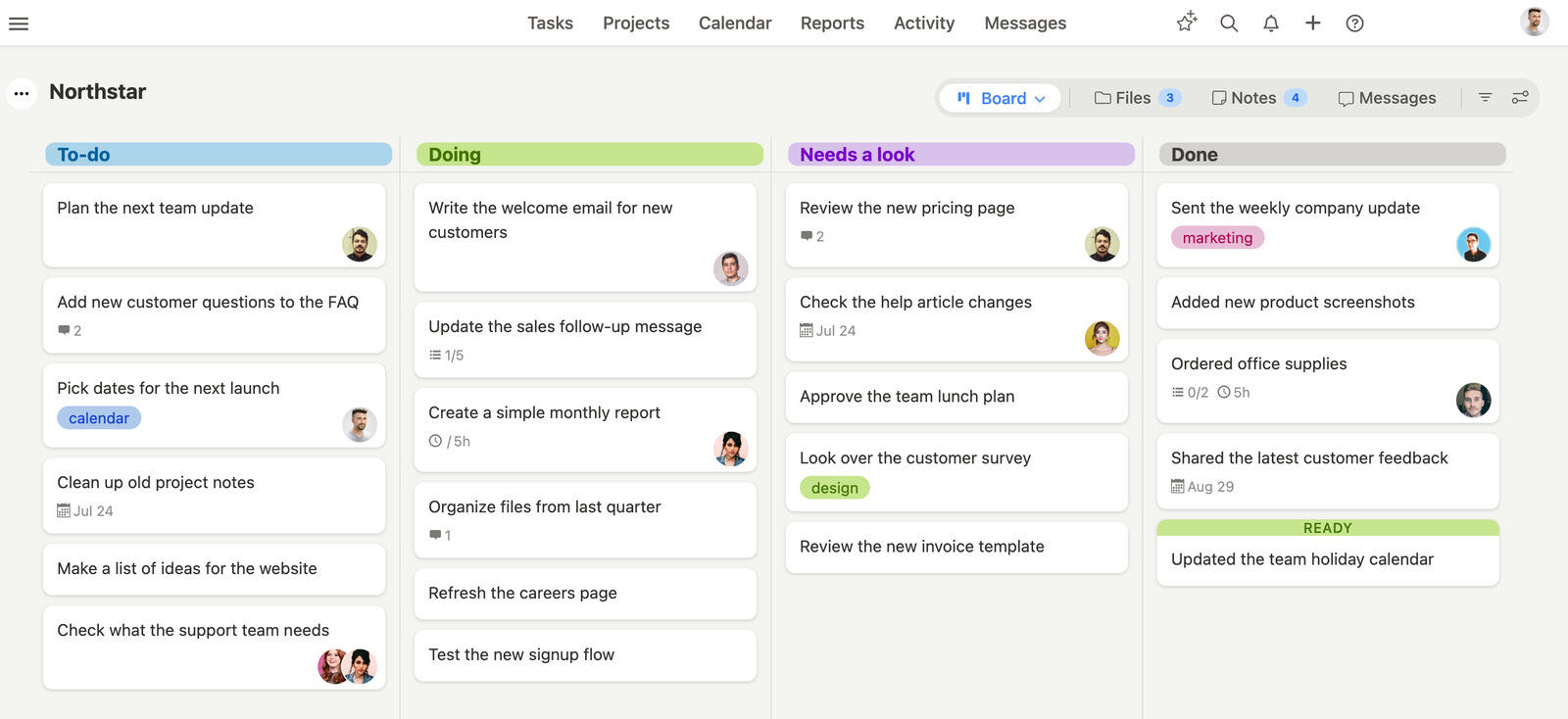
Breeze gives marketing teams a clear way to plan campaigns, assign work, and keep approvals moving without getting buried in setup. It combines task tracking, collaboration, and team workload management in one focused workspace, which makes it easier to launch campaigns on time and stay aligned as priorities shift.
Where Breeze fits
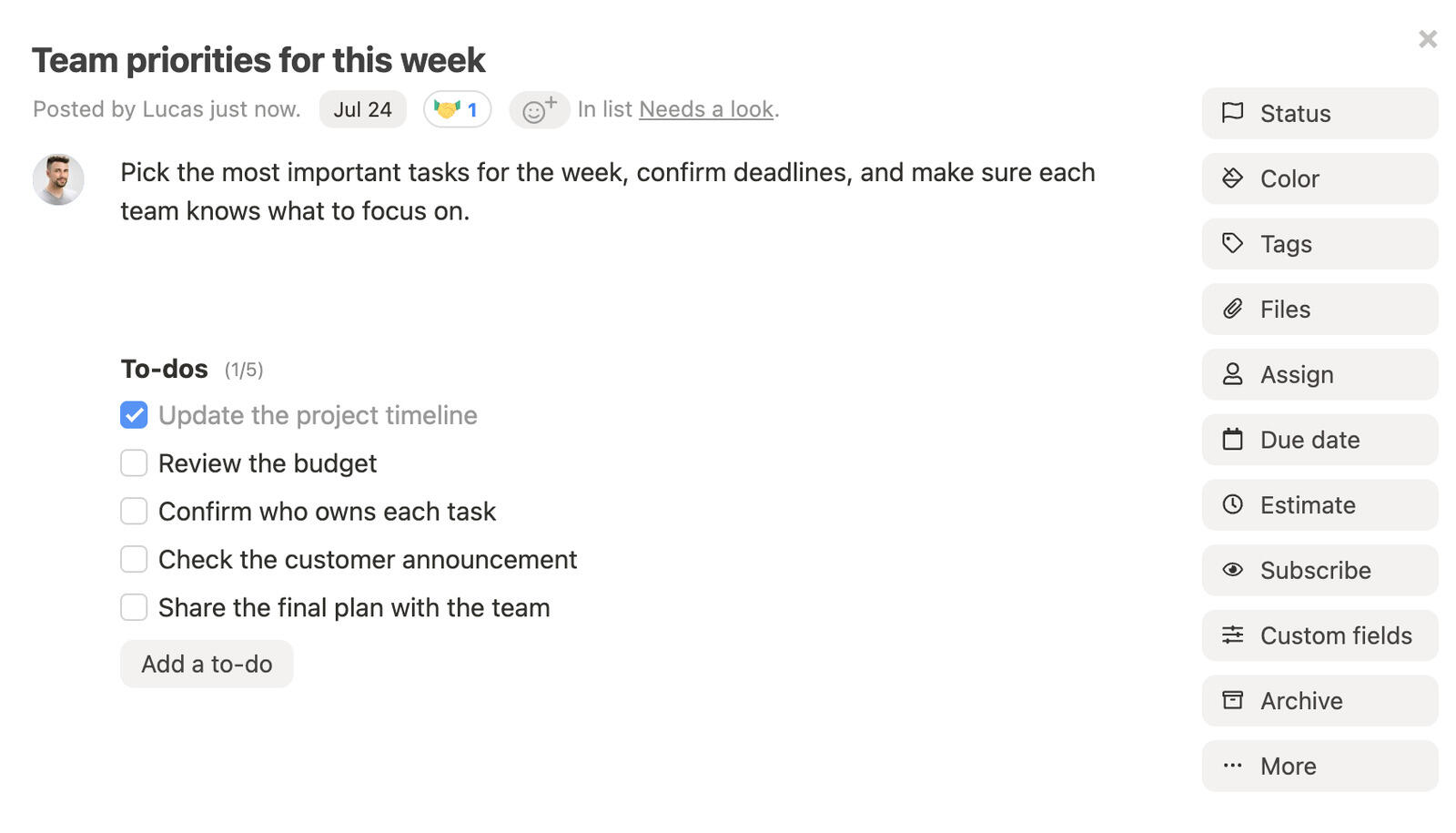
- Centralized communication: Built-in messaging and task comments allow team members to collaborate instantly, reducing the need to switch between multiple platforms.
- Organized campaign planning: Breeze helps teams organize campaigns, assign tasks, and monitor progress—all from one dashboard.
- Calendar sync: Integrate campaign milestones and schedules directly with team calendars, keeping everyone aligned without extra reminders.
- File management: Upload and share marketing assets directly within tasks to ensure all files are easy to find when needed.
- Workload overview: Easily see how tasks are assigned among team members to balance responsibilities and maintain productivity.
- Reporting: Track campaign performance and identify areas for adjustment to improve ongoing efforts.
Where Breeze isn't the right fit: Enterprise governance, deep agile sprint planning, complex configurable databases, or advanced portfolio management at scale — that's not where we focus.
What users say about Breeze:
“Tested many systems and Breeze was hands down the best”
Source: Capterra
ClickUp

- Pricing: Free for basic use, with premium plans starting at $9 per user per month
- Rating: 4.6/5 on Capterra
ClickUp works well for marketing teams that need a flexible way to manage campaigns and content without unnecessary complexity. Its adaptable views make it easier to organize workflows, track progress, and keep projects visible across the team. Marketing teams can shape ClickUp around their campaign process while keeping collaboration straightforward.
Where ClickUp fits
- Customizable views: Use boards, lists, or timelines to organize campaigns and monitor progress in a way that suits your team.
- Task dependencies and automations: Maintain campaign flow with easy-to-set task dependencies and reduce repetitive work with automation.
- Integrated collaboration: Built-in comments, mentions, and notifications make communication direct, keeping everyone informed without relying on external apps.
- Centralized document storage: Keep campaign assets, creative briefs, and files in one place to maintain easy access and keep projects moving efficiently.
Where ClickUp isn't the right fit: Teams that want a tool that works on day one without configuration, or organizations without dedicated PM-admin ownership.
If you want to compare similar tools, we also have a list of ClickUp alternatives.
What users say about ClickUp:
“I am overall happy about using ClickUp in my daily workflow. It is a tools that helps me with my daily tasks and organizes my work. Sometimes it can be a bit laggy, but except meetings it doesn't happen really often.”
Source: Capterra
Asana

- Pricing: Free for basic use, premium features start at $10.99 per user per month
- Rating: 4.5/5 on Capterra
Asana offers marketing teams an effective way to manage campaigns, organize projects, and collaborate efficiently. With workflow automation and visual project tracking, Asana helps marketing managers keep campaigns organized. Its flexible project views and integrated collaboration tools allow marketing teams to stay aligned and keep campaigns progressing smoothly.
Where Asana fits
- Workflow automation: Automate task transitions to keep campaigns on track and reduce repetitive work, allowing the team to concentrate on creativity.
- Flexible project views: Use lists, boards, or calendars to track campaigns and progress in the way that works best for the team.
- Collaboration features: Integrated comments, tags, and notifications make it easy for marketing teams to communicate and remain coordinated without switching between tools.
- Task dependencies: Define dependent tasks clearly to help campaigns proceed smoothly and prevent delays.
Where Asana isn't the right fit: Tiny teams (under 5 people) where the depth is overhead, or engineering teams that need real issue tracking — Jira fits better.
If you want to compare similar tools, we also have a list of Asana alternatives.
What users say about Asana:
“I love love Asana! It is a highly organizational and efficient work tool. I can manage the entire team as a project manager from anywhere in the world. Though a bit difficult to navigate, it's one of the best tools for a project manager"
Source: Capterra
Monday.com

- Pricing: Starting at $9 per user per month
- Rating: 4.6/5 on Capterra
With Monday.com marketing teams can manage campaigns, tasks, and workflows in a flexible way. The visual dashboards provide an at-a-glance overview of ongoing projects, making it easy to understand the status of campaigns. Automation features help reduce repetitive tasks, freeing up time for creative work and strategic planning.
Where Monday.com fits
- Customizable dashboards: Keep all campaign details, progress, and marketing data in one accessible space to maintain clarity across the team.
- Automation: Automate repetitive tasks to save time and reduce errors, allowing team members to focus on creative aspects of the campaign.
- Real-time updates: Share project updates with clients and team members, ensuring everyone stays informed and aligned on campaign progress.
- Adaptable features: Adjust views and settings to meet the unique needs of different campaigns, making it suitable for managing various marketing activities.
Where Monday.com isn't the right fit: Very small teams (the 3-user minimum is a tax), or anyone wanting pricing without forced tier jumps as the team grows.
If you want to compare similar tools, we also have a list of Monday.com alternatives.
What users say about Monday.com:
“In our case, monday.com was introduced to the workers, and they have given rather positive feedback. The presentation of the project through the platform with pictures enables many people to see the progress of the project at first glance.”
Source: Capterra
Wrike

- Pricing: Free for up to 5 users, with paid plans starting at $10 per user per month
- Rating: 4.3/5 on Capterra
Wrike helps marketing teams plan campaigns, track deadlines, and collaborate effectively. Custom dashboards provide a clear overview of progress, while time tracking helps campaigns stay on schedule. With built-in collaboration tools, marketing managers can share updates and gather feedback easily, keeping campaigns on track.
Where Wrike fits
- Task management: Create and prioritize campaign tasks to ensure marketing projects progress smoothly from start to finish.
- Custom dashboards: Use visual dashboards to monitor deadlines, milestones, and campaign performance in one place.
- Collaboration: Share updates and gather feedback from both clients and team members, helping campaigns stay aligned and progress efficiently.
- Scalability: Adjust features and add team members as campaign needs grow, making Wrike adaptable to marketing requirements.
Where Wrike isn't the right fit: Small teams (under 15 people) where the configuration overhead doesn't pay back.
If you want to compare similar tools, we also have a list of Wrike alternatives.
What users say about Wrike:
“Wrike allows me to be flexible in the way I organize work, and see work with the dashboards. By using this I never lose track of my projects and tasks, and can easily communicate with other team members. It absolutely increases our work efficiency.”
Source: Capterra
Teamwork.com

- Pricing: Starting at €13.99 per user per month
- Rating: 4.4/5 on Capterra
With Teamwork.com marketing teams can handle both client-facing campaigns and internal projects with ease. Its built-in time tracking and task management features support effective campaign planning and execution, while the client portal ensures that clients stay updated on progress. Teamwork.com's scalability makes it a reliable option for marketing teams that need a solution that will grow as their projects and clients expand.
Where Teamwork.com fits
- Client and internal management: Keep both client campaigns and internal projects organized in one central location, ensuring clear oversight of all activities.
- Time tracking: Log work hours directly to campaign tasks to maintain accuracy and transparency in reporting.
- Scalability: Add new team members or features as campaign needs evolve, making it a fitting tool for teams expecting growth.
- Client portal: Use the client portal to share campaign progress, collect feedback, and keep communication in one accessible place.
Where Teamwork.com isn't the right fit: Non-agency teams where the client-portal value goes unused, or teams that don't run a client-billable model.
What users say about Teamwork.com:
“Teamwork has proven to be an indispensable tool in managing my team's projects effectively and efficiently. Its comprehensive set of features, user-friendly interface, and seamless integrations make it a must-have for any team looking to enhance collaboration and streamline its project management process. I wholeheartedly recommend Teamwork to organizations of all sizes looking to optimize their productivity and achieve their goals.“
Source: Capterra
Basecamp

- Pricing: Flat rate of $299 per month for unlimited users or $15 per user per month
- Rating: 4.3/5 on Capterra
Basecamp gives marketing teams a simple way to manage tasks, files, and communications in one place. The interface ensures that every team member can easily access important information. Automatic check-ins help keep everyone on the same page without requiring frequent meetings, which allows marketing teams to stay focused on their work. Basecamp also reduces the need for multiple different tools, making collaboration cohesive.
Where Basecamp fits
- All-in-one platform: Manage campaign tasks, files, and communications within a single platform, simplifying project coordination.
- Automatic check-ins: Gather team updates without holding lengthy meetings, keeping everyone informed while preserving focus on creative work.
- Client access: Invite clients to see campaign progress and provide feedback, allowing for transparent and collaborative project management.
- Message boards: Keep all campaign discussions organized, avoiding scattered emails and making it easy to track communication history.
Where Basecamp isn't the right fit: Tiny teams under 10 people (the flat fee is too expensive), or teams that need real reporting, time tracking, or scheduling features.
If you want to compare similar tools, we also have a list of Basecamp alternatives.
What users say about Basecamp:
“My Overall Experience using basecamp is good. It is my daily activity to update my basecamp tasks so that everybody in the team would know about the update on the task. Manager would check the update and will check the basecamp and if he/she find the task is updated with all the requirement they close the task which is best satifaction moment like "this is complete to do" something like this”
Source: Capterra
Trello

- Pricing: Free for basic use, with paid plans starting at $5 per user per month
- Rating: 4.5/5 on Capterra
Trello's visual Kanban boards make it easy to manage campaigns, helping teams organize tasks and set deadlines with minimal complexity. The platform's flexibility allows marketing teams to add extra features through power-ups as campaign requirements. This adaptability makes Trello suitable for both daily activities and larger, long-term initiatives.
Where Trello fits
- Visual boards: Use drag-and-drop cards to gain a clear overview of all campaign tasks and their progress.
- Collaboration: Team members and clients interact directly on shared boards, keeping communication streamlined.
- Scalable features: Add integrations such as time tracking or calendars as the campaign needs to expand.
- User-friendly: The simple interface helps marketing teams start managing projects efficiently without extensive onboarding.
Where Trello isn't the right fit: Teams past about 10 people, anyone needing cross-board rollup, or workflows with hierarchical project structures.
If you want to compare similar tools, we also have a list of Trello alternatives.
What users say about Trello:
“Overall the software did what we needed, tracking our team and showing our schedule timeline for software releases. Really a great tool for small teams looking to grasp their jobs and find a management system.”
Source: Capterra
Notion

- Pricing: Free for personal use, with team plans starting at $10 per user per month
- Rating: 4.7/5 on Capterra
Notion combines project planning, documentation, and task management in one workspace, making it a strong choice for marketing teams. It allows teams to track tasks, store important files, and maintain knowledge bases. Customizable layouts help adapt Notion to specific campaign requirements, giving teams one place to manage launches, briefs, and daily execution.
Where Notion fits
- Customizable layouts: Adapt workspaces to match the unique needs of each marketing campaign.
- All-in-one platform: Manage tasks, notes, and campaign documents in one centralized space, reducing the need for additional tools.
- Collaboration: Invite team members to view or edit workspaces, making teamwork efficient and communication easy.
- Knowledge management: Keep campaign briefs, guidelines, and creative resources organized and easily accessible for the entire team.
Where Notion isn't the right fit: As a primary PM tool — native time tracking, workload, and team-scale task management aren't really there.
If you want to compare similar tools, we also have a list of Notion alternatives.
What users say about Notion:
“I use Notion for business management and to handle the business information of one of my most valued clients. While it is almost unlimited in its functionality, when you hit one of those limits, it can be felt. In particular there are mission critical plug-ins (Notion Calendar) that work well on a web browser but -- oddly -- aren't compatible with their own desktop software. When it's good, Notion is very, very good. But it does have its limits.”
Source: Capterra
Zoho Projects

- Pricing: Free for small teams, with paid plans starting at $4 per user per month
- Rating: 4.4/5 on Capterra
Source: Capterra
Zoho Projects includes task tracking, built-in communication tools, and adaptable workflows, making it a strong choice for marketing teams. Gantt charts and task dependencies help marketing managers plan campaigns with precision. Integrated time tracking and communication features keep teams organized, minimizing the need to switch between multiple tools.
Where Zoho Projects fits
- Gantt charts and task dependencies: Plan campaign timelines visually and manage dependent tasks effectively.
- Time tracking: Monitor work hours directly in Zoho Projects to ensure campaigns stay on schedule.
- Built-in communication tools: Use real-time updates and internal forums to keep the team aligned and connected.
- Flexible workflows: Adjust workflows to fit the unique needs of different marketing campaigns.
Where Zoho Projects isn't the right fit: Teams that want a polished, design-led PM tool — Zoho prioritizes feature breadth over UI craft.
What users say about Zoho Projects:
"I appreciates the comprehensive suite of tools it offers, such as task management, time tracking, and Gantt charts, which helped streamline project management and improve team collaboration. The platform's user-friendly interface made navigating and managing projects easier, although there was a learning curve initially."
Source: Capterra
FAQ
- What is the best marketing project management software in 2026?
- Breeze fits in-house marketing teams that want simple PM with native time tracking. Asana is the strongest pick for teams that want structured campaign calendars and dependencies. Teamwork fits agency-side marketing work with client portals. Monday.com is the visual dashboard pick.
- What should teams look for in marketing project management software?
- Look for a tool that matches how your team plans work, shares updates, and reviews progress. The right tool should be easy to adopt, flexible enough for your workflow, and clear enough that important work does not get lost.
- Which tool works best for campaign teams that need structured calendars, dependencies, and launch planning?
- Asana is a strong fit for campaign teams that need structured calendars, dependencies, and launch planning. Breeze is better when you want a simpler daily workflow with less setup and less admin overhead.
- Should I choose a simple tool or a more customizable one?
- Choose the simpler option if speed, clarity, and fast team adoption matter most. Choose the more customizable option if your team needs deeper automation, specialized workflows, or more detailed reporting.
Takeaway
The best marketing project management software helps teams plan campaigns, manage briefs, coordinate reviews, and keep launches on schedule. Whether you run a small internal team or a larger marketing department, the right software gives you clearer ownership, better approval flow, and stronger visibility across deadlines. Look for software that fits your campaign process, keeps assets and conversations close to the work, and helps the team move from planning to launch without extra admin overhead.




