
 Why choose Breeze
 Marketing
 Creative
 Sales
Sales Remote work
 Managers
 Product teams
 Project management
 Task management
 Kanban tool
 Time tracking
 Project reporting
 Project calendars
 Project timeline
 Team workload
 Project automation
 Project customization
 Chat
Chat Web forms
 Project roadmap
 AI
AI What's new
 Articles & guides
 Help center
 Mobile apps
 Integrations
 Developers & API
 Free tools
Trello vs Asana

Disclosure: Breeze publishes this comparison and is one of the tools discussed here. We try to be candid about where Breeze isn't the right fit; weigh that bias when reading our recommendations.
Review process: We compared current vendor documentation, pricing pages, published product interfaces, and independent user reviews. Pricing and plan names were checked against vendor sites on July 16, 2026; vendors change packaging often, so confirm the current total for your team before buying.
If you're evaluating project management tools, Trello and Asana will probably be on your list. They're both flexible and feature-rich. Trusted by teams, organizations and individuals all over the world to manage tasks, and improve collaboration and workflows. From startups and freelancers to big companies, both tools have made a place in the productivity space.
But choosing between them isn't always easy. Each tool brings different features to the table and suits different work styles. Trello's Kanban boards make task tracking easy for smaller teams or individual users. Asana has more project management features and is better suited for managing complex workflows and bigger teams.
In this article, we'll break down the pros and cons of Trello and Asana to help you decide. We'll also look at Breeze, a simple alternative that balances simplicity with project management features.
Trello vs Asana at a glance
| Feature | Trello | Asana |
|---|---|---|
| Best for | Teams that want simple Kanban-based planning | Teams that need structured project management across departments |
| Pricing | Free for basic use, with paid plans starting at $5 per user per month | Free for basic use, with premium features starting at $10.99 per user per month |
| Rating | 4.5/5 on Capterra | 4.5/5 on Capterra |
| Standout strengths | Faster to get started with, as the initial setup can be completed in minutes; Offers fewer features and options, making it easier for the entire team to use | Advanced visualization options, such as List, Board, Timeline, and Calendar views; Makes it easier to manage multiple projects with its Portfolio feature |
| Main tradeoff | Limited reporting and few views beyond boards; leans on Power-Ups | More features and setup than a small team browsing a single board needs |
Quick verdict: Trello vs Asana
Choose Trello if:
- Faster to get started with, as the initial setup can be completed in minutes
- Offers fewer features and options, making it easier for the entire team to use
- Its selection of Power-Ups and integrations is more extensive than Asana's
Choose Asana if:
- Advanced visualization options, such as List, Board, Timeline, and Calendar views
- Makes it easier to manage multiple projects with its Portfolio feature
- Supports automating tasks, submitting work requests, and tracking workloads
Choose Breeze if:
- Unlike Trello and Asana, Breeze includes time tracking as a core feature, making it easier to monitor task progress
- Breeze simplifies pricing by offering all features without requiring multiple tiers
- Breeze's interface makes onboarding quick and ensures teams can focus on their work
Key differences between Trello and Asana
Trello is a better fit for teams that want simple Kanban-based planning. Asana is a better fit for teams that need structured project management across departments.
The main difference comes down to how much structure, setup, and reporting your team needs. Trello usually has a lower learning curve, while Asana usually has a moderate learning curve.
Is Trello better than Asana?
Trello is better than Asana for teams that want simple Kanban-based planning.
Asana is better than Trello for teams that need structured project management across departments.
Breeze is a good alternative if you want boards, timelines, time tracking, and automation in one simpler workspace.
Teams comparing these two often end up evaluating Trello alternatives and other Asana alternatives too.
If the team doing the work is an engineering team, Jira vs Trello is the closer comparison — the same starting board, measured against sprints and issue workflows rather than cross-department projects.
What is Trello?

- Pricing: Free for basic use, with paid plans starting at $5 per user per month
- Rating: 4.5/5 on Capterra
Trello is a simple yet flexible Kanban tool. It was one of the first apps to popularize the Kanban approach to project management. Trello allows teams to track their progress visually, making it easy to identify bottlenecks. Every task is presented as a card on your Trello board and can be dragged and dropped as it moves through the different stages of your workflow. Every card can contain checklists, descriptions, comments, attachments, custom color-coded tags, and more.
A wide selection of Trello's Power-Ups allows you to configure your board and make it as complex and powerful as you need. Trello owes much of its popularity to how easy it is to use. While it doesn't offer the advanced customization options that Asana does, it compensates with a lower learning curve. Simplicity is key when it comes to online collaboration tools—the easier the product, the less time it takes to train new team members.
What users say about Trello
"Overall, a great Project management tool to manage projects efficiently for Individual Contributors as well as Team Collaborations."
Source: Capterra
What is Asana?

- Pricing: Free for basic use, with premium features starting at $10.99 per user per month
- Rating: 4.5/5 on Capterra
Asana started as a to-do list app but quickly evolved into a full-fledged project management tool. Today, it's fairly similar to Trello and offers many of the features Trello users love Kanban boards, filters, checklists, and more. But while Kanban boards are the core of Trello, they're only a small part of what Asana offers.
Asana provides numerous visualization options, including lists, timelines, calendars, and Gantt charts. Routine tasks can be automated, saving time and reducing errors. Tasks can also have dependencies, making it easy to track blockers and milestones. This extensive feature set comes with a modern interface. While the initial setup may take longer than Trello's, Asana is a good option for teams that need additional functionality.
What users say about Asana
"Overall, ASANA has been a game-changer for our project management needs, enhancing productivity and collaboration within our team."
Source: Capterra
Trello vs Asana features
Trello and Asana overlap on core project management, but they emphasize different strengths. The main differences usually come down to workflow depth, visibility, setup effort, and how much structure the team needs day to day.
| Area | Trello | Asana |
|---|---|---|
| Workflow style | Teams that want simple Kanban-based planning | Teams that need structured project management across departments |
| Top strengths | Faster to get started with, as the initial setup can be completed in minutes; Offers fewer features and options, making it easier for the entire team to use | Advanced visualization options, such as List, Board, Timeline, and Calendar views; Makes it easier to manage multiple projects with its Portfolio feature |
| Ease of use | Lower learning curve | Moderate learning curve |
| Main tradeoff | Limited reporting and few views beyond boards; leans on Power-Ups | More features and setup than a small team browsing a single board needs |
Trello stands out when teams want to get started in minutes with a simple, visual board — fewer features and options mean the whole team can pick it up quickly.
Asana stands out when teams want advanced visualization options — List, Board, Timeline, and Calendar views — plus Portfolios to manage many projects at once.
Trello vs Asana pricing
Pricing changes over time, so confirm the latest details on each vendor site before you commit.
| Plan detail | Trello | Asana |
|---|---|---|
| Pricing | Free for basic use, with paid plans starting at $5 per user per month | Free for basic use, with premium features starting at $10.99 per user per month |
| Rating | 4.5/5 on Capterra | 4.5/5 on Capterra |
Trello pricing: Free for basic use, with paid plans starting at $5 per user per month.
Asana pricing: Free for basic use, with premium features starting at $10.99 per user per month.
The better value depends on team size, feature needs, and how much workflow depth or reporting your team actually needs.
Trello vs Asana ease of use
Trello usually has a lower learning curve.
Asana usually has a moderate learning curve.
If your team values fast adoption and lower overhead, choose the simpler option. If you need more control, customization, or reporting, a steeper learning curve can still be worth it.
Trello pros and cons
Trello pros
- Faster to get started with, as the initial setup can be completed in minutes
- Offers fewer features and options, making it easier for the entire team to use
- Its selection of Power-Ups and integrations is more extensive than Asana's
- Allows multiple assignees to a task, unlike Asana
- Trello's visual simplicity makes it ideal for teams that need an intuitive way to track projects. Its Kanban boards ensure quick understanding and efficient task management
- The drag-and-drop feature enables seamless task movement across boards, reducing time spent on reorganizing workflows
Trello cons
- Little beyond the Kanban board — no built-in timeline, workload, or portfolio views
- Reporting and dashboards are minimal without paid tiers or Power-Ups
- Managing many projects at once gets messy across separate boards
- Depends heavily on Power-Ups, which can add cost and clutter as you scale
Asana pros and cons
Asana pros
- Advanced visualization options, such as List, Board, Timeline, and Calendar views
- Makes it easier to manage multiple projects with its Portfolio feature
- Supports automating tasks, submitting work requests, and tracking workloads
- Features a cleaner, less cluttered interface
- Asana's timeline feature is good for teams managing complex workflows, as it provides a clear overview of project schedules and dependencies
- Asana integrates with tools like Google Drive, allowing teams to centralize documents and collaborative efforts
- Asana's task dependency management ensures teams can effectively prioritize and address blockers, keeping projects on track
Asana cons
- The feature depth means a steeper setup than Trello for small or simple projects
- Per-user pricing jumps to $10.99+/mo once you outgrow the free plan
- No native time tracking; you need an integration or add-on
- You can't assign a single task to multiple people, which trips up some workflows
When Trello is the better choice
- Faster to get started with, as the initial setup can be completed in minutes
- Offers fewer features and options, making it easier for the entire team to use
- Its selection of Power-Ups and integrations is more extensive than Asana's
When Asana is the better choice
- Advanced visualization options, such as List, Board, Timeline, and Calendar views
- Makes it easier to manage multiple projects with its Portfolio feature
- Supports automating tasks, submitting work requests, and tracking workloads
Breeze as an alternative
If you're searching for a project management tool that combines simplicity with essential features, Breeze is worth considering. Unlike Trello and Asana, Breeze focuses on making project management intuitive without overwhelming users. It is designed for teams that want all the core project management tools they need in one place.
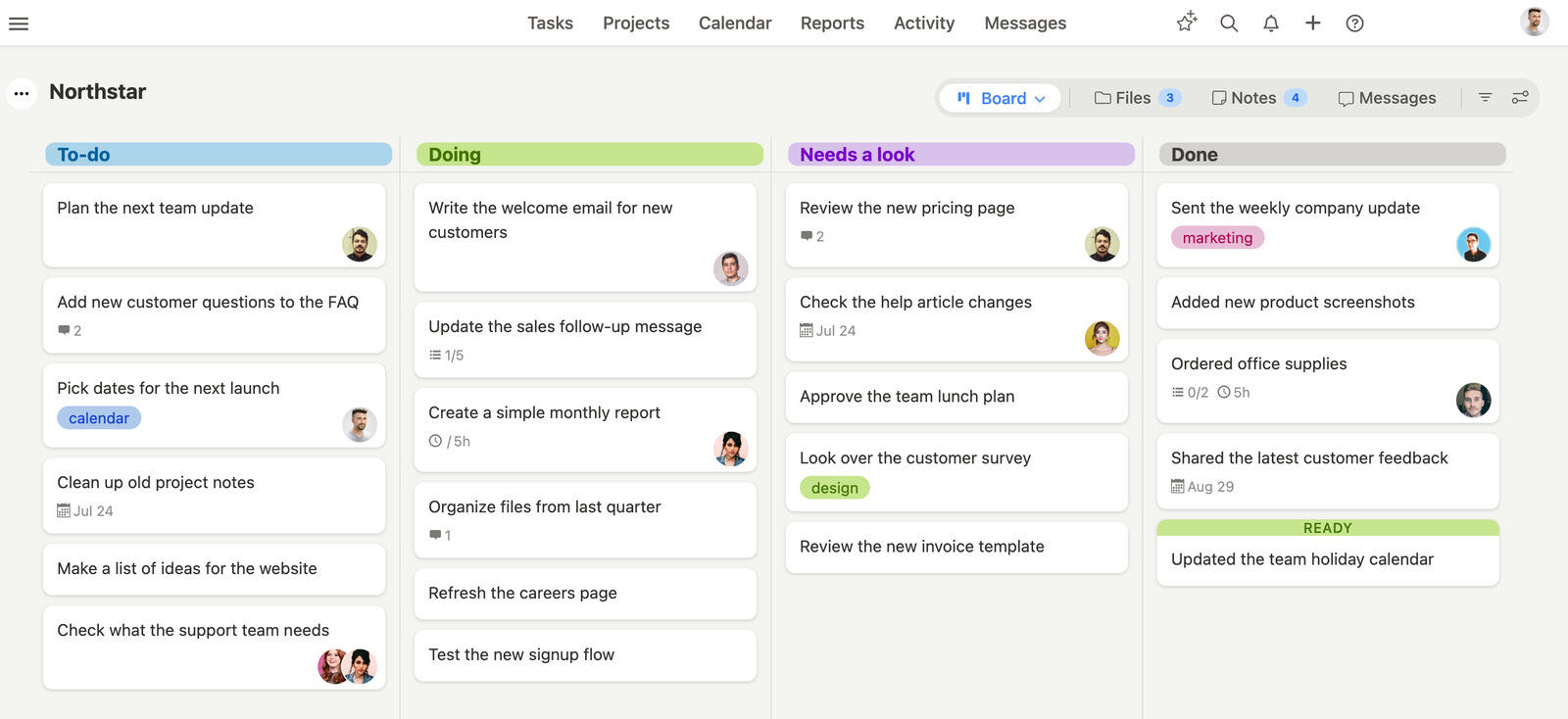
Breeze is made to deliver essential project management features without the complexity often associated with tools like Trello and Asana. While it avoids catering to overly complicated workflows, Breeze still provides a robust set of tools. For example, built-in time tracking, workflow automation, and detailed reporting.
These features enable teams to stay organized, monitor progress, and complete projects with ease. With its simple pricing model and user-friendly interface, Breeze stands out as an ideal choice for small to medium-sized teams looking for simplicity without sacrificing functionality.
The two comparisons break differently. How Breeze compares to Trello is mostly about what arrives built in versus bolted on, while where Breeze lands against Asana is mostly about how much process a team wants imposed on it.
What users say about Breeze
"We selected Breeze because it integrates with harvest and because we liked their cards based approach."
Source: Capterra
Which tool should you choose?
The clearest way to decide is by scale of work. Trello is the better pick when the unit of work is a single board a small team can glance at — marketing calendars, personal task lists, a startup's sprint. Asana earns its extra cost once you're coordinating dependencies, deadlines, and multiple projects across teams, where Trello's board-per-project model starts to fray. It's worth knowing the switching cost runs one way: exporting Trello boards into Asana is straightforward, but pulling Asana's dependencies, custom fields, and portfolios back into Trello loses structure, so start on the tool that matches where you'll be in a year. If you want Asana-style timelines and reporting without its price climb or setup, that's the gap Breeze aims at.
Choose Trello if:
- Faster to get started with, as the initial setup can be completed in minutes
- Offers fewer features and options, making it easier for the entire team to use
- Its selection of Power-Ups and integrations is more extensive than Asana's
Choose Asana if:
- Advanced visualization options, such as List, Board, Timeline, and Calendar views
- Makes it easier to manage multiple projects with its Portfolio feature
- Supports automating tasks, submitting work requests, and tracking workloads
Choose Breeze if:
- Unlike Trello and Asana, Breeze includes time tracking as a core feature, making it easier to monitor task progress
- Breeze simplifies pricing by offering all features without requiring multiple tiers
- Breeze's interface makes onboarding quick and ensures teams can focus on their work
When comparing Trello and Asana, the right choice depends on your team's needs and workflows. Trello's simplicity and visual Kanban boards make it a decent option for smaller teams or freelancers who prioritize ease of use. In contrast, Asana's advanced features, such as task dependencies and portfolio management, are better for larger organizations managing complex projects.
For teams looking for a middle ground, Breeze is an attractive alternative. It combines essential features like time tracking and workflow automation in an easy-to-use platform, eliminating the learning curve often associated with other tools. Breeze's focus on functionality and simplicity makes it ideal for small to medium-sized teams looking to stay productive.
Ultimately, the best tool for your team will depend on your specific requirements. Evaluate these options with your team, consider your project needs, and choose the platform that aligns with your goals. If simplicity with essential features is a priority, Breeze is a solution worth exploring.
FAQ
- Is Trello better than Asana?
- Trello is better than Asana for teams that want simple Kanban-based planning. Asana is better than Trello for teams that need structured project management across departments.
- Which tool is easier to use, Trello or Asana?
- Trello usually has a lower learning curve, while Asana usually has a moderate learning curve.
- How do Trello and Asana compare on pricing?
- Trello pricing: Free for basic use, with paid plans starting at $5 per user per month. Asana pricing: Free plan; Starter costs $10.99 per user per month, billed annually.
- What is a good alternative to Trello and Asana?
- Breeze is a strong alternative if you want boards, timelines, time tracking, and automation in one simpler workspace.




