
 Why choose Breeze
 Marketing
 Creative
 Sales
Sales Remote work
 Managers
 Product teams
 Project management
 Task management
 Kanban tool
 Time tracking
 Project reporting
 Project calendars
 Project timeline
 Team workload
 Project automation
 Project customization
 Chat
Chat Web forms
 Project roadmap
 AI
AI What's new
 Articles & guides
 Help center
 Mobile apps
 Integrations
 Developers & API
 Free tools
Linear vs Jira

Disclosure: Breeze publishes this comparison and is one of the tools discussed here. Breeze is not an issue tracker and is not a serious candidate for most teams choosing between these two; we say so plainly rather than pretending otherwise.
Review process: We compared current vendor documentation, pricing pages and published product interfaces. Linear's plan names and prices were checked against linear.app on August 6, 2026; vendors change packaging often, so confirm the current total for your team before buying.
Linear and Jira are both issue trackers for software teams, and both cover issues, sprints and roadmaps. The difference is not the feature list. It is a decision about who does the configuring.
Linear is fast because it has already decided how your team works. Jira is slow to set up because it has decided nothing, and someone has to model your process. Knowing which of those you actually want settles the choice faster than any feature table.
Linear vs Jira at a glance
| Linear | Jira | |
|---|---|---|
| Best for | Product and engineering teams | Any team, with configuration |
| Setup time | An afternoon | Weeks, and ongoing |
| Custom workflows | Deliberately limited | Effectively unlimited |
| Free plan | Unlimited members, 2 teams, 250 issues | Up to 10 users |
| Paid from | $10 per user per month, billed yearly | Per user, tiered by team size |
| Marketplace | Integrations, no app ecosystem | Thousands of apps |
| Admin burden | Close to none | Usually a named person |
Quick verdict: Linear vs Jira
Choose Linear if the tracker's users are mostly engineers, you want it to be fast and quiet, and you are willing to adapt your process to the tool rather than the other way around. The speed is not a nice-to-have, it is the product.
Choose Jira if you need to model a process you cannot change, you have teams outside engineering in the same system, or you have compliance, audit or service-desk requirements. Also choose it if you already use Confluence, because that integration is hard to replicate.
Key differences between Linear and Jira
- Opinion versus configuration. Linear ships one good workflow. Jira ships a workflow engine. This is the whole comparison in a line.
- Speed as a design constraint. Linear is built around keyboard navigation and a local-first sync engine. Jira has improved but is not competing on this.
- Scope. Linear is for building software. Jira tracks work of any kind, including HR onboarding, legal review and IT tickets.
- Extensibility. Jira's marketplace is a genuine moat. Linear expects you to need less.
- Migration. Linear provides a Jira importer for issues, comments and attachments. What does not survive is custom workflow states, custom fields and automation rules, because Linear has no equivalents by design.
Is Linear better than Jira?
For product and engineering teams that want a fast, opinionated tracker with almost no configuration, yes. For organisations that need custom workflows, non-engineering teams in one system, or compliance and audit trails, Jira is the better tool.
Neither answer is universal, and the honest test is whether your organisation has a person whose job includes maintaining the tracker, and whether you need them to.
If this ends with Jira being too much configuration and Linear being too opinionated, Jira vs Trello looks in the other direction entirely — the same Atlassian account, with almost none of the setup.
What is Linear?
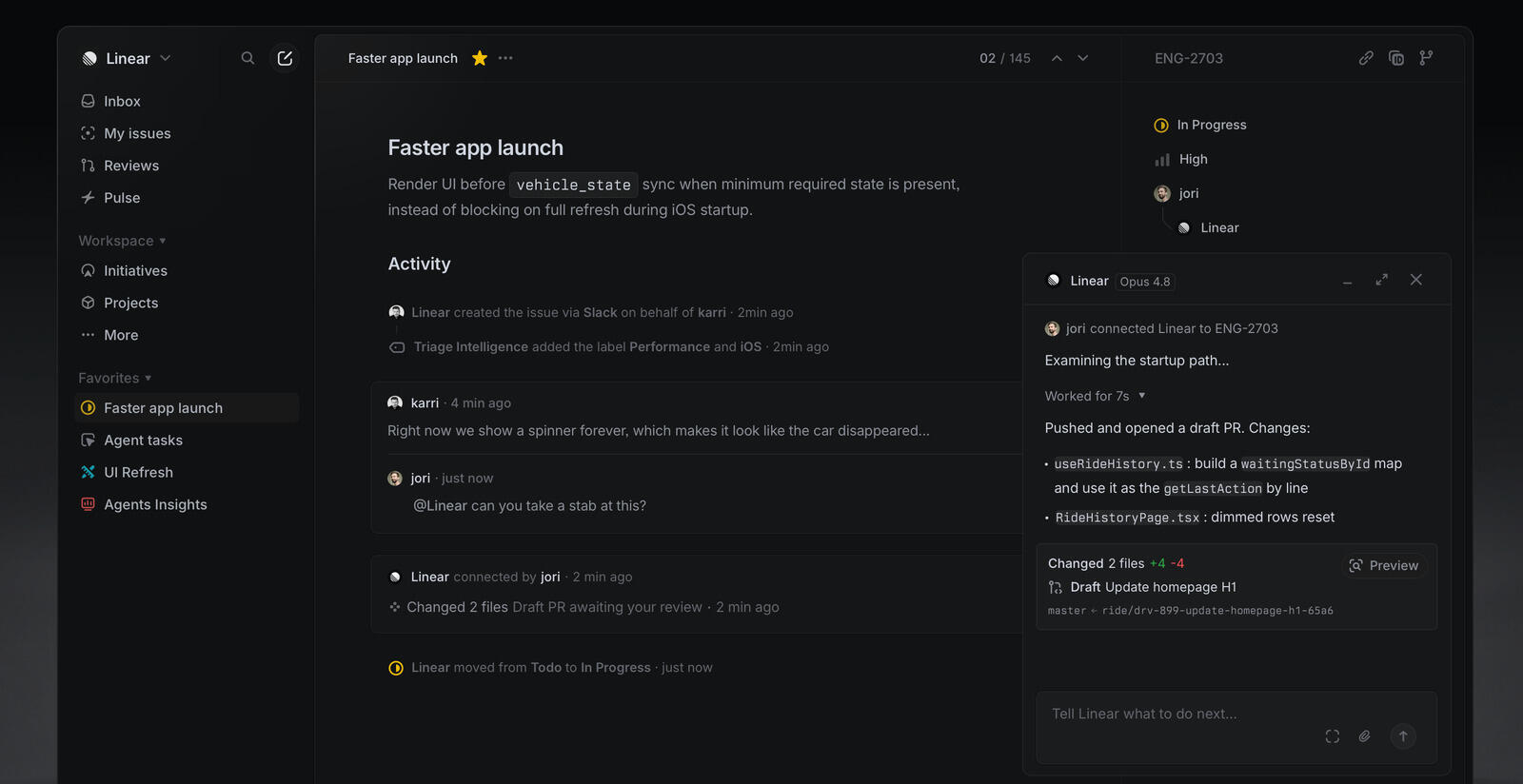
Linear is an issue tracker and project management tool for software teams, used by more than 40,000 companies. The core objects are issues, cycles (its version of sprints), projects and initiatives, with triage for incoming work.
The design philosophy is subtractive. Where most tools add options, Linear removes them and picks a default. There are no custom workflow states in the Jira sense, no equally deep custom field builder, and no marketplace. That is intentional, and it is why a new engineer can be productive on their first morning.
What users say about Linear
"Linear shines for a single team on a tight horizon"
Source: Capterra
Reviewers consistently praise the speed and the lack of setup compared with Jira. The recurring criticism is scope: Linear thins out for epics spanning several quarters and multiple teams, and it lacks fine-grained permissions for formal sign-offs. Rated 4.3 out of 5 on Capterra, though from a small number of reviews.
What is Jira?

Jira is Atlassian's work tracking platform and the default in enterprise software development. It started as a bug tracker and grew into a platform: custom issue types and fields, workflows with conditions and validators, permission schemes, automation rules, and thousands of marketplace apps.
Atlassian now positions it as project management for the AI era, with Rovo agents working inside Jira alongside people. Rovo comes with paid plans only up to an allowance, 25 credits per user per month on Standard, 70 on Premium and 150 on Enterprise, and from December 3, 2026 extra use is billed at $0.01 per credit. The underlying model has not changed. Jira is powerful because it is configurable, and frustrating for the same reason. Most complaints about Jira are really complaints about one particular Jira instance that nobody has pruned in years.
What users say about Jira
"Highly integrable project management and tracking platform for ease of work and support."
Source: Capterra
Linear vs Jira features
Both cover the core of issue tracking. The differences show up in how much structure each one lets you impose.
| Area | Linear | Jira |
|---|---|---|
| Issue tracking | Yes, with a fixed set of states | Yes, with fully custom states |
| Sprints | Cycles, automatic rollover | Sprints, manually configured |
| Roadmaps | Projects and initiatives, built in | Higher tiers or a marketplace app |
| Custom fields | Limited by design | Effectively unlimited |
| Automation | Basic rules | Deep rule engine with conditions |
| Service desk | No | Jira Service Management |
| Non-engineering teams | Possible, not the design goal | Yes, this is the point |
| Apps and add-ons | Integrations only | Thousands |
Linear vs Jira pricing
Pricing changes often, so treat this as the shape rather than the number and confirm on each vendor's site.
| Plan | Linear | Jira |
|---|---|---|
| Free | $0. Unlimited members, 2 teams, 250 issues | $0 for up to 10 users |
| Entry paid | Basic, $10 per user per month billed yearly. 5 teams, unlimited issues | Standard, priced per user and tiered by team size |
| Mid | Business, $16 per user per month billed yearly. Unlimited teams, private teams and guests | Premium, adds uptime SLA and 24/7 support |
| Top | Enterprise, custom, annual billing only | Enterprise, custom |
Two things the table does not show. Linear's free plan has a 250 issue limit, which is the constraint that matters: a real team passes it within a few months, so it is an evaluation tier rather than a long-term home. And Jira's list price is not the total, because marketplace apps are billed per user too and a stack of four or five can cost more than Jira itself.
The cost that appears on neither pricing page is administration. If maintaining Jira takes a quarter of someone's week, that is the largest line item in the comparison.
Linear vs Jira ease of use
Linear is markedly easier, and deliberately so. Keyboard-driven navigation, one workflow, and almost nothing to configure before a team can start. New joiners learn the tool, not your instance of it.
Jira starts approachable and its learning curve compounds as admins add workflows, fields, screens and apps. A well-run Jira is a good tool. A Jira carrying eight years of custom fields nobody remembers adding is a different experience, and it is the one most people are describing when they complain.
Linear pros and cons
Linear pros
- Fast, keyboard-driven interface built on a local-first sync engine
- Almost no configuration before a team can start working
- Cycles, projects and initiatives cover planning without add-ons
- Rarely needs a dedicated administrator
- Jira importer for issues, comments and attachments
Linear cons
- Non-engineering teams feel like guests in a tool built for someone else
- No service desk or external request queue
- No approval or compliance workflows, so audit trails are a blocker
- Free plan capped at 250 issues
- No marketplace, so gaps stay gaps
Jira pros and cons
Jira pros
- Models almost any process, however unusual
- Free plan covers up to 10 users with no time limit
- Thousands of marketplace apps for gaps in the core product
- Serves engineering and non-engineering teams in one system
- Deep integration with Confluence and the rest of Atlassian
Jira cons
- Configuration debt accumulates and is rarely removed
- Slower to use, and the people filing issues feel it most
- Usually needs a named administrator, which becomes a bottleneck
- Marketplace apps quietly multiply the per-user bill
- New joiners must be taught your instance, not just the tool
When Linear is the better choice
- The tracker's users are mostly engineers.
- You would rather adopt a good default process than design your own.
- Nobody wants to own tracker administration and you do not want to create that job.
- Speed and keyboard-driven use genuinely matter to your team.
- Your current Jira is lightly configured, so you would lose little by moving.
When Jira is the better choice
- Teams outside engineering need to work in the same system.
- You have compliance, audit or approval requirements to model explicitly.
- You run a service desk or handle external requests.
- You depend on Confluence or a specific marketplace app.
- Your process is genuinely unusual and genuinely necessary.
Breeze as an alternative
Some teams end up comparing Linear and Jira when what they need is neither. If the work is client projects, marketing campaigns or operations rather than software issues, both tools will feel built for someone else, because they were.
Breeze is a project management tool rather than an issue tracker. Tasks, boards, time tracking and reporting, with no workflow engine to configure and no marketplace to assemble. That makes it the wrong choice for a team that needs sprints, triage and a deep integration with its code host, and a reasonable one for a team that opened this comparison because Jira felt heavy and Linear turned out to be built for engineers.
What users say about Breeze
"The best thing about Breeze is it's minimalist approach."
Source: Capterra
Which tool should you choose?
If the tracker's users are engineers and you want it out of the way, Linear. If it has to serve an organisation rather than a team, Jira. If your work is projects and clients rather than issues, neither, and that is worth knowing before a migration rather than after.
For neighbouring comparisons, YouTrack vs Jira covers the other common Jira alternative, YouTrack vs Linear compares the two challengers directly, and OpenProject vs Jira is the choice if data ownership rather than speed is what is pushing you off Jira.
FAQ
- Is Linear better than Jira?
- For product and engineering teams that want a fast, opinionated tracker with almost no configuration, yes. For organisations needing custom workflows, non-engineering teams in one system, or compliance requirements, Jira is better.
- Is Linear cheaper than Jira?
- Not usually on list price. Linear's paid plans start at $10 per user per month billed yearly, and Jira's free plan covers up to ten users. Linear often costs less in total once administration time and marketplace apps are counted.
- Can Linear replace Jira?
- For a product engineering team, usually yes. It does not replace Jira for service desk work, heavily customised approval workflows, or organisations that want every department in one tool.
- How hard is it to migrate from Jira to Linear?
- The data moves through Linear's Jira importer. The difficulty is the custom fields, workflow states and automation rules that Linear deliberately has no equivalent for.




