
 Why choose Breeze
 Marketing
 Creative
 Sales
Sales Remote work
 Managers
 Product teams
 Project management
 Task management
 Kanban tool
 Time tracking
 Project reporting
 Project calendars
 Project timeline
 Team workload
 Project automation
 Project customization
 Chat
Chat Web forms
 Project roadmap
 AI
AI What's new
 Articles & guides
 Help center
 Mobile apps
 Integrations
 Developers & API
 Free tools
OpenProject vs Jira

Disclosure: Breeze publishes this comparison and makes a project management tool. Breeze is neither open source nor self-hostable, so for the main reason people choose OpenProject we are not a candidate at all. We say so again at the end rather than working around it.
Review process: We compared current vendor documentation and pricing pages. OpenProject's plan names, prices and seat minimums were checked against openproject.org on August 4, 2026; vendors change packaging often, so confirm the current total for your team before buying.
OpenProject and Jira both track work, run sprints and manage projects. For almost every team, though, the choice is settled by one question before any feature gets compared: is somebody going to run and patch a server, or not?
If the answer is yes, OpenProject is free, unlimited and yours. If the answer is no, the comparison gets much closer, and OpenProject's pricing carries a detail that catches small teams out.
OpenProject vs Jira at a glance
| OpenProject | Jira | |
|---|---|---|
| Licence | Open source, GPL | Proprietary |
| Self-hosting | Yes, and it is the main appeal | Cloud only for new customers |
| Free option | Community Edition, no user limit, self-hosted | Free plan, up to 10 users, hosted |
| Paid from | €5.95 per user per month, minimum 25 users | Per user, tiered by team size, no minimum |
| Built around | Classic and agile project management | Agile software workflows |
| Gantt charts | Built in | Higher tiers or a marketplace app |
| Marketplace | No equivalent | Thousands of apps |
| Who maintains it | You, if self-hosted | Atlassian |
Quick verdict: OpenProject vs Jira
Choose OpenProject if your data has to stay on infrastructure you control, if you want classic project management such as Gantt charts and work breakdown structures alongside agile boards, or if you have more than 25 people and per-seat cloud pricing has become the problem. The Community Edition is a genuine product, not a crippled demo.
Choose Jira if you do not want to run a server, if you are a small team, if you need the marketplace, or if you already use Confluence. Jira's free tier covers ten people properly and needs nobody to maintain it.
Key differences between OpenProject and Jira
- Ownership of the data. The reason most OpenProject evaluations start. Regulated industries, public sector and organisations with strict data residency rules often cannot use a US-hosted cloud, which settles the question outright.
- Classic project management. Gantt charts, baselines and budgets are core in OpenProject. In Jira they arrive through higher tiers or apps.
- The ecosystem. Jira's marketplace is a genuine moat. Check for an OpenProject equivalent to any add-on you rely on before committing, because there often is not one.
- Self-hosting is asymmetric. Atlassian ended new Server licences, so self-hosting Jira now means Data Center, which is priced for large organisations. Installing OpenProject on a box is not comparable.
- Where the cost sits. Jira's cost is a subscription. OpenProject's is either a subscription with a seat floor, or your own time.
Is OpenProject better than Jira?
It is better for teams that want their data on their own servers, classic project management alongside agile boards, or an escape from per-seat cloud pricing at scale. It is weaker for teams that depend on Jira's marketplace or on Confluence.
Below 25 people the answer is usually Jira regardless of preference, because OpenProject's cheapest paid plan cannot be bought at a small team's size.
For teams at the small end, where neither a seat floor nor a self-hosted install makes sense, Jira vs Trello compares Jira against the lightest tool Atlassian sells, free for the first ten people.
What is OpenProject?
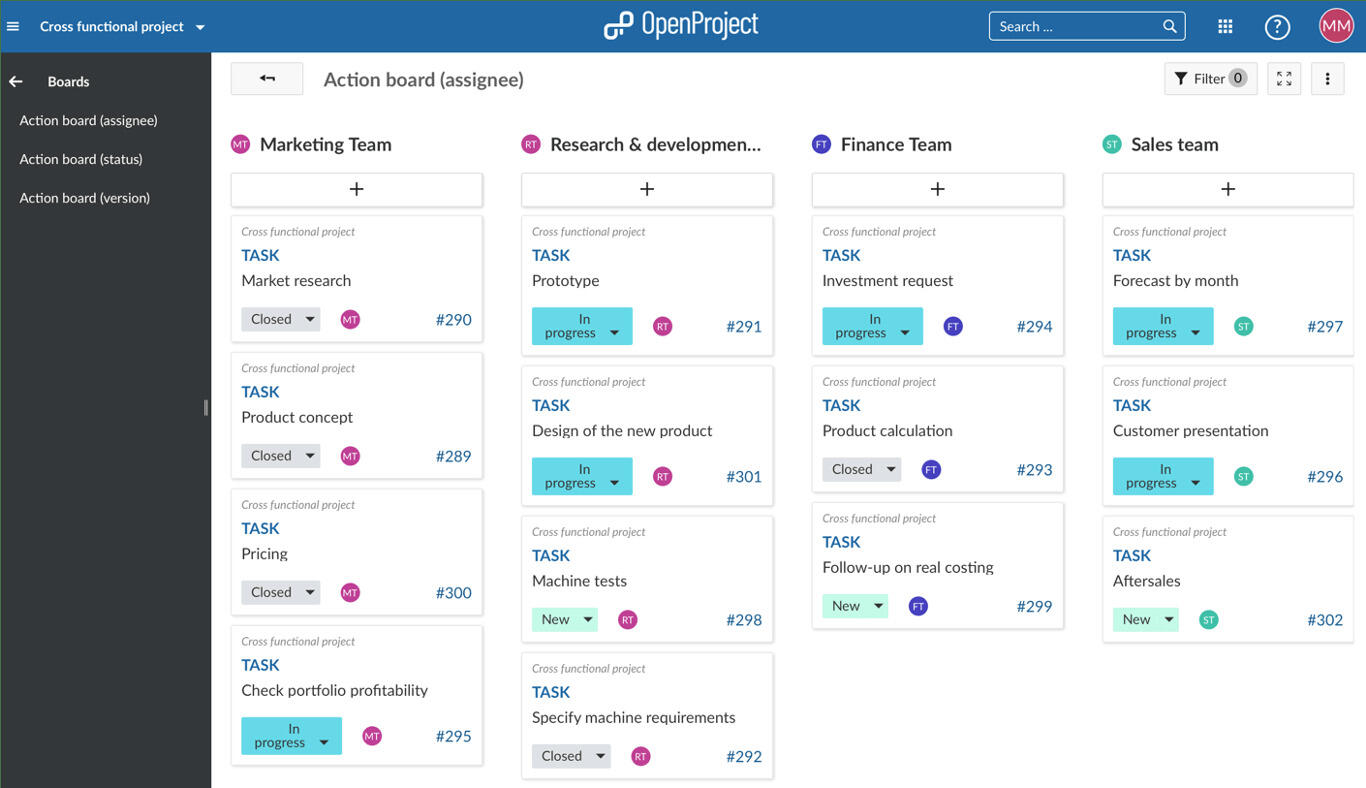
OpenProject is an open source project management application, GPL licensed, that you can install on your own infrastructure or buy hosted. It descends from the same lineage as Redmine and has grown well past it.
What distinguishes it from most Jira alternatives is scope. It covers classic project management properly, with Gantt charts, work breakdown structures, baselines and budgets, and also does agile boards, backlogs and sprints. Tools built for software teams usually treat the classic side as an afterthought or a paid add-on.
The Community Edition has no user limit. What the Enterprise tiers add is support, single sign-on, some advanced views and features like portfolio and resource management, not the basic ability to run the thing.
What users say about OpenProject
"It is free. While there are some paid features we might consider in the future, the core product does what we need"
Source: Capterra
Reviewers rate it 4.6 out of 5 across 188 reviews on Capterra. The praise centres on Gantt charts, Kanban boards and the fact that the free core product is genuinely usable. The recurring complaints are that the feature set can overwhelm new users, and that resource allocation is missing from the free version.
What is Jira?

Jira is Atlassian's work tracking platform and the default in enterprise software development. Custom issue types and fields, workflows with conditions and validators, permission schemes, automation, and a marketplace of thousands of apps.
Two things matter for this comparison. Jira Cloud is hosted by Atlassian, so nobody on your team patches anything. And because new Server licences ended, self-hosting Jira means Data Center, which is a different product at a different price.
What users say about Jira
"Highly integrable project management and tracking platform for ease of work and support."
Source: Capterra
OpenProject vs Jira features
Both cover issue tracking and agile delivery. The differences show up in classic project management and in the ecosystem around each tool.
| Area | OpenProject | Jira |
|---|---|---|
| Issue tracking | Yes, with custom types and workflows | Yes, deeply customisable |
| Agile boards | Scrum and Kanban built in | Scrum and Kanban built in |
| Gantt charts | Core feature | Higher tiers or an app |
| Budgets and baselines | Built in | Marketplace apps |
| Time tracking | Built in | Usually an app |
| Single sign-on | Enterprise tiers | Standard and above |
| Apps and add-ons | No marketplace | Thousands |
| Service desk | No | Jira Service Management |
OpenProject vs Jira pricing
This is the part most comparisons leave out, and it changes the answer for small teams.
| Plan | Price | Minimum users |
|---|---|---|
| OpenProject Community | Free, self-hosted | None |
| OpenProject Basic | €5.95 per user per month | 25 |
| OpenProject Professional | €10.95 per user per month | 25 |
| OpenProject Premium | €15.95 per user per month | 100 |
| Jira Free | Free, hosted | Up to 10 users |
| Jira Standard and above | Per user, tiered by team size | None |
Seats are bought in increments of five, and OpenProject's Enterprise plans cover both cloud hosting and on-premises support.
The consequence is easy to miss: a team of eight cannot buy the €5.95 plan for eight people. The smallest Basic purchase is 25 seats, so the real entry price is around €149 a month regardless of how few of you there are. For a small team the honest options are the free Community Edition on your own server, or a different tool.
Above 25 people the arithmetic flips, and it flips harder if you were heading for Jira Premium or a stack of marketplace apps, since those are billed per user too.
OpenProject vs Jira ease of use
Neither is simple. OpenProject covers a wide surface, from Gantt charts to budgets to agile boards, and the interface reflects that breadth. Jira starts approachable and its learning curve compounds as admins add workflows, fields and apps.
The real difference is who carries the setup. With Jira Cloud, Atlassian runs the software and your admin configures it. With self-hosted OpenProject, your team does both, and installation, upgrades and backups arrive before anyone has configured a workflow.
OpenProject pros and cons
OpenProject pros
- Community Edition is free and open source with no user limit
- Self-hostable, so data can stay on infrastructure you control
- Classic project management built in, including Gantt charts, baselines and budgets
- Agile boards and backlogs alongside the classic tools
- Open source, so leaving does not require a vendor's cooperation
OpenProject cons
- Paid plans start at a 25-seat minimum, which prices out small teams
- Self-hosting means you own upgrades, backups, patching and uptime
- No marketplace, so missing integrations tend to stay missing
- No service desk or external request queue
- Slower release pace than Jira
Jira pros and cons
Jira pros
- Free plan covers up to 10 users with no seat minimum
- Hosted by Atlassian, so nobody on your team patches anything
- Thousands of marketplace apps for gaps in the core product
- Deep integration with Confluence and the rest of Atlassian
- Models almost any process, however unusual
Jira cons
- Data sits in Atlassian's cloud, which some organisations cannot accept
- Self-hosting now means Data Center, priced for large organisations
- Gantt charts and time tracking need higher tiers or apps
- Configuration debt accumulates and is rarely removed
- Marketplace apps quietly multiply the per-user bill
When OpenProject is the better choice
- Data residency or compliance rules mean the data cannot sit in someone else's cloud.
- You want Gantt charts, baselines and budgets as first-class features rather than add-ons.
- You already run infrastructure, so hosting one more application is marginal.
- You have more than 25 people and per-seat cloud pricing has become the main cost.
- You want the option to leave without depending on a vendor.
When Jira is the better choice
- You are under 25 people, where the seat minimum makes OpenProject's paid tiers a bad fit.
- Nobody is going to own a server, and pretending otherwise would be optimistic.
- You depend on marketplace apps or on Confluence.
- Your work is agile software delivery specifically, rather than mixed project and delivery work.
- You want the tool to improve without you scheduling anything.
Breeze as an alternative
If self-hosting is your requirement, Breeze is not a candidate. We are hosted only, and no amount of comparison writing changes that.
The case where Breeze is worth a look is different, and people sometimes arrive at it by accident: teams evaluating OpenProject not because they need self-hosting but because Jira felt heavy, who then find OpenProject heavier still. If what you wanted was something simpler for client and project work rather than issue tracking, that is a different search and Breeze is built for it.
What users say about Breeze
"The best thing about Breeze is it's minimalist approach."
Source: Capterra
Which tool should you choose?
Answer the hosting question first and most of the decision resolves itself. Data must stay in-house and you have someone to run it: OpenProject Community. No appetite for a server and fewer than 25 people: Jira. More than 25 people, no self-hosting appetite, and per-seat pricing hurting: price OpenProject's hosted Enterprise plans properly against Jira's.
For neighbouring comparisons, Redmine vs OpenProject covers the other open source option, Redmine vs Jira is the same trade-off with an older tool, and Linear vs Jira is the choice if speed rather than ownership is pushing you off Jira.
FAQ
- Is OpenProject free?
- The Community Edition is free and open source with no user limit, but you host and maintain it. Paid Enterprise plans start at €5.95 per user per month with a minimum of 25 users, so the smallest paid purchase is around €149 a month whatever your team size.
- Is OpenProject a good alternative to Jira?
- Yes for teams that want data on their own servers, classic project management alongside agile boards, or an escape from per-seat cloud pricing at scale. Less so for teams that depend on Jira's marketplace or Confluence.
- Can OpenProject replace Jira for software teams?
- For issue tracking, sprints and backlogs, yes. The gap is the ecosystem, so check for an equivalent to any add-on you rely on before committing.
- What is the difference between OpenProject and Jira?
- OpenProject is open source and self-hostable and covers classic project management as well as agile. Jira is proprietary, hosted by Atlassian, focused on agile software workflows, and far more customisable through its marketplace.




