
 Why choose Breeze
 Marketing
 Creative
 Sales
Sales Remote work
 Managers
 Product teams
 Project management
 Task management
 Kanban tool
 Time tracking
 Project reporting
 Project calendars
 Project timeline
 Team workload
 Project automation
 Project customization
 Chat
Chat Web forms
 Project roadmap
 AI
AI What's new
 Articles & guides
 Help center
 Mobile apps
 Integrations
 Developers & API
 Free tools
YouTrack vs Linear

Disclosure: Breeze publishes this comparison and is one of the tools discussed here. Breeze is not an issue tracker — no cycles, no VCS integration, no self-hosting — so for a development team it is not the answer, and its section below is short for that reason.
Review process: Written in late July 2026 from both vendors' pricing pages, with JetBrains' rates read from the pricing data on the purchase page rather than estimated. Linear's rating and reviewer comments come from G2, where it is listed; YouTrack's come from Capterra.
Short answer: Linear for product-led teams where engineer-minutes cost more than seat licences and nobody wants to administer a tracker. YouTrack for teams that need configurability, a query language, a helpdesk in the same product, or the ability to run it on their own hardware. Linear costs two to four times more per seat and will never be self-hosted.
This is a comparison about a trade, not a winner. Linear is fast because it removed choices; YouTrack is flexible because it kept them. What matters is which of those you will still be glad about in two years.
YouTrack vs Linear at a glance
| Feature | YouTrack | Linear |
|---|---|---|
| Best for | Configurable tracking, mixed teams | Fast product engineering |
| Free plan | Up to 10 users | 2 teams, 250 issues |
| Entry paid plan | $4.50/user/month billed annually | $10/user/month billed yearly |
| Self-hosting | Yes — Server edition | Never offered |
| Customisation | Query language and JS workflows | Opinionated, constrained |
| Cadence model | Sprints you configure | Cycles, built in |
| Support desk | Helpdesk and knowledge base | Customer Requests, Asks |
| Rating | 4.5/5 on Capterra (95 reviews) | 4.6/5 on G2 (93 reviews) |
Quick verdict: YouTrack vs Linear
Choose YouTrack if:
- Your workflow does not match anybody's defaults and you need to encode your own
- The data has to live on your hardware, or the team is ten people and the budget is zero
- Support and engineering should share one tool rather than integrate two
Choose Linear if:
- Triage and filing happen dozens of times a day and every second shows
- You want a cadence enforced rather than designed
- Nobody on the team should be administering an issue tracker
Choose Breeze if:
- The people being onboarded are not engineers and never will be
- The work is client projects with deadlines and hours, not issues against code
- You want boards and timelines without a developer workflow attached
Things Linear will not do
Linear's design philosophy is subtractive, and most of what it removed was removed deliberately. Knowing the list in advance is more useful than any feature comparison, because these are not gaps that a roadmap will close.
It will not run on your infrastructure. There is no on-premise option at any tier, Enterprise included. For regulated environments and anyone with a hard data-residency requirement, that ends the evaluation.
It will not model an arbitrary workflow. Custom fields, workflow states and views are more constrained than in Jira or YouTrack — a Linear reviewer puts it as being opinionated by design, "which is great for speed but can be frustrating if your team's workflow doesn't fit its assumptions". YouTrack's answer to the same problem is a query language and JavaScript workflow rules.
It will not report deeply. The same reviewer describes built-in dashboards and cross-project reporting as thin, with teams exporting data or adding a BI tool. Linear Insights on the Business plan improves this; it does not turn it into an analytics product.
It will not suit non-technical teams. This is the one to weigh hardest, because it is where growing companies get caught. Linear is optimised for software and product work, and marketing, sales or operations teams forcing their work into it find it awkward — again, a reviewer's words rather than ours.
None of that is criticism of a tool that is very good at its job. It is the bill for the speed, and it comes due when the second kind of team arrives.
Key differences between YouTrack and Linear
The first difference is who decides how you work. Linear ships an opinion — cycles, projects, initiatives, a triage flow — and the payoff is that nobody has to design or maintain it. YouTrack ships mechanisms and expects you to assemble the opinion, which is more work and fits stranger processes.
The second is scope. Linear is a product development system and has stayed one. YouTrack bundles a helpdesk and a knowledge base into the same licence, so support teams and engineers can share a tool rather than integrating two.
Is YouTrack better than Linear?
YouTrack is better than Linear on price, on configurability, on self-hosting, and for mixed organisations where the tracker also serves support.
Linear is better than YouTrack on speed, on defaults that stop teams debating process, and on the daily experience of filing and triaging work — which is what most of its users are buying.
For a wider view, YouTrack alternatives covers Linear alongside GitLab, Redmine and the rest, and Jira alternatives is worth reading if Jira is the tool you are actually leaving.
If your CI and repositories are the real question, YouTrack vs Azure DevOps covers the tracker-versus-platform version of this decision.
What is YouTrack?

- Pricing: free for up to 10 users; $4.50 per user per month billed annually above that
- Rating: 4.5/5 on Capterra from 95 reviews
YouTrack is JetBrains' issue tracker, and against Linear its defining quality is that almost nothing is fixed. Issue types, fields, states and transitions are yours to define; saved searches are expressions in a query language; automation is JavaScript rules you write. Where Linear decides how a team should work, YouTrack asks.
Two things follow. The first is reach: the same licence covers a helpdesk and a knowledge base, so a support function can live in the tool rather than beside it. The second is cost — free to ten users on both cloud and self-hosted Server, then $4.50 per user per month billed annually, which is less than half Linear's entry price.
What users say about YouTrack
"I also appreciate we are able to easily customize task fields and workflows — it's flexible enough to mold around... It's not the prettiest interface compared to some more visual tools."
Source: Capterra
What is Linear?
- Pricing: free for 2 teams and 250 issues; Basic $10 and Business $16 per user per month billed yearly
- Rating: 4.6/5 on G2 from 93 reviews
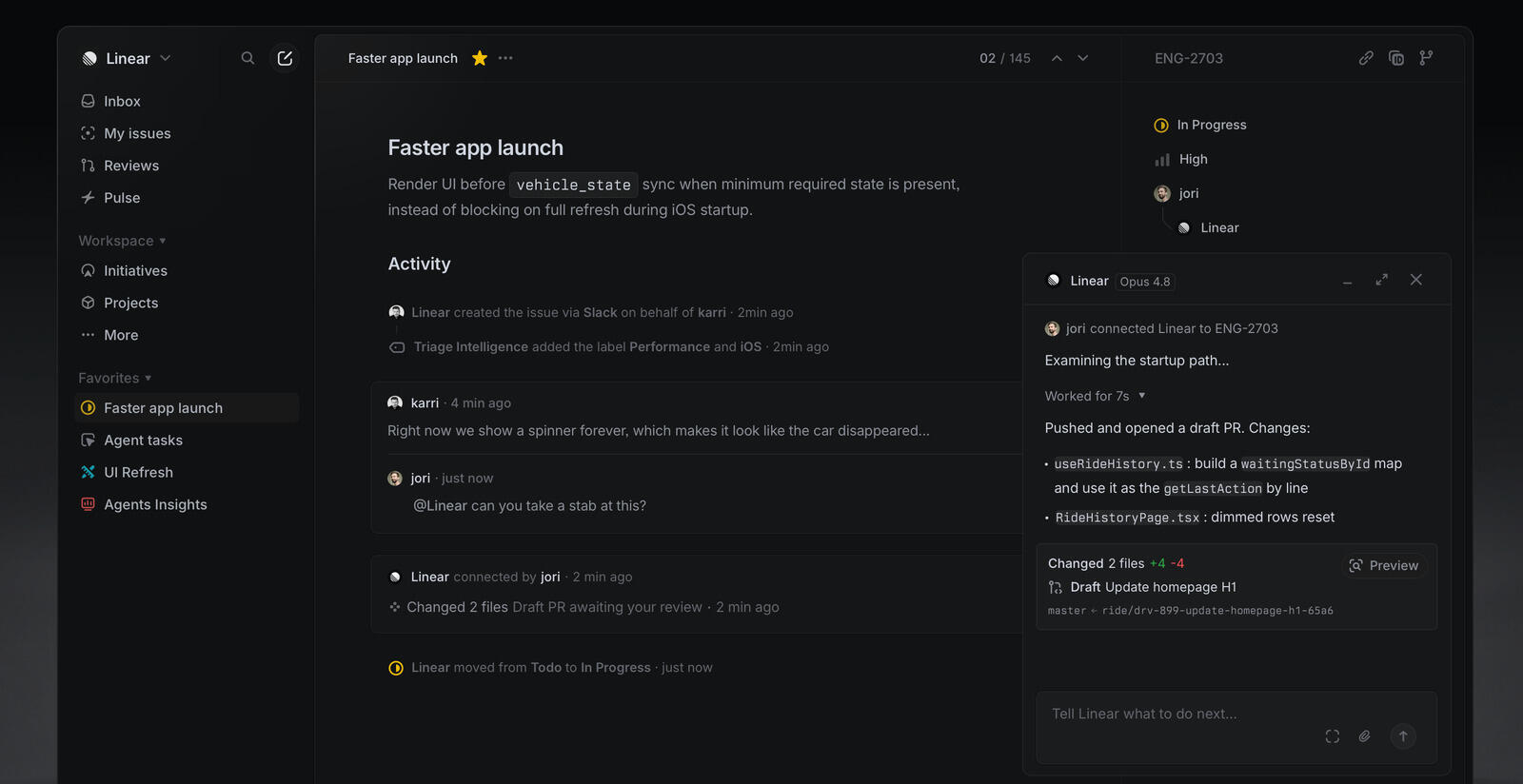
Linear is a product development system built around speed and a fixed set of concepts: issues, projects, cycles and initiatives. Against YouTrack's configurability, its bet is that most teams do not want to design a process and would rather inherit a good one. It reports powering more than 33,000 organisations, including OpenAI, Ramp, Cash App and Coinbase.
The free plan is a genuine trial rather than a home — two teams and 250 issues. Basic at $10 removes the issue limit and allows five teams; Business at $16 adds unlimited teams, private teams and guests, Triage Intelligence, Insights, Linear Asks and support-desk integrations. Coding sessions and Loops consume AI credits, and the Enterprise tier is annual billing only.
What users say about Linear
"Speed and keyboard-first design — Linear is built to be navigated almost entirely without a mouse. Cmd+K command palette, quick issue creation, instant search. It feels snappy in a way a lot of project management tools don't."
Source: G2
YouTrack vs Linear features
Both track issues, run boards and link to Git hosting. Below is where the two genuinely differ.
| Area | YouTrack | Linear |
|---|---|---|
| Self-hosting | Server edition | Not available |
| Workflow customisation | JavaScript rules | Constrained by design |
| Search | Query language | Instant search, simpler syntax |
| Keyboard-first navigation | Partial | Core design |
| Cadence | Configurable sprints | Enforced cycles |
| Helpdesk | Included module | Customer Requests and Asks |
| Reporting | Configurable reports | Insights on Business, thin |
| Non-technical teams | Workable | Awkward, per reviewers |
The helpdesk row is the underrated one. If your company answers customers as well as writing code, YouTrack covers both in one licence, where Linear expects Zendesk or Intercom on the Business plan and an integration between them.
The keyboard row is the one people actually switch for, and it is not a small effect. Filing and triaging happen dozens of times a day, and a tool that removes a second from each is a different working experience, not a marginally better one.
YouTrack vs Linear pricing
Both bill per user, so these compare directly.
| Team size | YouTrack Cloud | Linear Basic | Linear Business |
|---|---|---|---|
| 10 users | Free | $1,200 | $1,920 |
| 25 users | $1,350 | $3,000 | $4,800 |
| 100 users | $5,400 | $12,000 | $19,200 |
YouTrack figures assume every seat is billed at the annual rate once the free ten are exceeded; JetBrains applies volume discounts from 100 users upward, so confirm your exact count. Even at list, the gap compounds: at a hundred engineers Linear Business costs roughly $13,800 a year more than YouTrack Cloud, which is a hire's worth of tooling budget.
Whether that is expensive depends on the arithmetic you believe. If Linear saves each engineer a few minutes a day, it pays for itself easily. If your team files ten issues a week and spends its time elsewhere, it does not.
YouTrack vs Linear ease of use
Linear is the better daily experience and nobody seriously argues otherwise. The command palette, instant search and near-total keyboard navigation are the product, and its reviewers describe a snappiness that other trackers do not have.
YouTrack rates 4.1 for ease of use against 4.5 overall on Capterra, which is the signature of a capable tool with rough edges. Reviewers mention permissions being fiddly, thin onboarding material and an interface that is not the prettiest — while praising exactly the flexibility that causes it.
The fair summary: Linear is easier to use and YouTrack is easier to bend. Teams that have a process worth protecting tend to value the second more than they expect.
YouTrack pros and cons
YouTrack pros
- Free to 10 users and $4.50 per user per month after, against Linear's $10 entry price
- Self-hosted Server edition, which Linear does not offer at any tier
- Query language and JavaScript workflow rules, where Linear constrains customisation deliberately
- Helpdesk and knowledge base in the same licence, so support does not need a second product
- Workable for non-engineering teams, which Linear's own reviewers say it is not
YouTrack cons
- Slower and denser to use than Linear, with ease-of-use scores below its overall rating
- No enforced cadence — sprints are yours to design and maintain, where Linear's cycles just work
- Permissions are fiddly to configure, per reviewers
- Thin onboarding material, so teams learn it the hard way
- Interface is not the draw; reviewers call it clunky next to modern trackers
Linear pros and cons
Linear pros
- Keyboard-first navigation and a command palette that YouTrack only partly matches
- Cycles, projects and initiatives as an opinion you inherit rather than design
- Git integration that links issues to branches and updates status from PR activity
- Nothing to administer, where YouTrack expects someone to own its configuration
- Used by more than 33,000 organisations, so the defaults are well tested
Linear cons
- No self-hosting, ever — YouTrack Server exists precisely for this requirement
- Two to four times YouTrack's per-seat price depending on tier
- Custom fields, states and views are more constrained than YouTrack's
- Reporting is thin; teams export data or add a BI tool, per reviewers
- Poor fit for marketing, sales or operations teams, by its own users' account
When YouTrack is the better choice
A ten-person team with no budget and a data-residency requirement. YouTrack is free at that size on both cloud and self-hosted server, and Linear cannot meet the hosting condition at any price.
It is also the better choice for a company where engineering and customer support share a tool, since YouTrack's helpdesk and knowledge base come with the licence rather than through an integration.
When Linear is the better choice
A thirty-person product company where engineers file and triage constantly, nobody wants to own tracker configuration, and the process is close enough to the industry default that inheriting it is a relief rather than a constraint.
It is also the better choice when the team has previously drowned in configurable tooling. Removing options is a real feature for organisations that spent a year arguing about workflow states.
Breeze as an alternative
Breeze is not an issue tracker. There are no cycles, no commit linking, no query language and no self-hosted edition. If you are choosing between these two for a development team, neither this section nor Breeze is relevant to you.

It becomes relevant one step later, and Linear's own reviewers describe the moment: the tracker works beautifully for engineering and awkwardly for everyone else, so marketing, design and operations get pushed into a tool built for software work. Breeze covers that side with boards, timelines and built-in time tracking, without asking anyone to learn cycles or triage.
If that is the half of the company you are solving for, how Breeze compares with Jira on price and setup is the closest equivalent read, since Jira is what non-engineering teams usually inherit.
What users say about Breeze
"Simple. Most projects are small involving a handful of people with at most one dedicated scrum master. This provides exactly what you need."
Source: Capterra
Which tool should you choose?
| Choose YouTrack | Choose Linear | Choose Breeze |
|---|---|---|
| Self-hosting is required | Speed is the product | The team is not engineers |
| Your workflow is unusual | Defaults are a relief | Client work with deadlines |
| Support shares the tool | Nobody should administer it | Hours matter more than commits |
The most common mistake here is treating the price gap as the decision. Two to four times per seat sounds like a lot until you price an hour of engineering time, at which point Linear's case is easy to make. The genuinely disqualifying factors are structural rather than financial: if you must self-host, Linear is out; if your process cannot be expressed in Linear's model, you will fight it every week.
The second thing to check is who else will end up in the tool. Trackers spread — support wants visibility, marketing wants a board, someone in operations wants a request form. YouTrack absorbs that reasonably well and has a helpdesk for the support case. Linear does not, by its own users' account, and that is worth knowing before it happens rather than after.
FAQ
- Can Linear be self-hosted?
- No. Linear is cloud-only and its plan table offers no on-premise or private-cloud option at any tier, including Enterprise. If a data-residency or air-gap requirement is genuinely non-negotiable, Linear is disqualified before features are discussed. YouTrack Server is the direct answer here, and it is free for up to 10 users.
- Is Linear worth the price difference over YouTrack for a 20-person team?
- It depends on whether engineer-minutes cost you more than seat licences. Linear Basic is $10 per user per month billed yearly against YouTrack Cloud's $4.50, so twenty people is about $2,400 a year versus $1,080. Linear buys speed and sane defaults; YouTrack buys configurability, a query language and the option to self-host.
- Does YouTrack have anything like Linear's cycles?
- YouTrack has sprints on agile boards, which cover similar ground, but the difference is enforcement. Linear's cycles are part of the model — work rolls over, the cadence is assumed, and reports are built around it. YouTrack lets you configure sprints however you like, which means the cadence is yours to design and yours to maintain.
- Which is faster to use day to day, Linear or YouTrack?
- Linear, clearly, and this is the main reason teams pay more for it. Reviewers describe navigating almost entirely without a mouse, a command palette, instant search and a local-first feel. YouTrack's own reviewers rate ease of use below its overall score and describe the interface as clunky in places, especially on large projects.




