
 Why choose Breeze
 Marketing
 Creative
 Sales
Sales Remote work
 Managers
 Product teams
 Project management
 Task management
 Kanban tool
 Time tracking
 Project reporting
 Project calendars
 Project timeline
 Team workload
 Project automation
 Project customization
 Chat
Chat Web forms
 Project roadmap
 AI
AI What's new
 Articles & guides
 Help center
 Mobile apps
 Integrations
 Developers & API
 Free tools
YouTrack vs Jira

Disclosure: Breeze publishes this comparison and is one of the tools discussed here. We try to be candid about where Breeze isn't the right fit; weigh that bias when reading our recommendations.
Review process: We compared current vendor documentation, pricing pages, published product interfaces, and independent user reviews. Pricing and plan names were checked against vendor sites on July 16, 2026; vendors change packaging often, so confirm the current total for your team before buying.
YouTrack and Jira are two project management tools often considered by teams managing Agile projects. Both offer task tracking, sprint planning and performance monitoring. YouTrack is about flexibility and customization, and Jira is about issue tracking and developer tool integrations.
While both are great, their differences matter most when choosing the right fit. YouTrack is better for teams that need workflows without the extra setup, and Jira is better for teams that follow Agile and need advanced tracking. Knowing how each tool fits your team's workflow will help you make the right decision.
YouTrack vs Jira at a glance
| Feature | YouTrack | Jira |
|---|---|---|
| Best for | Development teams that want issue tracking with JetBrains integration | Software teams that need issue tracking and Agile workflows |
| Pricing | Free for up to 10 users, with paid plans starting at $4.40 per user per month | Free for up to 10 users, with paid plans starting at around $7.90 per user per month |
| Rating | 4.5/5 on Capterra | 4.4/5 on Capterra |
| Standout strengths | Agile tools like Scrum and Kanban boards without Jira's complexity; Customizable workflows without code | Agile-specific tools like sprint planning, velocity tracking and burndown charts for structured workflows; Built-in integrations with Bitbucket, Confluence and other developer tools |
| Main tradeoff | Developer-oriented and less familiar to non-technical teams | Powerful but complex to administer; overkill for simple projects |
Quick verdict: YouTrack vs Jira
Choose YouTrack if:
- Agile tools like Scrum and Kanban boards without Jira's complexity
- Customizable workflows without code
- Built-in time tracking without add-ons
Choose Jira if:
- Agile-specific tools like sprint planning, velocity tracking and burndown charts for structured workflows
- Built-in integrations with Bitbucket, Confluence and other developer tools
- Customizable workflows for Agile and non-Agile teams
Choose Breeze if:
- Breeze's Kanban boards are simple to use and visualize tasks and progress. Jira and YouTrack have advanced boards but may be too complex for non-technical teams
- Breeze is user-friendly and requires zero setups, unlike Jira which can overwhelm new users with technical config, or YouTrack which is geared towards development teams
- Time tracking is a built-in feature in Breeze, helping teams track time spent on projects
Key differences between YouTrack and Jira
YouTrack is a better fit for development teams that want issue tracking with JetBrains integration. Jira is a better fit for software teams that need issue tracking and Agile workflows.
The main difference comes down to how much structure, setup, and reporting your team needs. YouTrack has a learning curve but is generally more approachable, while Jira's is steeper, driven by its workflow, scheme, and permission configuration.
Is YouTrack better than Jira?
YouTrack is better than Jira for development teams that want issue tracking with JetBrains integration.
Jira is better than YouTrack for software teams that need issue tracking and Agile workflows.
Breeze is a good alternative if you want boards, timelines, time tracking, and automation in one simpler workspace.
Before deciding, plenty of teams also browse alternatives to Jira.
If YouTrack is the side you are moving away from, YouTrack alternatives covers the wider field, including Linear, GitLab, and lighter options for non-engineering teams.
If it is the daily experience you want to improve rather than the price, YouTrack vs Linear covers what a deliberately opinionated tracker gives and takes away.
What is YouTrack?

- Pricing: Free for up to 10 users, with paid plans starting at $4.40 per user per month
- Rating: 4.5/5 on Capterra
YouTrack is a project management tool for Agile teams that need issue tracking and workflow customization. With Scrum and Kanban boards, backlog management and built-in time tracking, YouTrack helps teams stay organized without the overhead of big platforms. Unlike Jira which has integrations with Bitbucket and Confluence, YouTrack is simple while still supporting Agile.
For teams that need control over their workflows, YouTrack's customization options are a big plus. Teams can create their own issue types, fields and workflows to match their processes. Unlike Jira's steeper learning curve, YouTrack is designed to be more approachable, so it's great for teams that need both flexibility and simplicity.
What is Jira?

- Pricing: Free for up to 10 users, with paid plans starting at around $7.90 per user per month
- Rating: 4.4/5 on Capterra
Jira is a project management tool designed for Agile teams that need advanced issue tracking, sprint planning and workflow customization. With Scrum and Kanban boards, backlog management and reporting Jira helps teams stay in sync across complex projects. Unlike YouTrack Jira integrates with development tools like Bitbucket and Confluence so is a natural choice for software teams.
For teams managing large projects Jira's scalability and flexibility are major advantages. Custom workflows, fine-grained permissions and advanced automation help teams streamline processes while maintaining control. While YouTrack is known for simplicity Jira has more functionality so it is better suited for teams that need lots of customization and integration.
What users say about Jira
"Highly integrable project management and tracking platform for ease of work and support."
Source: Capterra
YouTrack vs Jira features
YouTrack and Jira overlap on core project management, but they emphasize different strengths. The main differences usually come down to workflow depth, visibility, setup effort, and how much structure the team needs day to day.
| Area | YouTrack | Jira |
|---|---|---|
| Workflow style | Development teams that want issue tracking with JetBrains integration | Software teams that need issue tracking and Agile workflows |
| Top strengths | Agile tools like Scrum and Kanban boards without Jira's complexity; Customizable workflows without code | Agile-specific tools like sprint planning, velocity tracking and burndown charts for structured workflows; Built-in integrations with Bitbucket, Confluence and other developer tools |
| Ease of use | Moderate-to-steep learning curve | Higher learning curve |
| Main tradeoff | Developer-oriented; less familiar to non-technical teams | Complex to administer; overkill for simple projects |
YouTrack stands out for its Scrum and Kanban boards that deliver Agile workflows without Jira's complexity, plus code-free workflow customization.
Jira stands out for its Agile-specific tooling — sprint planning, velocity tracking, and burndown charts — and its built-in integrations with Bitbucket, Confluence, and other developer tools.
YouTrack vs Jira pricing
Pricing changes over time, so confirm the latest details on each vendor site before you commit.
| Plan detail | YouTrack | Jira |
|---|---|---|
| Pricing | Free for up to 10 users, with paid plans starting at $4.40 per user per month | Free for up to 10 users, with paid plans starting at around $7.90 per user per month |
| Rating | 4.5/5 on Capterra | 4.4/5 on Capterra |
YouTrack pricing: Free for up to 10 users, with paid plans starting at $4.40 per user per month.
Jira pricing: Free for up to 10 users, with the Standard plan starting at around $7.90 per user per month and Premium around $14.50.
The better value depends on team size, feature needs, and how much workflow depth or reporting your team actually needs.
YouTrack vs Jira ease of use
YouTrack has a learning curve, but it is generally considered more approachable than Jira, especially for smaller teams.
Jira has a steeper learning curve, largely from configuring workflows, schemes, and permissions.
If your team values fast adoption and lower overhead, choose the simpler option. If you need more control, customization, or reporting, a steeper learning curve can still be worth it.
YouTrack pros and cons
YouTrack pros
- Agile tools like Scrum and Kanban boards without Jira's complexity
- Customizable workflows without code
- Built-in time tracking without add-ons
- More straightforward pricing than Jira's tiered plans
- Self-hosted or cloud-based options for your data
- Easier onboarding with a non-technical interface for both technical and non-technical teams
YouTrack cons
- Smaller ecosystem and community than Jira
- Best value if you already use JetBrains tools
- Less familiar to non-technical teams and mixed departments
- Fewer third-party integrations and marketplace apps than Jira
Jira pros and cons
Jira pros
- Agile-specific tools like sprint planning, velocity tracking and burndown charts for structured workflows
- Built-in integrations with Bitbucket, Confluence and other developer tools
- Customizable workflows for Agile and non-Agile teams
- Reporting features including dashboards and performance metrics
- Cloud and self-hosted options for different business needs
- Large support ecosystem with documentation, tutorials and community forums
Jira cons
- Configuring workflows, schemes, and permissions is genuinely complex and often needs an admin
- Can feel heavy and jargon-laden for non-technical teams
- Many capabilities require paid Marketplace apps on top of the subscription
- Performance and UI can lag in very large instances
When YouTrack is the better choice
- Agile tools like Scrum and Kanban boards without Jira's complexity
- Customizable workflows without code
- Built-in time tracking without add-ons
When Jira is the better choice
- Agile-specific tools like sprint planning, velocity tracking and burndown charts for structured workflows
- Built-in integrations with Bitbucket, Confluence and other developer tools
- Customizable workflows for Agile and non-Agile teams
Breeze as an alternative
Jira and YouTrack have structured workflows but can be too much for teams looking for simplicity. Breeze is all about ease of use with Kanban boards, workflow automation and time tracking. It has integrated messaging so you can comment on tasks to keep communication in one place.
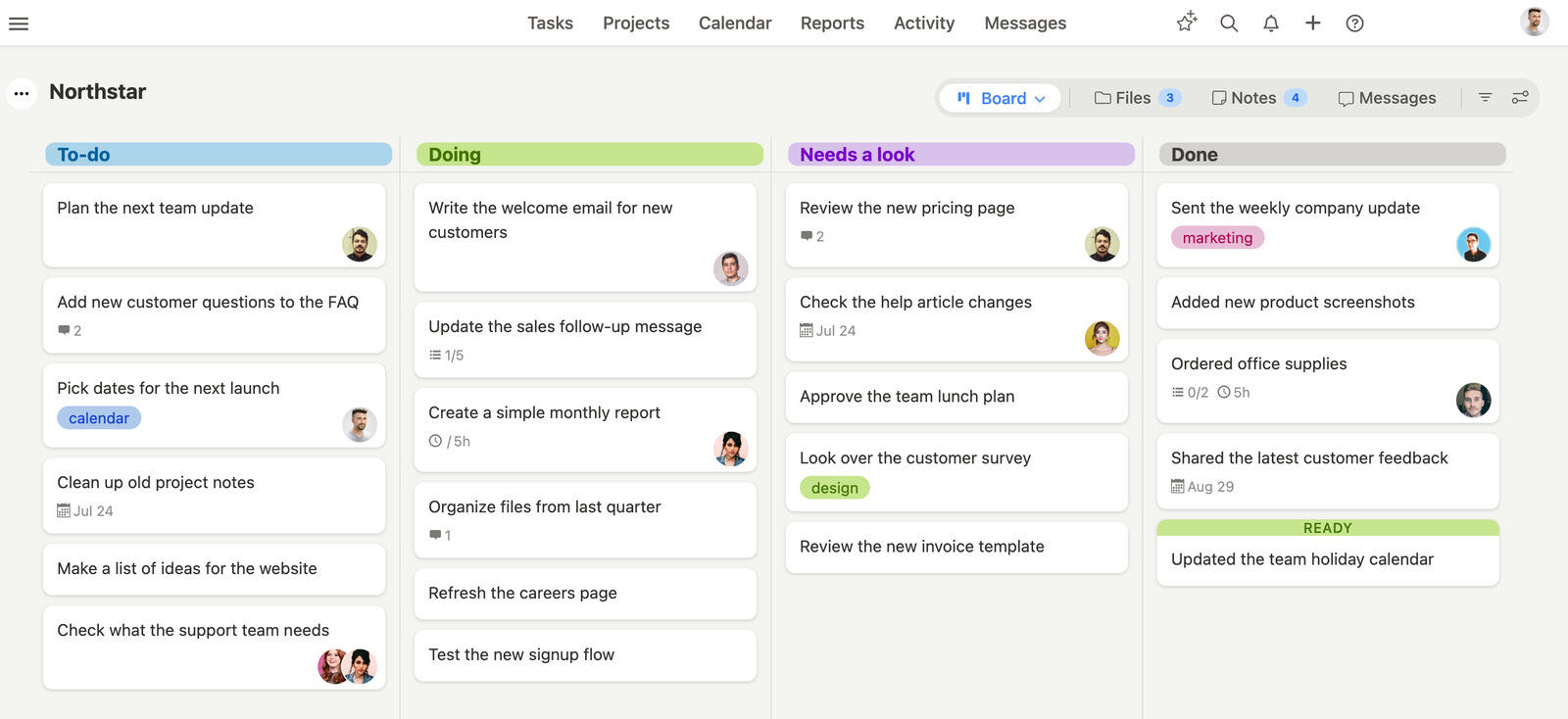
Unlike Jira's developer-focused setup or YouTrack's Agile-only features, Breeze works across all industries. Shared calendars, project timelines and real-time chat let you collaborate without rigid structures or technical setups. Breeze keeps your projects on track without the steep learning curve of more complex tools.
For teams that prioritize simplicity and usability Breeze offers a streamlined project management experience. It has all the essentials without overwhelming you, so it's a great alternative to YouTrack and Jira. While these tools have their strengths, teams that want to stay focused without the complexity may find Breeze is the better choice.
That is a claim worth checking rather than taking on faith, and Breeze against Jira directly lays out the feature and pricing detail behind it.
What users say about Breeze
"This is and has always been the most appropriate commercial task management system for small teams available today in my experience."
Source: Capterra
Which tool should you choose?
Choose YouTrack if:
- Agile tools like Scrum and Kanban boards without Jira's complexity
- Customizable workflows without code
- Built-in time tracking without add-ons
Choose Jira if:
- Agile-specific tools like sprint planning, velocity tracking and burndown charts for structured workflows
- Built-in integrations with Bitbucket, Confluence and other developer tools
- Customizable workflows for Agile and non-Agile teams
Choose Breeze if:
- Breeze's Kanban boards are simple to use and visualize tasks and progress. Jira and YouTrack have advanced boards but may be too complex for non-technical teams
- Breeze is user-friendly and requires zero setups, unlike Jira which can overwhelm new users with technical config, or YouTrack which is geared towards development teams
- Time tracking is a built-in feature in Breeze, helping teams track time spent on projects
Because both tools target developers, the real deciding factor is usually which ecosystem you already live in. If your team runs on JetBrains IDEs, YouTrack is the natural, cheaper fit and it is genuinely lighter to administer. If you are already invested in Atlassian — Bitbucket, Confluence, or an existing Jira instance elsewhere in the company — Jira wins on integration and on the sheer depth of its Marketplace, at the cost of more administration. For a small team with no existing allegiance, YouTrack tends to be the faster, less expensive start; Jira earns its complexity mainly at scale or where a dedicated admin already owns the configuration.
The right tool keeps your team aligned without slowing them down, but choosing between YouTrack and Jira isn't always easy. Both have robust features but may not fit every team. If your team needs advanced Agile features and deep integrations into developer workflows Jira is a good choice. If your team wants more flexibility without sacrificing structure YouTrack's workflows and user-friendly interface are the better fit. Each tool has its strengths but the best one depends on your team's specific needs and workflow preferences.
If neither tool feels like the right fit consider Breeze. It has essential project management features like task tracking, workflow automation and built-in time tracking in a clean and intuitive interface. Unlike Jira's steep learning curve or YouTrack's customization requirements Breeze is easy to set up and simple to use from day one.
When choosing a project management tool think about how your team works best. Do you need detailed customization and advanced features or do you prefer a simpler tool that helps you stay organized with minimal setup? The right tool should fit into your workflow, help you stay on track and make collaboration easier.
FAQ
- Is YouTrack better than Jira?
- YouTrack is better than Jira for development teams that want issue tracking with JetBrains integration. Jira is better than YouTrack for software teams that need issue tracking and Agile workflows.
- Which tool is easier to use, YouTrack or Jira?
- Both have a real learning curve, but YouTrack is generally considered more approachable, while Jira's is steeper because of its workflow, scheme, and permission configuration.
- How do YouTrack and Jira compare on pricing?
- YouTrack pricing: Free for up to 10 users, with paid plans starting at $4.40 per user per month. Jira has a free plan for up to 10 users. Standard displays a headline rate of $7.91 per user per month; the total depends on user count and billing term.
- What is a good alternative to YouTrack and Jira?
- Breeze is a strong alternative if you want boards, timelines, time tracking, and automation in one simpler workspace.




