Why choose Breeze
 Marketing
 Creative
 Sales
Sales Remote work
 Managers
 Product teams
 Project management
 Task management
 Kanban tool
 Time tracking
 Project reporting
 Project calendars
 Project timeline
 Team workload
 Project automation
 Project customization
 Chat
Chat Web forms
 Project roadmap
 AI
AI What's new
 Articles & guides
 Help center
 Mobile apps
 Integrations
 Developers & API
 Free tools
Is it worth switching project management tools if the current one kind of works?

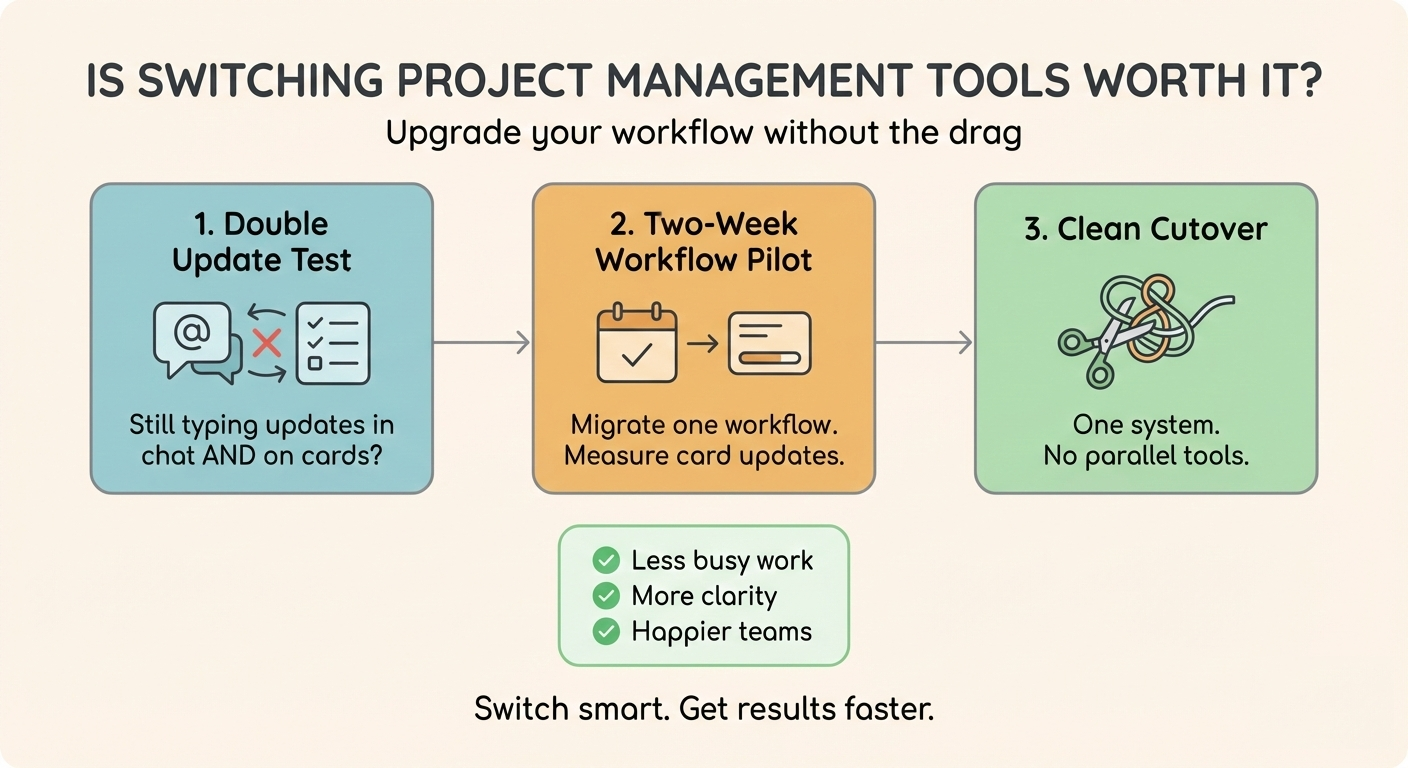
Switching project management tools is worth it when the current tool creates duplicate updates, hides ownership, or makes reporting so painful that people stop trusting the board. If you migrate one workflow at a time and do a clean cutover, a switch can pay back quickly.
1. Worth it test: When is switching tools actually worth it?
It is worth switching when your current tool fails at one job: making the current state obvious without asking. If you are not on a tool yet, the prior question is whether the software is worth it at all. If teammates cannot tell what's next, who's on it, and what's blocked in under a minute, the tool is not doing its job, even if it technically works.
The practical goal is simple: the task holds the question, the answer, and the latest file, so people stop chasing context in chat.
Here is a quick decision table you can use in a team meeting. If you check two or more items in the right column, you are in "switch" territory.
| If this is true... | Then you should... |
|---|---|
| Updates are accurate and happen on the card | Stay, but tighten the workflow and permissions |
| Status still lives in chat or meetings | Switch or redesign, because the tool is not the source of truth |
| Owners are unclear or tasks have "multiple owners" | Switch or simplify so every active task has one owner |
| Reporting takes manual work every week | Switch to a tool that makes progress visible by default |
2. Real pain: What problems justify switching even if the tool kind of works?
Three problems justify switching: duplicate updates, invisible ownership, and slow retrieval of context. If every task needs a follow-up message to understand it, the tool is creating work instead of reducing it.
You can diagnose this without a survey. For one week, note how often you hear "what's the status", "who owns this", and "where's the latest file". If those questions keep coming up, your process is leaking information - and switching only helps if you move those answers onto the task.
- Duplicate updates: update the tool, then re-type it in Slack.
- Invisible ownership: tasks move, but no one owns the next action.
- Missing context: decisions and files live outside the task.
If these sound familiar, switching tools can help, but only if you also change the habit: questions and answers go on the task. If you want a quick gut-check on whether your pain is really tool complexity (and not just a messy workflow), skim these complexity signs and see which ones match your team.
3. Switching cost: How much does switching really cost (and how do you estimate it)?
Switching costs are mostly time costs: re-learning, rebuilding workflows, and re-finding context. Estimate it by counting how many people will touch the tool each week, then multiplying by the extra minutes per update during the first two weeks.
One reason switching feels harder than it is: status quo bias. As Samuelson and Zeckhauser put it, "individuals disproportionately stick with the status quo."
If your current tool already forces a double update, the "stay" cost might be higher than the "switch" cost. Tools that make updates fast tend to win because people actually keep them current.
| Cost area | What to measure | How to reduce it |
|---|---|---|
| Learning time | Minutes per update for week 1-2 | Train actions (create, assign, update, close), not features |
| Workflow rebuild | Number of recurring workflows to recreate | Start with one board that matches reality |
| Context risk | How often you need old decisions or files | Keep a read-only archive and link key history on the new card |
4. Tool comparison: What should you compare besides features?
Compare tools on daily behavior: ownership, visibility, and where conversations live. Features matter, but the real question is whether updates will happen on the task, in seconds, without a meeting.
If you are looking at multiple options, a few tool comparisons can help you shortlist, but the decision should come from a real pilot.
- 30-second scan: can anyone see priorities without filters?
- Single owner: does every active task have one owner?
- On-card decisions: are answers and files on the task?
- Fast updates: can someone move and comment in seconds?
- New person test: can a newcomer reconstruct context from the card?
5. Two-week pilot: How do you test a new tool without derailing the team?
Test a new tool by migrating one workflow for two weeks. Pick a workflow with clear inputs and outputs, and make that one board the source of truth in the pilot tool.
A good pilot ends with one question: did updates move out of chat and onto the card?
- Choose one workflow: pick the place where work disappears.
- Set one rule: if you change the work, you update the card.
- Measure movement: cards get created, assigned, updated, and closed.
If you are moving from Trello, start by mapping your lists and labels before you move anything. A simple Trello export flow can save you from losing context mid-pilot.
6. Clean cutover: How do you switch tools without running two systems forever?
The fastest way to fail a switch is to run two sources of truth. To avoid that, set a cutover date, keep the old tool read-only after that date, and make the new tool the only place where tasks get updated.
Most switches fail for predictable failure patterns: parallel systems, unclear ownership, and leaders still asking for updates in meetings instead of looking at the board.
Here is a cutover plan that keeps history without dragging the past into the new system:
- Week 0: decide the workflow you are migrating first and define what "done" means.
- Day 1: create the new board, seed it with active tasks, and set owners.
- Day 2-3: move questions, files, and decisions onto the cards as they come up.
- End of week 2: stop creating new tasks in the old tool and declare the new board the source of truth.
If you are worried about backsliding after week one, that pattern is common. The fix is boring but effective: keep one board alive long enough that people feel the payoff.
Common questions about switching project management tools
- How long should a project management tool trial be?
- Two weeks is enough if you trial a real workflow and enforce one rule: updates happen on the task. Longer trials often just turn into parallel systems.
- Do we need to migrate every old task and comment?
- No. Move active work and the context you will actually need. Keep the old tool as a read-only archive and link legacy decisions from the new cards when needed.
- What is the biggest reason tool switches fail?
- Running two sources of truth. If Slack or meetings stay the real update channel, no tool will stick.
Next steps
If your current tool "kind of works" but still forces double updates or hides ownership, switching is worth it only with a workflow-first pilot and a clean cutover.
Practical next step: Pick one workflow and run it for two weeks with one rule: if you change the work, you update the card. If you are evaluating tools (including Breeze), use the same pilot so you are comparing behavior, not feature lists.