Why choose Breeze
 Marketing
 Creative
 Sales
Sales Remote work
 Managers
 Product teams
 Project management
 Task management
 Kanban tool
 Time tracking
 Project reporting
 Project calendars
 Project timeline
 Team workload
 Project automation
 Project customization
 Chat
Chat Web forms
 Project roadmap
 AI
AI What's new
 Articles & guides
 Help center
 Mobile apps
 Integrations
 Developers & API
 Free tools
Spot task overload with a workload view

Most task overload is invisible until it is expensive. The person who is drowning usually does not announce it. They just start missing small dates, replying late, and moving fewer cards.
A quick workload view check lets you spot the pileup before they hit the wall.
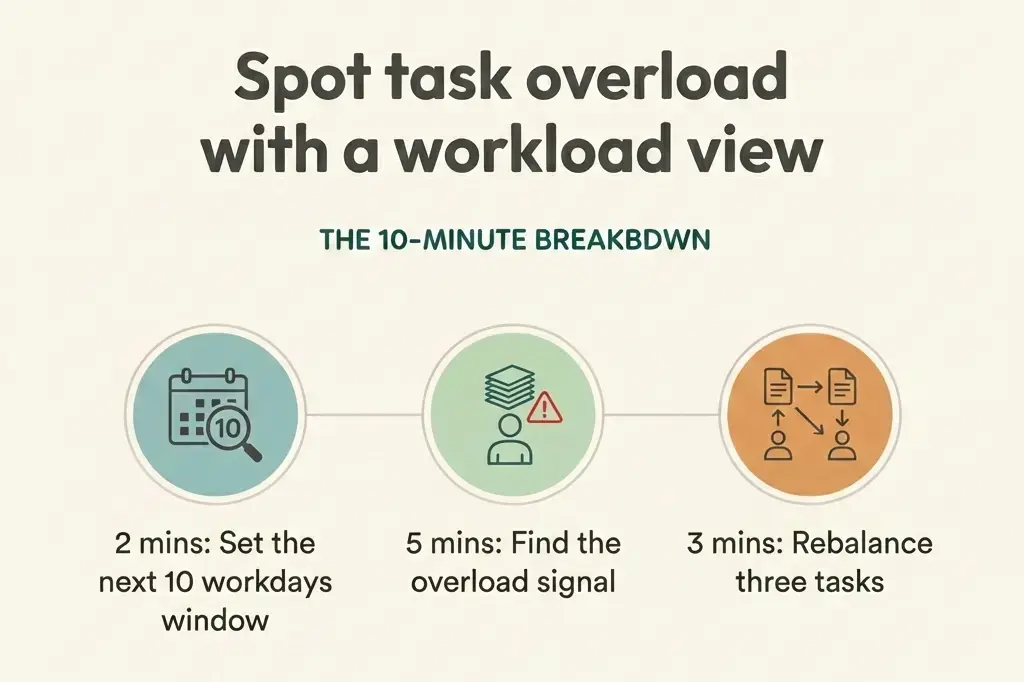
The 10-minute breakdown
- 2 mins: Set the next 10 workdays window
- 5 mins: Find the overload signal
- 3 mins: Rebalance three tasks
The 10-minute fix
The goal is not perfect capacity planning. The goal is to catch a bad week early and change the plan while it is still easy.
1. Set the next 10 workdays window (2 minutes)
Open a workload view for your team and look only at the next two weeks. That is where overload turns into late work.
In Breeze, open team workload and filter to your active project or the few projects that matter this week. If the view is too broad, it will hide the real problem.
2. Find the overload signal (5 minutes)
Look for one person with a sharp spike, not the person who is always busy. The usual signals:
- Too many due dates stacked on the same day
- Many tasks marked urgent or high priority at once
- Work split across too many projects at the same time
Click into the top three tasks driving the spike and read the first line of each description. If you cannot tell what the next action is, overload is about to turn into thrash.
3. Rebalance three tasks (3 minutes)
Make three concrete moves right now:
- Push one: move one non-urgent task out a week and update the due date.
- Split one: break a big task into two smaller tasks so progress can start today.
- Reassign one: hand off a low-risk piece to someone with slack.
Leave one short comment on each card explaining the change. Use an action plan pattern so nobody has to ask what changed or what done means.