Why choose Breeze
 Marketing
 Creative
 Sales
Sales Remote work
 Managers
 Product teams
 Project management
 Task management
 Kanban tool
 Time tracking
 Project reporting
 Project calendars
 Project timeline
 Team workload
 Project automation
 Project customization
 Chat
Chat Web forms
 Project roadmap
 AI
AI What's new
 Articles & guides
 Help center
 Mobile apps
 Integrations
 Developers & API
 Free tools
Is project management software worth it for non-technical teams?

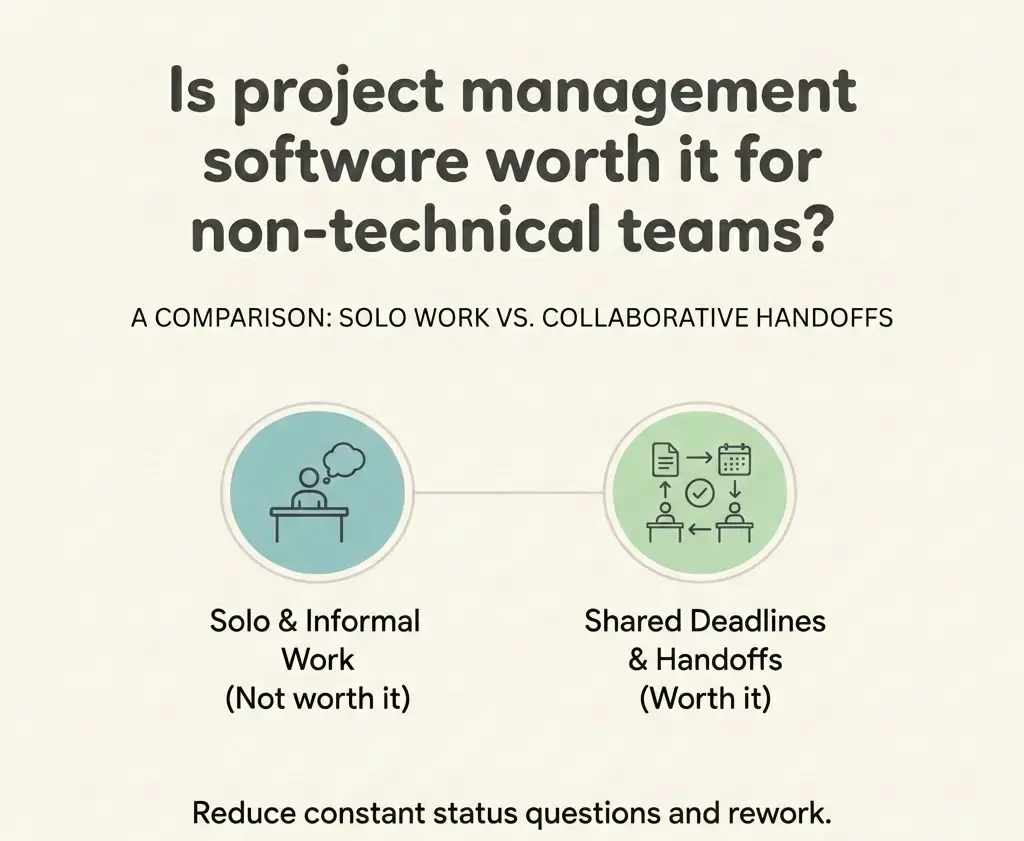
Project management software is worth it for non-technical teams when work involves handoffs, approvals, or shared deadlines, and not worth it when work is mostly solo and informal.
1. Worth it test: Is project management software worth it for non-technical teams?
Yes, it is worth it when your work is shared and time-bound, not when it is mostly solo and flexible. Teams feel value fastest when a Breeze board holds handoffs, approvals, and changing assets.
Project management software is worth it for non-technical teams when questions like "what is the status", "who owns this", and "where is the latest file" show up every week.
- Worth it: shared deliverables, approvals, deadlines, and work that changes hands.
- Maybe not yet: a tiny team with mostly independent work and one reliable place for updates.
If you decide to try it, avoid the common mistake of moving everything at once. Starting with one workflow is what makes a non-technical team say, "ok, this is actually easier."
2. Problems it solves: What does project management software actually fix for non-technical teams?
It fixes missing clarity, not missing effort. The main value for non-technical teams is making the current state obvious: what is next, who owns the next move, and which asset is the latest.
The simplest version is a board where each card holds the conversation, the latest file, and the next step, so teams stop rebuilding context in chat.
In practice, it prevents three common problems: decisions lost in chat, handoffs that require a DM to start, and requests that get forgotten because they arrive in too many places.
4. Features: What should non-technical teams look for in project management software?
Look for features that make weekly work easier, not features that look impressive in a demo.
In Breeze, the features that matter are the ones that make updates take seconds: owner, due date, comments, and checklists.
Prioritize these:
- One owner + due date: prevents "everyone owns it" and clarifies timing.
- Comments + files on the task: keeps decisions and assets tied to the work, not lost in chat.
- Checklists and templates: stops last-mile steps from being forgotten.
Skip at first: automation, deep reporting, and anything that takes training to update.
5. Rollout: How do you introduce project management software without turning it into admin work?
Start with one workflow and one rule: if the work changes, update the card. That is how you avoid the "extra place to copy updates" problem that kills adoption.
Teams often notice fewer "any update?" messages within the first two weeks.
A two-week pilot in Breeze works better than a big migration because the team can feel the payoff before the novelty wears off. If you are already on a tool, the question shifts to whether switching is worth the disruption.
Keep the rollout light:
- Day 0 (15 minutes): pick one repeating workflow and create a small board (3-5 lists).
- Day 1: seed real work, assign owners, and write a next step on each active card.
- Week 1-2: questions and answers go in the card comments, then chat links back.
If adoption drops after week one, updates still happen elsewhere. This breakdown of week-one drop-off explains the fix.
6. Spreadsheet vs tool: Should a non-technical team just use spreadsheets and Slack?
Spreadsheets and Slack can work for simple tracking, but they break when you need durable context and reliable handoffs.
| Option | Works well for | Breaks down when |
|---|---|---|
| Spreadsheet | Simple lists and owners | You need approvals, files, and decisions on the task |
| Slack and email | Fast questions | Status is hard to find later |
| Project management software | Handoffs, deadlines, shared visibility | You run two sources of truth and updates stay in chat |
If your team stays in Slack, make one change: when you ask a question about a task, ask it where the task lives so the answer stays with the work.
7. ROI: How do you tell if project management software is paying for itself?
It is paying for itself when Breeze saves enough coordination time to offset the subscription cost, and when you reduce expensive mistakes that show up as late surprises. You do not need perfect measurement, you need a reasonable estimate.
Use a simple ROI check:
- Time saved: fewer pings, fewer status meetings, faster handoffs.
- Mistakes avoided: fewer re-dos and fewer "wrong file" incidents.
- Tool cost: licenses plus a small setup cost in week one.
Rule of thumb: if you save about 10 minutes per person per day, it usually pays back quickly.
Common questions about project management software for non-technical teams
- Do non-technical teams need agile to use project management software?
- No. Most non-technical teams only need a simple workflow, clear owners, and a place for updates. Use a board because it is easy to scan, not because you want scrum ceremonies.
- How long does it take to see value?
- You should feel value in 1-2 weeks if you move one repeating workflow into Breeze and stop doing parallel updates in Slack.
- What if people do not update the board?
- Assume friction, not laziness. Reduce steps, keep lists simple, and make one rule: if you change the work, you update the card. Leaders should ask for status by opening the board.
- Is project management software overkill for small non-technical teams?
- No. It is only overkill when work is mostly solo. Small teams see value as soon as work requires handoffs, approvals, or shared deadlines.
Next steps
Project management software is worth it for non-technical teams when it reduces coordination and makes progress visible without meetings. Prove it with one workflow, one board, and one update rule.
Next step: pick your noisiest workflow, set it up in Breeze, and run a two-week pilot. Use this adoption plan.