Why choose Breeze
 Marketing
 Creative
 Sales
Sales Remote work
 Managers
 Product teams
 Project management
 Task management
 Kanban tool
 Time tracking
 Project reporting
 Project calendars
 Project timeline
 Team workload
 Project automation
 Project customization
 Chat
Chat Web forms
 Project roadmap
 AI
AI What's new
 Articles & guides
 Help center
 Mobile apps
 Integrations
 Developers & API
 Free tools
At what point does managing projects in Slack and email break down?

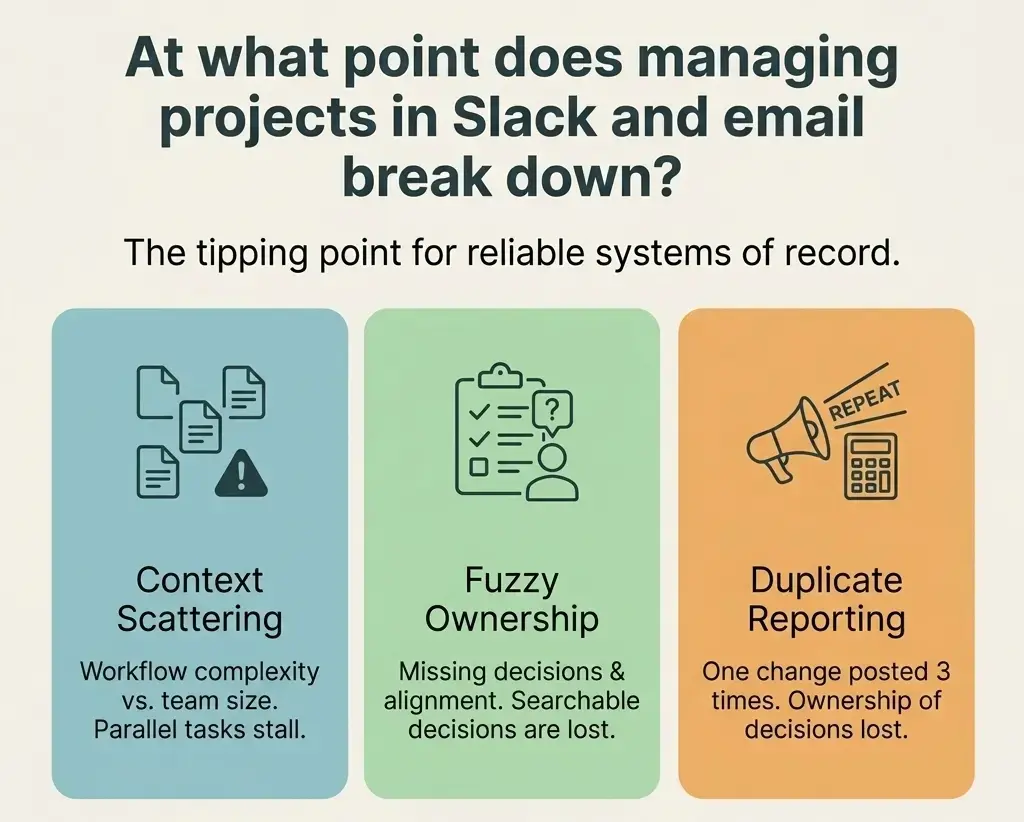
Managing projects in Slack and email breaks down when the team needs a system of record, not just fast conversation. That usually happens once work has handoffs, parallel tasks, or weekly reporting, because context starts scattering across threads and inboxes.
1. Slack and email breakdown point: when do they stop working for projects?
Slack and email stop working as project systems when one place can no longer show the next step, owner, and latest change. That point usually arrives earlier than teams expect, often as soon as a project has approvals, handoffs, and several active tasks.
Cal Newport calls this the hyperactive hive mind: work coordinated through ongoing, unstructured messages. It feels flexible early, but once too many conversations are open, people end up checking Slack and email just to stay current.
My rule of thumb is simple: if a new teammate cannot reconstruct the project in five minutes, chat and email have already crossed the line. That is usually when a Breeze board starts paying off.
2. Warning signs: what shows your team already crossed the line?
You have crossed the line when status questions keep multiplying even though everyone is constantly messaging. The problem is not silence. The problem is that nothing has a durable home.
Asana's research on work about work says knowledge workers spend 60% of their time on coordination and searching for information. Microsoft describes an infinite workday where the average worker receives 117 emails and 153 Teams messages per day. That is the cost of using messages as the workflow.
- Status lives in replies: people ask 'any update?' because there is nowhere else to look.
- Approvals disappear: nobody remembers whether the final call was in Slack, email, or a meeting.
- Managers rewrite the same summary: every Friday report starts by re-reading messages instead of checking the board.
If those feel normal, the team does not need more communication. It needs a clearer place for updates, the same lesson sales teams learn when avoiding Slack-based proposal bottlenecks. Breeze helps because comments stay attached to the task instead of drifting into separate channels.
3. Ownership and history: why do projects get lost in chat and inboxes?
Projects get lost in Slack and email because those tools are built for conversation, not state. They preserve messages in time order, but projects need owner, next step, due date, blocker, latest file, and final decision in one place.
A search result is not a workflow. An old message may show what someone said, but not whether the task is still active or who is waiting on whom. Wellingtone's data on manual reporting shows 42% of respondents spend one day or more each month collating project reports by hand.
This is where a Breeze card helps. The quick question can still happen in Slack and the client reply can still happen in email, but the task should hold the current answer. That is also the logic behind a good async update.
4. Tool split: what should stay in Slack or email and what belongs on a board?
Slack and email do not need to disappear. They need a smaller job, partly because it is so easy to understand the pull back toward chat once a tool is in place. Keep Slack for quick questions and alerts. Keep email for external communication and formal approvals. Put the project record on a board like Breeze.
The line is crossed when Slack or email hold the only copy of project truth. Once that happens, every message becomes admin work because someone will have to translate it later.
| Work item | Slack or email | Board like Breeze |
|---|---|---|
| Urgent blocker | Fast alert | Record blocker, owner, next step |
| Client approval | Fine for the message | Save final decision and file |
| Weekly status | Bad if someone rewrites it every week | Show progress and ownership by default |
| Recurring workflow | Too noisy once steps repeat | Track tasks with status, dates, comments, files |
The table takeaway is simple: use communication tools to notify people, and use the board to remember the work. Breeze works well when you want that memory without heavy process.
5. Transition plan: how do you move out of Slack and email without adding heavy process?
The safest way to move out of Slack and email is not to ban them. Shrink their role and pilot one workflow in a shared board for two weeks.
A simple Breeze rollout works better than a full migration because the team feels the benefit quickly. If the work changes, update the task. If a question affects the work, ask it on the task.
- Pick one workflow: launches, content reviews, or client requests.
- Set one owner per task: shared ownership is usually invisible ownership.
- Keep 3 to 6 statuses: enough to show movement, not enough to create bureaucracy.
- Leave old threads as history: move active work and current context only.
If you need a cleaner rollout, use a short adoption plan and treat the first two weeks as behavior change, not software training. If usage slips, that is often just week-one drop-off.
Common questions about managing projects in Slack and email
- Can a small team manage projects in Slack and email?
- Yes, but only for short-lived work with one clear owner and very little reporting. Once tasks have handoffs, files, or approvals, the team usually needs a board.
- Is Slack better than email for project management?
- Slack is better for fast coordination, but neither Slack nor email is a strong system of record. They are communication tools, not durable task systems.
- What is the clearest sign we need project management software?
- The clearest sign is duplicate work around updates. If people have to restate status in multiple places, you need a shared project record.
- Should we move every conversation out of Slack?
- No. Keep the quick conversation in Slack, but move any decision, owner change, due date, or file that affects delivery onto the task.
Next steps
Managing projects in Slack and email breaks down when conversation becomes the only place the work exists. Keep Slack and email for communication, but move the project record into a lightweight board so owners, dates, files, and decisions stay visible.
Practical next step: pick one recurring workflow and run it in Breeze for two weeks. If status questions drop and updates stop getting repeated, you have already found the tipping point.