
 Why choose Breeze
 Marketing
 Creative
 Sales
Sales Remote work
 Managers
 Product teams
 Project management
 Task management
 Kanban tool
 Time tracking
 Project reporting
 Project calendars
 Project timeline
 Team workload
 Project automation
 Project customization
 Chat
Chat Web forms
 Project roadmap
 AI
AI What's new
 Articles & guides
 Help center
 Mobile apps
 Integrations
 Developers & API
 Free tools
YouTrack vs Azure DevOps

Disclosure: Breeze publishes this comparison and is one of the tools discussed here. Breeze has no CI, no repositories, no test management and is not an issue tracker, so it is not a substitute for either product on this page.
Review process: Written in late July 2026 from Microsoft's Azure DevOps Services pricing page, including its per-licence feature grid, and from JetBrains' YouTrack purchase page. Ratings and reviewer comments come from Capterra, where Azure DevOps is listed under its former VSTS name.
Short answer: Azure DevOps if you are in a Microsoft shop, need Test Plans or Entra ID identity, or want repositories and pipelines bundled with the tracker — and you may already be paying for it through Visual Studio subscriptions. YouTrack if you only need tracking, your CI already lives elsewhere, or non-engineers have to use the tool. The comparison only makes sense once you name which Azure DevOps service you mean.
Azure DevOps is five services — Boards, Repos, Pipelines, Artifacts and Test Plans — and YouTrack competes with exactly one of them. Half the confusion in this comparison comes from treating the platform and the tracker as the same purchase.
YouTrack vs Azure DevOps at a glance
| Feature | YouTrack | Azure DevOps |
|---|---|---|
| Best for | Tracking alone, mixed teams | Microsoft shops wanting one platform |
| Free tier | Up to 10 users | First 5 users, plus free Stakeholders |
| Paid rate | $4.50/user/month billed annually | $6/user/month |
| Git hosting included | No | Yes — Azure Repos |
| CI/CD included | No | Yes — Azure Pipelines |
| Test management | Not offered | Test Plans, $52/user/month |
| Self-hosting | Server edition | Azure DevOps Server |
| Rating | 4.5/5 on Capterra (95 reviews) | 4.4/5 on Capterra (147 reviews) |
Quick verdict: YouTrack vs Azure DevOps
Choose YouTrack if:
- You need a tracker and nothing else, because CI and repositories already live elsewhere
- Non-engineering colleagues will use it and should not meet a DevOps platform
- Ten people or fewer, where it costs nothing on cloud or self-hosted server
Choose Azure DevOps if:
- You are already inside Microsoft identity and tooling
- Test case management is a requirement rather than a nice-to-have
- Bundling repos, pipelines and artifacts with the tracker is worth more than tracker flexibility
Choose Breeze if:
- The people you are buying for do not write code and never will
- Deadlines, client work and tracked hours describe the job better than builds
- You want a board and a timeline without adopting a delivery platform
The licensing you may already own
Azure DevOps has the most consequential licensing model in this comparison, and it is worth working through before any feature discussion, because it frequently changes the answer.
The first five users are free. After that, the Basic plan is $6 per user per month, and it includes Azure Boards, unlimited private Git repositories, 2 GiB of Artifacts and a free Pipelines allowance — one Microsoft-hosted parallel job with 1,800 minutes a month plus one self-hosted job with unlimited minutes.
Visual Studio subscribers do not count against the five. If your developers already have Visual Studio subscriptions, they have Azure DevOps access and they do not consume free seats. For a lot of .NET organisations this means the tracker is already paid for and the comparison is really "use what we own, or buy something else as well".
Stakeholder accounts are free — and narrower than they sound. This is the part almost no comparison spells out. Stakeholders can create, edit, search and query work items, view backlogs and boards, set alerts, provide feedback, approve releases and use CI/CD. What Microsoft's own grid marks unavailable to them is the agile tooling — Kanban boards, backlogs, sprint planning and portfolio management as working surfaces — along with creating work item tags, delivery plans, and any access to Azure Repos.
In practice, treat Stakeholder as read-and-file rather than plan. It is genuinely useful for the product owner who files requests and approves releases, and it is not a way to give a marketing team a free board.
One more line that belongs here: GitHub Advanced Security for Azure DevOps is billed per committer, at $30 a month for Code Security and $19 for Secret Protection. If security scanning is part of the requirement, that is a bigger number than the seat licence.
Key differences between YouTrack and Azure DevOps
The first difference is scope. YouTrack is one product that also happens to include a helpdesk and knowledge base. Azure DevOps is a suite where tracking is one of five services, and the value proposition depends on using more than one of them.
The second is identity and governance. Azure DevOps sits inside Microsoft Entra ID, with conditional access and the compliance posture an enterprise already runs. YouTrack supports LDAP and SSO but is not part of anyone's identity platform, which is a simplification for small teams and a complication for large ones.
Is YouTrack better than Azure DevOps?
YouTrack is better than Azure DevOps when you want a tracker rather than a platform: it is cheaper per seat, more configurable, and far more approachable for people who do not ship code.
Azure DevOps is better than YouTrack when the bundle is the point — repositories, pipelines, artifacts and test plans under one licence, inside Microsoft identity, often already paid for.
For the wider field, YouTrack alternatives covers Linear, GitLab and the rest, and Jira alternatives is the broader survey if Jira is also in the running.
If self-hosting is the requirement pushing you toward a platform, Redmine vs YouTrack covers the open-source side of that decision.
What is YouTrack?

- Pricing: free for up to 10 users; $4.50 per user per month billed annually above that
- Rating: 4.5/5 on Capterra from 95 reviews
YouTrack is JetBrains' issue tracker, and against Azure DevOps its defining characteristic is what it leaves out. There is no source control, no build system and no artifact feed — the assumption is that you already have those and want the tracker to integrate with them rather than replace them.
What it adds instead sits sideways rather than downstream: a query language for saved searches, JavaScript workflow rules for automation, and a helpdesk with a knowledge base in the same licence. That last point matters against Azure DevOps, which has no equivalent and expects a separate service desk entirely.
What users say about YouTrack
"YouTrack has the feature of customizable workflows and automation. You can customize workflow according to your team's requirement... YouTrack's mobile support is not that great."
Source: Capterra
What is Azure DevOps?
- Pricing: first 5 users free, then $6 per user per month; Test Plans $52 per user per month
- Rating: 4.4/5 on Capterra from 147 reviews
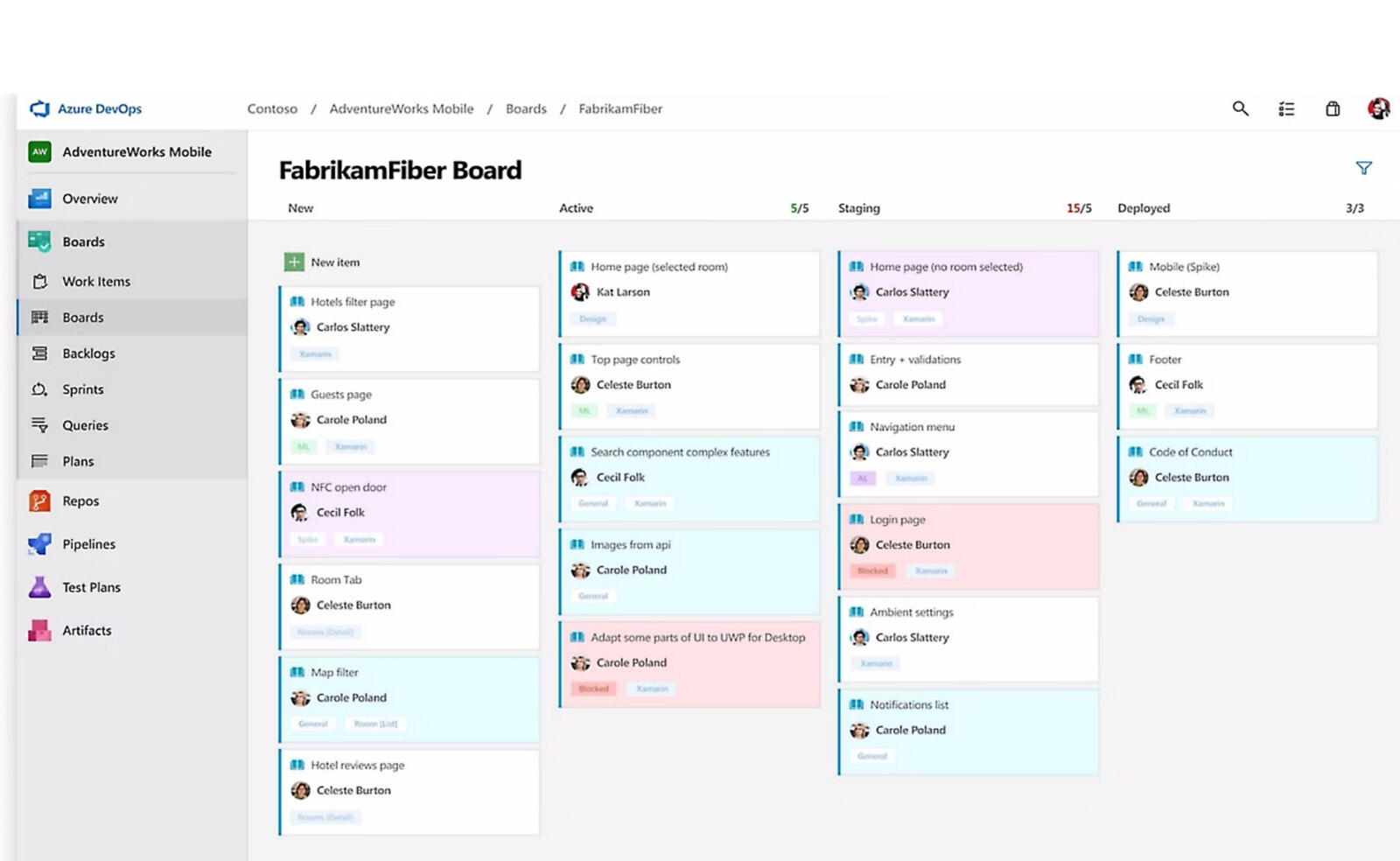
Azure DevOps Services is Microsoft's delivery platform, and the tracker is one component of it. Azure Boards covers work items, backlogs and Kanban with process templates — Agile, Scrum and CMMI — rather than YouTrack's freeform custom fields. Around it sit Azure Repos, Azure Pipelines, Azure Artifacts and Azure Test Plans.
Two structural facts are worth stating plainly. There is a genuine on-premise product, Azure DevOps Server, which is a real answer to a data-residency requirement in the same way YouTrack Server is. And Microsoft's strategic centre of gravity has moved to GitHub — GitHub Enterprise Cloud customers managing users with Entra ID can access Azure DevOps at no extra cost, and reviewers have noticed the direction of travel, with one describing Boards as feeling like a tool being wound down.
What users say about Azure DevOps
"The service provides a lot under the one package, task management, source control, CI/CD, and release pipelines... The UI is clunky in places, task management specifically leaves a lot to be desired."
Source: Capterra
YouTrack vs Azure DevOps features
Both track work items on boards with custom states. Below is where a tracker and a platform stop resembling each other.
| Area | YouTrack | Azure DevOps |
|---|---|---|
| Git hosting | Integrations only | Azure Repos included |
| CI/CD | Not offered | Pipelines, free tier included |
| Package feeds | Not offered | Artifacts, 2 GiB free |
| Test case management | Not offered | Test Plans, $52/user/month |
| Process model | Freeform custom fields | Agile, Scrum, CMMI templates |
| Query syntax | Search query language | WIQL |
| Helpdesk | Included module | Not in scope |
| Identity | LDAP and SSO | Microsoft Entra ID |
The Test Plans row is the one that decides regulated and QA-heavy work. Structured test case management with execution runs and centralised reporting has no YouTrack equivalent — but at $52 per user per month it is also the most expensive line either vendor sells.
The process-model row is the quieter difference. Azure Boards gives you templates that encode a methodology; YouTrack gives you fields and expects you to encode your own. Teams with an unusual process usually prefer the second, and teams who want to stop arguing usually prefer the first.
YouTrack vs Azure DevOps pricing
Both bill per user with a free allowance, so these compare directly — though only one of them includes source control and CI in the price.
| Team size | YouTrack Cloud | Azure DevOps Basic | What Azure DevOps adds |
|---|---|---|---|
| 10 users | Free | $360 | Repos, Pipelines, 2 GiB Artifacts |
| 25 users | $1,350 | $1,440 | Same, plus Entra ID identity |
| 100 users | $5,400 | $6,840 | Same, at enterprise scale |
Azure DevOps figures charge only for users beyond the free five, and assume no Visual Studio subscribers — if you have those, the real number is lower. YouTrack figures assume every seat is billed once the free ten are exceeded, with JetBrains' volume discounts starting at 100 users.
The striking result is how close they land. At 25 people the difference is under a hundred dollars a year, and Azure DevOps is including Git hosting and a CI allowance in that. Anyone comparing on price alone should check what they currently pay for repositories and pipelines before treating YouTrack as the cheaper option.
YouTrack vs Azure DevOps ease of use
Neither is a delight, and their reviewers say so in similar terms. Azure DevOps users praise the breadth — one calls it a lot under one package — and criticise the interface, with task management singled out as the weakest part. YouTrack users praise the flexibility and describe the interface as dense, with mobile support notably behind the desktop experience.
The difference is where the complexity lands. Azure DevOps is complex because it is five products with one navigation; YouTrack is complex because everything is configurable and someone has to configure it.
For non-engineering colleagues, YouTrack is the more approachable of the two by a clear margin. Azure DevOps is a developer platform in its layout and vocabulary, and the free Stakeholder licence does not solve that — it removes the agile tooling rather than simplifying it.
YouTrack pros and cons
YouTrack pros
- Free for ten users against Azure DevOps' five, and cheaper per seat after that
- Freeform custom fields and JavaScript workflows, where Azure Boards steers you to process templates
- Helpdesk and knowledge base in the same licence, which Azure DevOps does not offer
- Far more approachable for non-engineering colleagues than a five-service DevOps platform
- Self-hosted Server edition, matching Azure DevOps Server for residency requirements
YouTrack cons
- No source control, CI/CD or package feeds — all bundled into Azure DevOps' $6 seat
- No test case management, where Azure Test Plans is a complete product
- Not part of Entra ID, so enterprise identity governance is an integration rather than a given
- Mobile support trails the desktop experience, per reviewers
- Dense interface that reviewers describe as clunky in places
Azure DevOps pros and cons
Azure DevOps pros
- Repos, Pipelines and Artifacts included in the same $6 seat that YouTrack charges $4.50 for tracking alone
- First five users free, and Visual Studio subscribers do not count against them
- Free Stakeholder accounts for people who only file and approve
- Azure Test Plans for structured test management, which YouTrack does not attempt
- Entra ID identity, conditional access and an on-premise Server edition for regulated environments
Azure DevOps cons
- Stakeholder licences exclude the agile tools and Azure Repos entirely, which the word free obscures
- Test Plans is $52 per user per month, nearly twelve times the Basic seat
- Reviewers describe the interface as clunky and task management as the weak part
- Microsoft's investment has shifted to GitHub, and reviewers read Boards as being wound down
- Poor fit for non-engineering teams, where YouTrack is at least workable
When YouTrack is the better choice
A twelve-person team whose code lives on GitHub and whose CI runs there too. Azure DevOps would be buying a second copy of things they already have, and YouTrack costs less while being easier for the designer and the support person who also need accounts.
It is also the better choice when engineering and customer support should share one tool, since the helpdesk and knowledge base come with the YouTrack licence.
When Azure DevOps is the better choice
A .NET organisation with Visual Studio subscriptions, Entra ID identity and a compliance function. The tracker is effectively already licensed, the identity story needs no work, and adding a separate tool would mean another vendor review for no capability gain.
It is also the right answer wherever formal test management is required. Test Plans is expensive, and nothing in YouTrack replaces it.
Breeze as an alternative
Breeze has no CI, no repositories, no artifact feeds and no test management, and it is not an issue tracker. Against a delivery platform it is not a competitor and this section does not pretend otherwise.

The place it belongs is the adjacent problem this comparison creates. Once a company standardises on a DevOps platform, marketing, design and operations get pushed into it too — and a free Stakeholder licence does not give them a board, because that is one of the things Stakeholder excludes. Breeze covers those teams with boards, timelines and built-in time tracking, without asking anyone to learn a delivery pipeline.
Since Jira rather than Azure DevOps is what most non-engineering teams inherit, Breeze against Jira, in detail is the closest equivalent comparison for that side of the company.
What users say about Breeze
"Provides a decent amount of customization and allows our team to grab tasks from the board and organize our workflows."
Source: Capterra
Which tool should you choose?
| Choose YouTrack | Choose Azure DevOps | Choose Breeze |
|---|---|---|
| You need tracking only | You are a Microsoft shop | The team is not engineers |
| CI lives somewhere else | Test Plans is a requirement | Client work with deadlines |
| Non-engineers need accounts | Visual Studio already pays for it | Hours matter more than builds |
The first question to settle is whether you are buying a tracker or a platform, because the answer usually already exists in your infrastructure. If repositories and pipelines are on GitHub, adopting Azure DevOps for Boards means running two of everything. If they are already on Azure DevOps, adding YouTrack means paying twice for tracking and integrating what was previously one product.
The second is the long horizon, and it deserves more weight in 2026 than it did five years ago. Microsoft has clearly moved its investment to GitHub, and some Azure DevOps users read Boards as a tool in maintenance. That is not a reason to migrate away from a working deployment — but for a greenfield decision, it belongs in the same conversation as the free five seats.
FAQ
- Is Azure DevOps free for small teams?
- Largely, yes. The Basic plan is free for the first 5 users and $6 per user per month after that, and it includes Azure Boards, unlimited private Git repositories in Azure Repos, 2 GiB of Azure Artifacts and a free Pipelines allowance. Visual Studio subscribers get access without counting against the 5 free users, so many Microsoft shops are already paying for it.
- What can free Stakeholder accounts in Azure DevOps actually do?
- Less than the word free suggests. Stakeholders can create, edit, search and query work items, view backlogs and boards, set alerts, provide feedback, approve releases and use CI/CD. They cannot use the agile tools — Kanban boards, backlogs, sprint planning and portfolio management — create work item tags, use delivery plans, or access Azure Repos at all. Treat Stakeholder as read-and-file, not plan.
- What is the difference between Azure Boards and Azure DevOps?
- Azure Boards is the work-tracking service inside Azure DevOps. The platform also includes Azure Repos for Git hosting, Azure Pipelines for CI/CD, Azure Artifacts for package feeds and Azure Test Plans for test management. Comparing YouTrack with Azure DevOps as a whole is a category error unless you name the service — the fair comparison is YouTrack against Azure Boards.
- Should you choose Azure DevOps or GitHub for a new project in 2026?
- For a brand-new project, GitHub is the safer long-horizon bet — Microsoft's investment has clearly shifted there, and some Azure DevOps reviewers describe Boards as feeling like a tool in maintenance. Azure DevOps remains the stronger choice where Test Plans, Entra ID integration or an existing on-premise Azure DevOps Server deployment are part of the requirement.




