
 Why choose Breeze
 Marketing
 Creative
 Sales
Sales Remote work
 Managers
 Product teams
 Project management
 Task management
 Kanban tool
 Time tracking
 Project reporting
 Project calendars
 Project timeline
 Team workload
 Project automation
 Project customization
 Chat
Chat Web forms
 Project roadmap
 AI
AI What's new
 Articles & guides
 Help center
 Mobile apps
 Integrations
 Developers & API
 Free tools
Basecamp vs Monday

Disclosure: Breeze publishes this comparison and is one of the tools discussed here. We try to be candid about where Breeze isn't the right fit; weigh that bias when reading our recommendations.
Review process: We compared current vendor documentation, pricing pages, published product interfaces, and independent user reviews. Pricing and plan names were checked against vendor sites on July 16, 2026; vendors change packaging often, so confirm the current total for your team before buying.
Effective task management and collaboration require the right tools. Basecamp and Monday both help teams stay organized but they work differently. Basecamp keeps it simple with an easy-to-use interface and flat pricing, Monday has customizable workflows and visual dashboards for more complex projects.
This article compares Basecamp and Monday, their features, strengths and differences. You'll see how each tool fits different team workflows so you can choose the one that's right for you. We'll also review Breeze. Project management tool for teams that want all the core project management features without extra bells and whistles.
Basecamp vs Monday at a glance
| Feature | Basecamp | Monday |
|---|---|---|
| Best for | Teams that want simple collaboration and team communication | Teams that want visual work management with flexible dashboards |
| Pricing | Flat-rate plans: $25, $59, $99 or $299 per month, billed annually. Freelancer allows 20 users; Studio and above include unlimited users | Free for up to 2 seats; paid plans from $9 per seat per month (Basic, 3-seat minimum), with Standard at $12 and Pro at $19 |
| Rating | 4.3/5 on Capterra | 4.6/5 on Capterra |
| Standout strengths | Manage tasks, team messaging and file storage in one place without needing extra integrations; Centralized message boards and group chat keep team conversations front and center, not task-focused like Monday's comments | Flexible boards, timelines and Gantt charts to visualize and manage projects; Built-in automation reduces repetitive tasks, Basecamp requires manual updates |
| Main tradeoff | Light on customization, automation, and reporting depth | Flexibility means more setup, and per-seat cost climbs as you scale |
Quick verdict: Basecamp vs Monday
Choose Basecamp if:
- Manage tasks, team messaging and file storage in one place without needing extra integrations
- Centralized message boards and group chat keep team conversations front and center, not task-focused like Monday's comments
- Pre-built project dashboards show tasks, deadlines and progress without needing customization
Choose Monday if:
- Flexible boards, timelines and Gantt charts to visualize and manage projects
- Built-in automation reduces repetitive tasks, Basecamp requires manual updates
- Customizable workflows to fit team needs, Basecamp has a fixed structure
Choose Breeze if:
- Kanban boards, task prioritization, and project timelines into one simple platform. Monday is super customizable but can feel too feature-heavy and Basecamp is minimalist but lacks task management features
- Teams can get started without training or complicated setup. Basecamp's interface is unique and can be overwhelming for new users, and Monday's customization options can be overwhelming for smaller teams
- Breeze's time tracking is built into the platform, delivering seamless productivity monitoring. Monday and Basecamp rely on external integrations to achieve similar functionality, which can add complexity
Key differences between Basecamp and Monday
Basecamp is a better fit for teams that want simple collaboration and team communication. Monday is a better fit for teams that want visual work management with flexible dashboards.
The main difference comes down to how much structure, setup, and reporting your team needs. Basecamp usually has a lower learning curve, while Monday usually has a moderate learning curve.
Is Basecamp better than Monday?
Basecamp is better than Monday for teams that want simple collaboration and team communication.
Monday is better than Basecamp for teams that want visual work management with flexible dashboards.
Breeze is a good alternative if you want boards, timelines, time tracking, and automation in one simpler workspace.
If price or fit is the sticking point, skim other Basecamp alternatives and Monday.com alternatives as well.
Plenty of people who land here drift over to Rally vs Jira too.
What is Basecamp?

- Pricing: Flat-rate plans: $25, $59, $99 or $299 per month, billed annually. Freelancer allows 20 users; Studio and above include unlimited users
- Rating: 4.3/5 on Capterra
Basecamp is a good tool to manage tasks and files without going through multiple tools. Monday on the other hand has customizable workflows and advanced automation for teams with more complex processes. While Monday has flexibility, Basecamp has simplicity so teams can get started without a huge learning curve.
For teams that prioritize clear communication and fast setup, Basecamp's pre-built tools help organize tasks and discussions without extra configuration. Monday's visual dashboards and automation are great for tracking detailed workflows but require more setup and training. Basecamp's flat rate pricing is also more cost-effective for bigger teams vs Monday's per-user pricing.
What users say about Basecamp
"The layout is simple, and I like that all the discussions, files, and tasks related to a project are all in one place."
Source: Capterra
What is Monday?

- Pricing: Free for up to 2 seats; paid plans from $9 per seat per month (Basic, 3-seat minimum), with Standard at $12 and Pro at $19
- Rating: 4.6/5 on Capterra
Monday has a high level of customization and flexibility, with tools to create workflows that fit different projects. While Basecamp keeps it simple, Monday's advanced features like automation, integrations and dashboards give teams more control. The interface is flexible so teams can use boards, timelines and Gantt charts to manage both tasks and long-term projects.
Monday's customization options offer more scalability than Basecamp. Basecamp is good for smaller teams, but Monday's automation and reporting tools help teams streamline workflows and reduce manual work. While Basecamp's flat rate is nice, Monday's per-user plans offer more features as you grow.
What users say about Monday
"monday.com has given us a smooth and efficient experience running our projects."
Source: Capterra
Basecamp vs Monday features
Basecamp and Monday overlap on core project management, but they emphasize different strengths. The main differences usually come down to workflow depth, visibility, setup effort, and how much structure the team needs day to day.
| Area | Basecamp | Monday |
|---|---|---|
| Workflow style | Teams that want simple collaboration and team communication | Teams that want visual work management with flexible dashboards |
| Top strengths | Manage tasks, team messaging and file storage in one place without needing extra integrations; Centralized message boards and group chat keep team conversations front and center, not task-focused like Monday's comments | Flexible boards, timelines and Gantt charts to visualize and manage projects; Built-in automation reduces repetitive tasks, Basecamp requires manual updates |
| Ease of use | Lower learning curve | Moderate learning curve |
| Main tradeoff | Light on customization, automation, and reporting depth | Flexibility means more setup, and per-seat cost climbs as you scale |
Basecamp stands out for keeping tasks, team messaging, and file storage in one place without extra integrations, with centralized message boards and group chat that keep conversation front and center rather than buried in task comments.
Monday stands out for flexible boards, timelines, and Gantt charts that visualize and manage projects, plus built-in automation that removes repetitive manual updates.
Basecamp vs Monday pricing
Pricing changes over time, so confirm the latest details on each vendor site before you commit.
| Plan detail | Basecamp | Monday |
|---|---|---|
| Pricing | Flat-rate plans: $25, $59, $99 or $299 per month, billed annually. Freelancer allows 20 users; Studio and above include unlimited users | Free for up to 2 seats; paid plans from $9 per seat per month (Basic, 3-seat minimum), with Standard at $12 and Pro at $19 |
| Rating | 4.3/5 on Capterra | 4.6/5 on Capterra |
Basecamp charges a flat rate: $25 (Freelancer), $59 (Studio), $99 (Pro) or $299 (Unlimited) per month, billed annually. Freelancer allows 20 users; Studio and above include unlimited users.
Monday pricing: Free for up to 2 seats; paid plans from $9 per seat per month (Basic, 3-seat minimum), with Standard at $12 and Pro at $19.
The better value depends on team size, feature needs, and how much workflow depth or reporting your team actually needs.
Basecamp vs Monday ease of use
Basecamp usually has a lower learning curve.
Monday usually has a moderate learning curve.
If your team values fast adoption and lower overhead, choose the simpler option. If you need more control, customization, or reporting, a steeper learning curve can still be worth it.
Basecamp pros and cons
Basecamp pros
- Manage tasks, team messaging and file storage in one place without needing extra integrations
- Centralized message boards and group chat keep team conversations front and center, not task-focused like Monday's comments
- Pre-built project dashboards show tasks, deadlines and progress without needing customization
- Flat rate pricing includes unlimited users so more affordable for bigger teams
- Built-in file storage keeps documents organized in one place, not scattered across tasks
- Faster onboarding with simple tools so less time to set up and learn compared to Monday's feature-heavy platform
Basecamp cons
- No Gantt, timeline, or customizable board views for visual planning
- Fixed, opinionated structure with limited automation and customization
- Thin reporting and dashboards compared with Monday
- No built-in time tracking without third-party tools
Monday pros and cons
Monday pros
- Flexible boards, timelines and Gantt charts to visualize and manage projects
- Built-in automation reduces repetitive tasks, Basecamp requires manual updates
- Customizable workflows to fit team needs, Basecamp has a fixed structure
- More integrations with Slack, Google Drive and Zoom for seamless collaboration
- Dashboards to get a high-level overview of key metrics so teams can see performance
- Scalable pricing tiers so teams can add features as they grow, more flexibility than Basecamp's one-size-fits-all plan
Monday cons
- Extensive customization takes real time to configure and maintain
- Per-seat pricing with a 3-seat minimum adds up as the team grows
- The dense feature set can overwhelm small teams that want something simple
- Best features and higher automation limits sit on the pricier tiers
When Basecamp is the better choice
- Manage tasks, team messaging and file storage in one place without needing extra integrations
- Centralized message boards and group chat keep team conversations front and center, not task-focused like Monday's comments
- Pre-built project dashboards show tasks, deadlines and progress without needing customization
When Monday is the better choice
- Flexible boards, timelines and Gantt charts to visualize and manage projects
- Built-in automation reduces repetitive tasks, Basecamp requires manual updates
- Customizable workflows to fit team needs, Basecamp has a fixed structure
Breeze as an alternative
Every team works differently, and the right project management tool depends on how you collaborate and track progress. Basecamp is simple, with built-in messaging, task lists and file storage, easy to get started. Monday has more customization, workflow automation, visual dashboards and flexible task tracking. But for companies that need the essentials without the extra complexity Breeze is a great alternative.
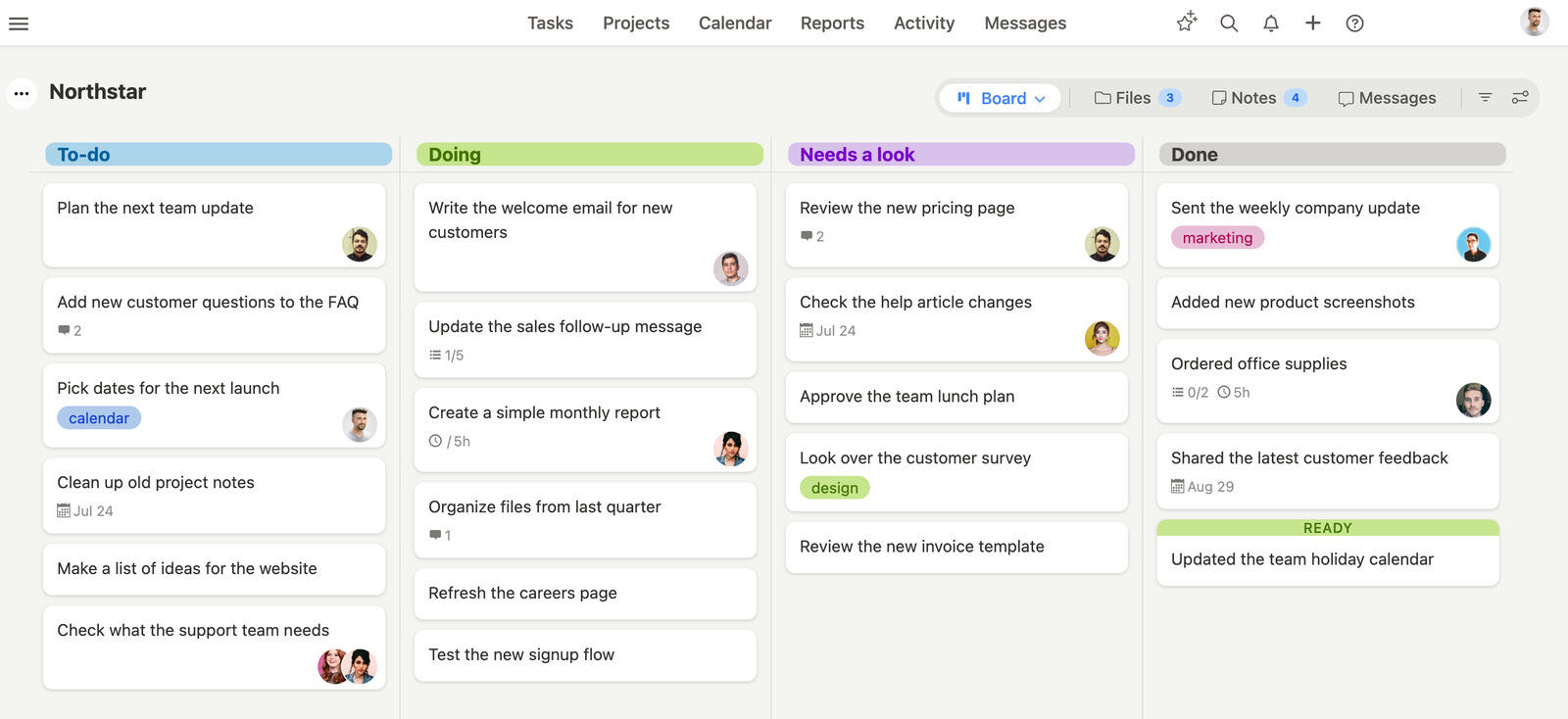
Breeze combines task management, workflow automation and time tracking in one platform without the steep learning curve of more complex tools. Unlike Basecamp's limited customization or Monday's setup, Breeze is ready to use from day one. Teams can track progress visually, manage tasks and collaborate without switching between multiple tools. With built-in Kanban boards and shared calendars, Breeze helps teams stay organized.
Many teams choose Breeze because it's simple enough for everyday use but powerful enough to manage multiple projects. Basecamp works well with teams that need basic collaboration and Monday is for those that need advanced workflows, Breeze is in the middle. With the essentials built in and no need for a complex setup Breeze helps teams focus, meet deadlines and move projects forward.
Where that middle ground actually sits is easier to see one at a time: Breeze next to Basecamp covers what you gain when task tracking gains structure, and Monday.com and Breeze side-by-side covers what you stop paying for when the dashboards go unbuilt.
What users say about Breeze
"I love the email notifications for comments on important tasks + email reminders on projects and tasks."
Source: Capterra
Which tool should you choose?
Choose Basecamp if:
- Manage tasks, team messaging and file storage in one place without needing extra integrations
- Centralized message boards and group chat keep team conversations front and center, not task-focused like Monday's comments
- Pre-built project dashboards show tasks, deadlines and progress without needing customization
Choose Monday if:
- Flexible boards, timelines and Gantt charts to visualize and manage projects
- Built-in automation reduces repetitive tasks, Basecamp requires manual updates
- Customizable workflows to fit team needs, Basecamp has a fixed structure
Choose Breeze if:
- Kanban boards, task prioritization, and project timelines into one simple platform. Monday is super customizable but can feel too feature-heavy and Basecamp is minimalist but lacks task management features
- Teams can get started without training or complicated setup. Basecamp's interface is unique and can be overwhelming for new users, and Monday's customization options can be overwhelming for smaller teams
- Breeze's time tracking is built into the platform, delivering seamless productivity monitoring. Monday and Basecamp rely on external integrations to achieve similar functionality, which can add complexity
The honest split here is temperament, not team size. Basecamp assumes you want the tool to stay out of the way and impose one calm structure; Monday assumes you want to shape the tool around your process with boards, automations, and dashboards. If nobody on your team enjoys configuring software, Monday's flexibility becomes a maintenance tax rather than a benefit, and Basecamp will feel like relief. If someone is willing to own the setup, Monday scales into far richer reporting than Basecamp can reach. Switching between them is a real project either way, because Basecamp's flat lists don't map onto Monday's column-based boards, so it pays to pick based on how your team actually likes to work rather than on feature counts.
Finding the right project management tool is crucial. The selection depends on your team's workflows and the type of projects you do. Basecamp's simple design is a good choice for those who want quick communication and simple task management, Monday's custom workflows and dashboards are better for teams with more complex needs. Both have their pros and cons, but the best one is the one that fits your team's daily habits without adding extra steps.
When comparing options, think about how your team collaborates and tracks progress. Basecamp's simplicity keeps projects organized without overwhelming users but may not be suitable for growing teams with more advanced needs. Monday has more flexibility but setup can be time-consuming, especially for teams that don't need advanced features. That's where Breeze stands out. For teams wondering why switch to Breeze the answer is in its balanced approach. It has all the essential tools like Kanban boards, time tracking and workflow automation in a platform that's ready to use without extensive setup.
In the end, the best tool is the one your team can adopt fast and use consistently. Breeze has a clear and easy-to-navigate interface with all the features teams need to manage projects, collaborate in real time, and stay on track. Whether you want to simplify your workflow or need a tool that grows with your team Breeze is a practical alternative to Basecamp's minimalism and Monday's complexity.
FAQ
- Is Basecamp better than Monday?
- Basecamp is better than Monday for teams that want simple collaboration and team communication. Monday is better than Basecamp for teams that want visual work management with flexible dashboards.
- Which tool is easier to use, Basecamp or Monday?
- Basecamp usually has a lower learning curve, while Monday usually has a moderate learning curve.
- How do Basecamp and Monday compare on pricing?
- Basecamp charges a flat rate: $25 (Freelancer), $59 (Studio), $99 (Pro) or $299 (Unlimited) per month, billed annually. Freelancer allows 20 users; Studio and above include unlimited users. Monday pricing: Free for up to 2 seats; paid plans from $9 per seat per month (Basic, 3-seat minimum), with Standard at $12 and Pro at $19.
- What is a good alternative to Basecamp and Monday?
- Breeze is a strong alternative if you want boards, timelines, time tracking, and automation in one simpler workspace.




