
 Why choose Breeze
 Marketing
 Creative
 Sales
Sales Remote work
 Managers
 Product teams
 Project management
 Task management
 Kanban tool
 Time tracking
 Project reporting
 Project calendars
 Project timeline
 Team workload
 Project automation
 Project customization
 Chat
Chat Web forms
 Project roadmap
 AI
AI What's new
 Articles & guides
 Help center
 Mobile apps
 Integrations
 Developers & API
 Free tools
Basecamp vs Jira

Disclosure: Breeze publishes this comparison and is one of the tools discussed here. We try to be candid about where Breeze isn't the right fit; weigh that bias when reading our recommendations.
Review process: We compared current vendor documentation, pricing pages, published product interfaces, and independent user reviews. Pricing and plan names were checked against vendor sites on July 16, 2026; vendors change packaging often, so confirm the current total for your team before buying.
Basecamp and Jira are two widely used project management tools. Basecamp simplifies communication and collaboration, so it's a good choice for teams that want a straightforward platform. Jira is for Agile software development, with tools for issue tracking, sprint planning and detailed reporting.
Basecamp keeps communication clear and organized, and Jira gives you a full project management system with Agile features. Basecamp's flat rate pricing is better for larger teams, and Jira's per-user pricing may be more cost-effective for smaller teams. Both have their strengths, but the right project management tool depends on how much structure and customization your team needs.
Basecamp vs Jira at a glance
| Feature | Basecamp | Jira |
|---|---|---|
| Best for | Teams that want simple collaboration and team communication | Software teams that need issue tracking and Agile workflows |
| Pricing | Flat-rate plans: $25, $59 or $99 a month, or $299 a month billed annually for Unlimited. Freelancer allows 20 users; Studio and above include unlimited users | Free for up to 10 users; Standard at $9.05 per user per month on monthly billing for teams of up to 100 users |
| Rating | 4.3/5 on Capterra | 4.4/5 on Capterra |
| Standout strengths | Simpler setup and user-friendly design so non-technical teams can get started; Built-in messaging and group chat so communication stays within the platform, no external tools are needed | Agile tools like Scrum and Kanban boards are built for structured project management; Advanced issue tracking with task histories, priorities and custom statuses |
| Main tradeoff | Light on dependencies, reporting, and advanced workflow control | Steep learning curve and dev-oriented setup that overwhelms non-technical teams |
Quick verdict: Basecamp vs Jira
Choose Basecamp if:
- Simpler setup and user-friendly design so non-technical teams can get started
- Built-in messaging and group chat so communication stays within the platform, no external tools are needed
- Automatic check-ins replace long status meetings, save time and improve transparency
Choose Jira if:
- Agile tools like Scrum and Kanban boards are built for structured project management
- Advanced issue tracking with task histories, priorities and custom statuses
- Sprint planning and backlog management keep teams aligned and productive
Choose Breeze if:
- With Breeze, you can start managing projects immediately, unlike Jira's more technical setup. Basecamp's interface is simpler but lacks the task and workflow depth of Breeze
- Breeze has time tracking built in, Basecamp doesn't, and Jira requires third-party add-ons
- Breeze has Kanban boards tailored to your team's workflow, simplifying task visibility and tracking
Key differences between Basecamp and Jira
Basecamp is a better fit for teams that want simple collaboration and team communication. Jira is a better fit for software teams that need issue tracking and Agile workflows.
The main difference comes down to how much structure, setup, and reporting your team needs. Basecamp usually has a lower learning curve, while Jira usually has a higher learning curve.
Is Basecamp better than Jira?
Basecamp is better than Jira for teams that want simple collaboration and team communication.
Jira is better than Basecamp for software teams that need issue tracking and Agile workflows.
Breeze is a good alternative if you want boards, timelines, time tracking, and automation in one simpler workspace.
Depending on what is missing for you, alternatives to Basecamp or Jira alternatives may point to a better fit.
If your shortlist is still moving, Basecamp vs Monday.com is a natural one to read next.
What is Basecamp?

- Pricing: Flat-rate plans: $25, $59 or $99 a month, or $299 a month billed annually for Unlimited. Freelancer allows 20 users; Studio and above include unlimited users
- Rating: 4.3/5 on Capterra
Basecamp is a collaboration and project management tool that focuses on simple and clear communication. It combines messaging, to-do lists and file sharing in one place so teams can coordinate and stay aligned without multiple tools. Compared to Jira's feature-heavy platform, Basecamp is all about usability so non-technical teams can get started without a learning curve.
While Jira is built for Agile workflows with tools like sprint planning and issue tracking, Basecamp takes a more straightforward approach. Instead of velocity tracking or backlog management, Basecamp has structured message boards, automatic check-ins and real-time group chat. For teams that value clear communication and simple task management, Basecamp is a practical alternative to Jira's developer-focused platform.
What users say about Basecamp
"Using Basecamp has been a really fruitful experience."
Source: Capterra
What is Jira?

- Pricing: Free for up to 10 users; Standard at $9.05 per user per month on monthly billing for teams of up to 100 users
- Rating: 4.4/5 on Capterra
Jira is a good option for structured workflows and project tracking. With features like sprint planning, issue tracking and backlog management, it's designed to help teams get productive and deliver on time. Integration with tools like Bitbucket and Confluence makes Jira part of a full software development ecosystem. While the advanced features can take time to learn, they're powerful for those managing complex projects.
Compared to Basecamp's simplicity, Jira has more customization and flexibility. Agile teams can track tasks on Scrum or Kanban boards, monitor progress with burndown charts and automate workflows. Unlike Basecamp's simple messaging and task lists, Jira lets you create custom workflows, set dependencies and track detailed issue histories. For teams that need advanced project tracking and Agile workflows, Jira has more customization and scalability than Basecamp's collaboration tools.
What users say about Jira
"Jira's collaborative features enable a holistic view of bug fixes and project advancements."
Source: Capterra
Basecamp vs Jira features
Basecamp and Jira overlap on core project management, but they emphasize different strengths. The main differences usually come down to workflow depth, visibility, setup effort, and how much structure the team needs day to day.
| Area | Basecamp | Jira |
|---|---|---|
| Workflow style | Teams that want simple collaboration and team communication | Software teams that need issue tracking and Agile workflows |
| Top strengths | Simpler setup and user-friendly design so non-technical teams can get started; Built-in messaging and group chat so communication stays within the platform, no external tools are needed | Agile tools like Scrum and Kanban boards are built for structured project management; Advanced issue tracking with task histories, priorities and custom statuses |
| Ease of use | Lower learning curve | Higher learning curve |
| Main tradeoff | Light on dependencies, reporting, and advanced workflow control | Steep learning curve and dev-oriented setup that overwhelms non-technical teams |
Basecamp stands out for its simple setup and user-friendly design, letting non-technical teams get started fast, with built-in messaging and group chat that keep communication inside the platform so no external tools are needed.
Jira stands out for Agile tooling built for structured software delivery, Scrum and Kanban boards, plus advanced issue tracking with full task histories, priorities, and custom statuses.
Basecamp vs Jira pricing
Pricing changes over time, so confirm the latest details on each vendor site before you commit.
| Plan detail | Basecamp | Jira |
|---|---|---|
| Pricing | Flat-rate plans: $25, $59 or $99 a month, or $299 a month billed annually for Unlimited. Freelancer allows 20 users; Studio and above include unlimited users | Free for up to 10 users; Standard at $9.05 per user per month on monthly billing for teams of up to 100 users |
| Rating | 4.3/5 on Capterra | 4.4/5 on Capterra |
Basecamp charges a flat monthly price per account instead of per user: $25 (Freelancer), $59 (Studio) or $99 (Pro) a month, or $299 a month billed annually for Unlimited. Freelancer allows 20 users; Studio and above include unlimited users.
Jira pricing: Free for up to 10 users, with Standard at $9.05 per user per month on monthly billing for teams of up to 100 users. Per-user rates fall for larger teams, and annual plans are priced per user tier.
The better value depends on team size, feature needs, and how much workflow depth or reporting your team actually needs.
Basecamp vs Jira ease of use
Basecamp usually has a lower learning curve.
Jira usually has a higher learning curve.
If your team values fast adoption and lower overhead, choose the simpler option. If you need more control, customization, or reporting, a steeper learning curve can still be worth it.
Basecamp pros and cons
Basecamp pros
- Simpler setup and user-friendly design so non-technical teams can get started
- Built-in messaging and group chat so communication stays within the platform, no external tools are needed
- Automatic check-ins replace long status meetings, save time and improve transparency
- Centralized file storage and document sharing without the complexity of integrations
- Flat rate pricing is more affordable for large teams than Jira's per-user cost
- Flexible to-do lists and task assignments without Agile-specific workflows
Basecamp cons
- No sprint planning, backlog, or issue tracking for software teams
- Light on dependencies, custom workflows, and analytical reporting
- Opinionated structure means limited customization as needs grow
- No built-in time tracking without third-party tools
Jira pros and cons
Jira pros
- Agile tools like Scrum and Kanban boards are built for structured project management
- Advanced issue tracking with task histories, priorities and custom statuses
- Sprint planning and backlog management keep teams aligned and productive
- Integrations with tools like Bitbucket and GitHub for the software lifecycle
- Customizable workflows and automation for repetitive tasks and efficiency
- Reporting with velocity charts, burndown charts and workload tracking
Jira cons
- Steep learning curve that overwhelms non-technical and cross-functional teams
- Interface and setup are geared to software work, not general collaboration
- Getting full value often depends on admin configuration and marketplace add-ons
- Weak built-in messaging compared with Basecamp's communication-first design
When Basecamp is the better choice
- Simpler setup and user-friendly design so non-technical teams can get started
- Built-in messaging and group chat so communication stays within the platform, no external tools are needed
- Automatic check-ins replace long status meetings, save time and improve transparency
When Jira is the better choice
- Agile tools like Scrum and Kanban boards are built for structured project management
- Advanced issue tracking with task histories, priorities and custom statuses
- Sprint planning and backlog management keep teams aligned and productive
Breeze as an alternative
Breeze is a strong choice for those who prefer easy-to-use tools while covering all the necessary project management features. Unlike Basecamp's collaboration or Jira's workflows, Breeze is just clean. No setups, endless customizations, or overly complex automations.
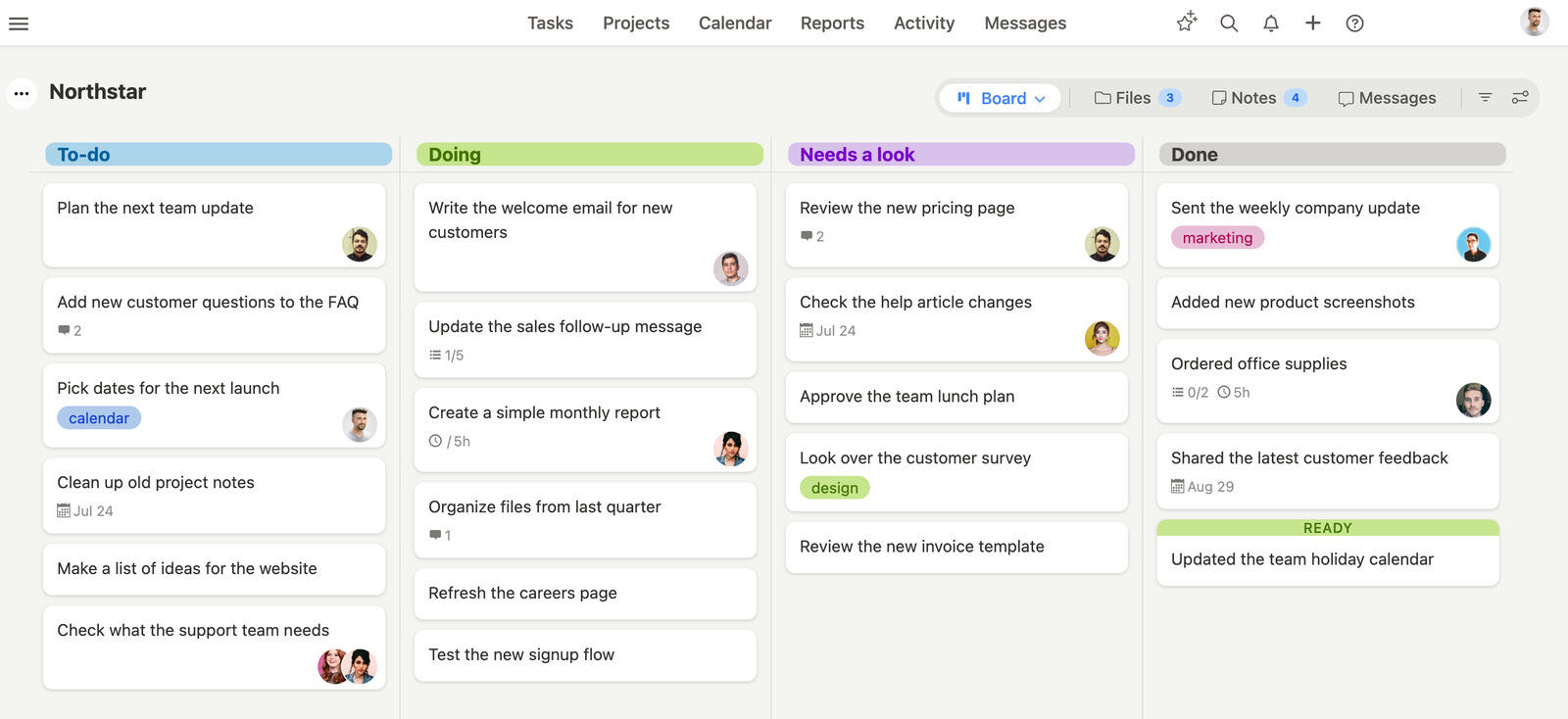
With Breeze, teams can get started without tweaking settings or navigating menus. Task assignments, real-time progress tracking and team chat all in one place, so collaboration is easy without extra features getting in the way.
For teams managing multiple projects or across departments, Breeze has the features you need to keep tasks organized and deadlines on track – without the learning curve of more complex platforms.
The two pull in opposite directions, which is easier to judge spelled out: where Breeze and Basecamp differ once projects need real task tracking, and Jira and Breeze side-by-side once you weigh its configuration against what it buys you.
What users say about Breeze
"Breeze is a powerful tool for our company, we can track and manage our business details and can store the information on cloud storage."
Source: Capterra
Which tool should you choose?
Choose Basecamp if:
- Simpler setup and user-friendly design so non-technical teams can get started
- Built-in messaging and group chat so communication stays within the platform, no external tools are needed
- Automatic check-ins replace long status meetings, save time and improve transparency
Choose Jira if:
- Agile tools like Scrum and Kanban boards are built for structured project management
- Advanced issue tracking with task histories, priorities and custom statuses
- Sprint planning and backlog management keep teams aligned and productive
Choose Breeze if:
- With Breeze, you can start managing projects immediately, unlike Jira's more technical setup. Basecamp's interface is simpler but lacks the task and workflow depth of Breeze
- Breeze has time tracking built in, Basecamp doesn't, and Jira requires third-party add-ons
- Breeze has Kanban boards tailored to your team's workflow, simplifying task visibility and tracking
These two rarely land on the same shortlist for the right reasons, and picking between them is mostly a question of who the tool is for. Jira is built for engineers shipping software in sprints; forcing a marketing or operations team into its issue-tracker mental model usually creates more admin than it removes. Basecamp is the opposite bet, deliberately light, so it keeps a non-technical team aligned but hits a wall the moment you need dependencies, backlogs, or real reporting. The one scenario where the comparison is genuinely live is a small software shop deciding whether it needs Jira's rigor yet, and for many, starting on something simpler and moving to Jira once the backlog demands it is the cheaper, less painful path.
Staying aligned is essential for any team. Basecamp makes collaboration simple with messaging, to-do lists, and file sharing, while Jira's Agile tools help developers track sprints and manage issues. But both tools can feel limiting if your needs fall somewhere in between.
That's why many teams switch to Breeze. It combines structure with simplicity. It offers various features. For example built-in task management, time tracking, and workflow automation. Teams can jump in, assign tasks, and collaborate in real time, with no hidden features or confusing configurations.
If you are looking for a project management tool that values both flexibility and functionality, Breeze is a practical choice. It keeps everyone focused on their work, not the tool itself. With Breeze, you can meet deadlines and stay productive. If you are still undecided, you can always give our free 14-day trial a go and make up your decision down the line.
FAQ
- Is Basecamp better than Jira?
- Basecamp is better than Jira for teams that want simple collaboration and team communication. Jira is better than Basecamp for software teams that need issue tracking and Agile workflows.
- Which tool is easier to use, Basecamp or Jira?
- Basecamp usually has a lower learning curve, while Jira usually has a higher learning curve.
- How do Basecamp and Jira compare on pricing?
- Basecamp charges a flat monthly price per account instead of per user: $25 (Freelancer), $59 (Studio) or $99 (Pro) a month, or $299 a month billed annually for Unlimited. Freelancer allows 20 users; Studio and above include unlimited users. Jira has a free plan for up to 10 users. Standard costs $9.05 per user per month on monthly billing for teams of up to 100 users, and the per-user rate falls for larger teams.
- What is a good alternative to Basecamp and Jira?
- Breeze is a strong alternative if you want boards, timelines, time tracking, and automation in one simpler workspace.




