
 Why choose Breeze
 Marketing
 Creative
 Sales
Sales Remote work
 Managers
 Product teams
 Project management
 Task management
 Kanban tool
 Time tracking
 Project reporting
 Project calendars
 Project timeline
 Team workload
 Project automation
 Project customization
 Chat
Chat Web forms
 Project roadmap
 AI
AI What's new
 Articles & guides
 Help center
 Mobile apps
 Integrations
 Developers & API
 Free tools
Trello vs Todoist

Disclosure: Breeze publishes this comparison and is one of the tools discussed here. We try to be candid about where Breeze isn't the right fit; weigh that bias when reading our recommendations.
Review process: We compared current vendor documentation, pricing pages, published product interfaces, and independent user reviews. Pricing and plan names were checked against vendor sites on July 16, 2026; vendors change packaging often, so confirm the current total for your team before buying.
From quick errands to detailed projects, Trello and Todoist each have their own way of keeping track of everything. Instead of limiting you to the same method, they reflect different philosophies on how you handle daily responsibility. Choosing the right tool depends on how you want to see your upcoming work—on a board of cards or a list of tasks, or maybe both options for different projects.
Comparing Trello and Todoist often comes down to scale and project type. Trello's board layout is great for moving pieces around, and good for visual roadmaps. Todoist leans on concise task entries, which is good for those who want minimal clutter. Either can help you stay on top of things but only if it matches how you like to plan.
Trello vs Todoist at a glance
| Feature | Trello | Todoist |
|---|---|---|
| Best for | Teams that want simple Kanban-based planning | People and teams that want lightweight task planning |
| Pricing | Free for basic use, with paid plans starting at $5 per user per month | Free, with premium features starting from $5 per user per month |
| Rating | 4.5/5 on Capterra | 4.6/5 on Capterra |
| Standout strengths | Trello's Kanban boards work well for multi-step processes, while Todoist's lists feel limited for larger workflows; Power-Ups in Trello connect to Google Drive and Slack, more integrations than Todoist | List view is good for basic task management, but Trello's board view is too much for simple needs; Reminders and priority flags handle deadlines without needing Power-Ups |
| Main tradeoff | Boards get heavy for simple lists; extras rely on Power-Ups | Great for lists, but no boards, timelines, or real team project views |
Quick verdict: Trello vs Todoist
Choose Trello if:
- Trello's Kanban boards work well for multi-step processes, while Todoist's lists feel limited for larger workflows
- Power-Ups in Trello connect to Google Drive and Slack, more integrations than Todoist
- Trello's interface is real-time, team-based collaboration, Todoist is individual task management
Choose Todoist if:
- List view is good for basic task management, but Trello's board view is too much for simple needs
- Reminders and priority flags handle deadlines without needing Power-Ups
- Cleaner design, less clutter than Trello's multi-column view
Choose Breeze if:
- Breeze helps teams up and running fast, with no onboarding required. Trello needs Power-Ups for customization and Todoist needs manual work for complex workflows, Breeze is clear and simple right from the start
- With its time tracking built-in , teams can track productivity within the tool. Trello and Todoist don't have native time tracking and need external tools
- Breeze has real-time chat to centralize team conversation. Trello's card comments and Todoist's limited collaboration options make Breeze the better choice for teams that need ongoing discussion in one place
Key differences between Trello and Todoist
Trello is a better fit for teams that want simple Kanban-based planning. Todoist is a better fit for people and teams that want lightweight task planning.
The main difference comes down to format: Trello organizes work visually on boards of cards, while Todoist keeps everything in fast, simple lists. Both are easy to learn — the real question is whether you think in columns or in checklists.
Is Trello better than Todoist?
Trello is better than Todoist for teams that want simple Kanban-based planning.
Todoist is better than Trello for people and teams that want lightweight task planning.
Breeze is a good alternative if you want boards, timelines, time tracking, and automation in one simpler workspace.
Either way, it pays to weigh Trello alternatives and alternatives to Todoist before deciding.
If neither of these quite clicks, Asana vs Todoist might frame it better for you.
What is Trello?

- Pricing: Free for basic use, with paid plans starting at $5 per user per month
- Rating: 4.5/5 on Capterra
Trello's visual interface makes task management easy. You can drag and drop your work into columns and keep an eye on each stage of your project. Since Trello connects with Google Drive, Slack, Jira and many other apps through "Power-Ups" it's flexible to your needs. If you're managing multiple priorities or want a tool that grows with your workload, Trello has options for teams of all sizes.
Todoist on the other hand focuses on tasks and reminders in a list format. Its clean layout is for quick entries, daily to-dos and personal scheduling. While it does support collaboration, larger teams might find it less suitable for long-term projects with many requirements. Trello vs Todoist often comes down to whether you need a visual board system or a way to list everything in one place.
What users say about Trello
"In HR, our processes are extensive."
Source: Capterra
What is Todoist?

- Pricing: Free, with premium features starting from $5 per user per month
- Rating: 4.6/5 on Capterra
Todoist is a good option for individuals or smaller teams who need a simple, list-based solution. It has priority levels, recurring reminders and a simple interface that doesn't require extra setup. If you find Trello's boards too cluttered or don't need multiple columns for different stages, Todoist will simplify your daily tasks. It's easy to jump in, add tasks and start ticking off items without navigating a complex system.
But Todoist's simplicity can feel limiting if you need a visual overview of everything that's happening. Since Trello is great at mapping out each stage of a project on a board, larger teams or teams with multi-step projects might still prefer the card and column approach. If your main goal is to track personal chores or small team to-dos, Todoist keeps it simple.
What users say about Todoist
"The overall experience with Todoist has been amazing and very productive."
Source: Capterra
Trello vs Todoist features
Trello and Todoist overlap on core project management, but they emphasize different strengths. The main differences usually come down to workflow depth, visibility, setup effort, and how much structure the team needs day to day.
| Area | Trello | Todoist |
|---|---|---|
| Workflow style | Teams that want simple Kanban-based planning | People and teams that want lightweight task planning |
| Top strengths | Trello's Kanban boards work well for multi-step processes, while Todoist's lists feel limited for larger workflows; Power-Ups in Trello connect to Google Drive and Slack, more integrations than Todoist | List view is good for basic task management, but Trello's board view is too much for simple needs; Reminders and priority flags handle deadlines without needing Power-Ups |
| Ease of use | Simple, visual boards; low learning curve | Even simpler — fast list entry, almost no setup |
| Main tradeoff | Boards get heavy for simple lists; extras rely on Power-Ups | Great for lists, but no boards, timelines, or real team project views |
Trello stands out when teams want visual Kanban boards for multi-step processes, plus Power-Ups that connect to Google Drive, Slack, and more — integrations Todoist doesn't match.
Todoist stands out when you want a fast, clutter-free task list with reminders and priority flags that handle deadlines without any add-ons.
Trello vs Todoist pricing
Pricing changes over time, so confirm the latest details on each vendor site before you commit.
| Plan detail | Trello | Todoist |
|---|---|---|
| Pricing | Free for basic use, with paid plans starting at $5 per user per month | Free, with premium features starting from $5 per user per month |
| Rating | 4.5/5 on Capterra | 4.6/5 on Capterra |
Trello pricing: Free for basic use, with paid plans starting at $5 per user per month.
Todoist pricing: Free, with premium features starting from $5 per user per month.
The better value depends on team size, feature needs, and how much workflow depth or reporting your team actually needs.
Trello vs Todoist ease of use
Trello is easy to learn: drag cards between columns and you're productive within minutes, though boards take a little more thought to organize than a plain list.
Todoist is even lighter — you type a task, optionally in natural language, and it's captured. It's arguably the fastest of the two to pick up for personal task management.
If your team values fast adoption and lower overhead, choose the simpler option. If you need more control, customization, or reporting, a steeper learning curve can still be worth it.
Trello pros and cons
Trello pros
- Trello's Kanban boards work well for multi-step processes, while Todoist's lists feel limited for larger workflows
- Power-Ups in Trello connect to Google Drive and Slack, more integrations than Todoist
- Trello's interface is real-time, team-based collaboration, Todoist is individual task management
- More templates in Trello to get started with different project types, Todoist is list creation
- Multiple users can collaborate on Trello's free plan, making it more team-friendly than Todoist's basic plan
- Trello has a big community with tutorials and forums, especially helpful if you need to scale up
Trello cons
- The board metaphor is overkill for a simple personal to-do list
- Little built-in reporting or timeline view without paid tiers or Power-Ups
- Quick task capture is clunkier than Todoist's fast, keyboard-first entry
- Managing many projects across separate boards gets unwieldy
Todoist pros and cons
Todoist pros
- List view is good for basic task management, but Trello's board view is too much for simple needs
- Reminders and priority flags handle deadlines without needing Power-Ups
- Cleaner design, less clutter than Trello's multi-column view
- Smaller teams find Todoist's lightweight collaboration tools enough
- Lower plans are better for teams with smaller budgets
Todoist cons
- No Kanban board, timeline, or Gantt view — it's lists first and foremost
- Team collaboration and project features are lighter than Trello's
- No native time tracking or built-in reporting dashboards
- The list format struggles to show progress across a multi-stage workflow
When Trello is the better choice
- Trello's Kanban boards work well for multi-step processes, while Todoist's lists feel limited for larger workflows
- Power-Ups in Trello connect to Google Drive and Slack, more integrations than Todoist
- Trello's interface is real-time, team-based collaboration, Todoist is individual task management
When Todoist is the better choice
- List view is good for basic task management, but Trello's board view is too much for simple needs
- Reminders and priority flags handle deadlines without needing Power-Ups
- Cleaner design, less clutter than Trello's multi-column view
Breeze as an alternative
Trello and Todoist serve different purposes in task management. Trello uses a card-and-board approach to visually organize each stage of a project while Todoist is a list-based approach for daily to-dos. But many teams find they need more features that neither of them provide out of the box.
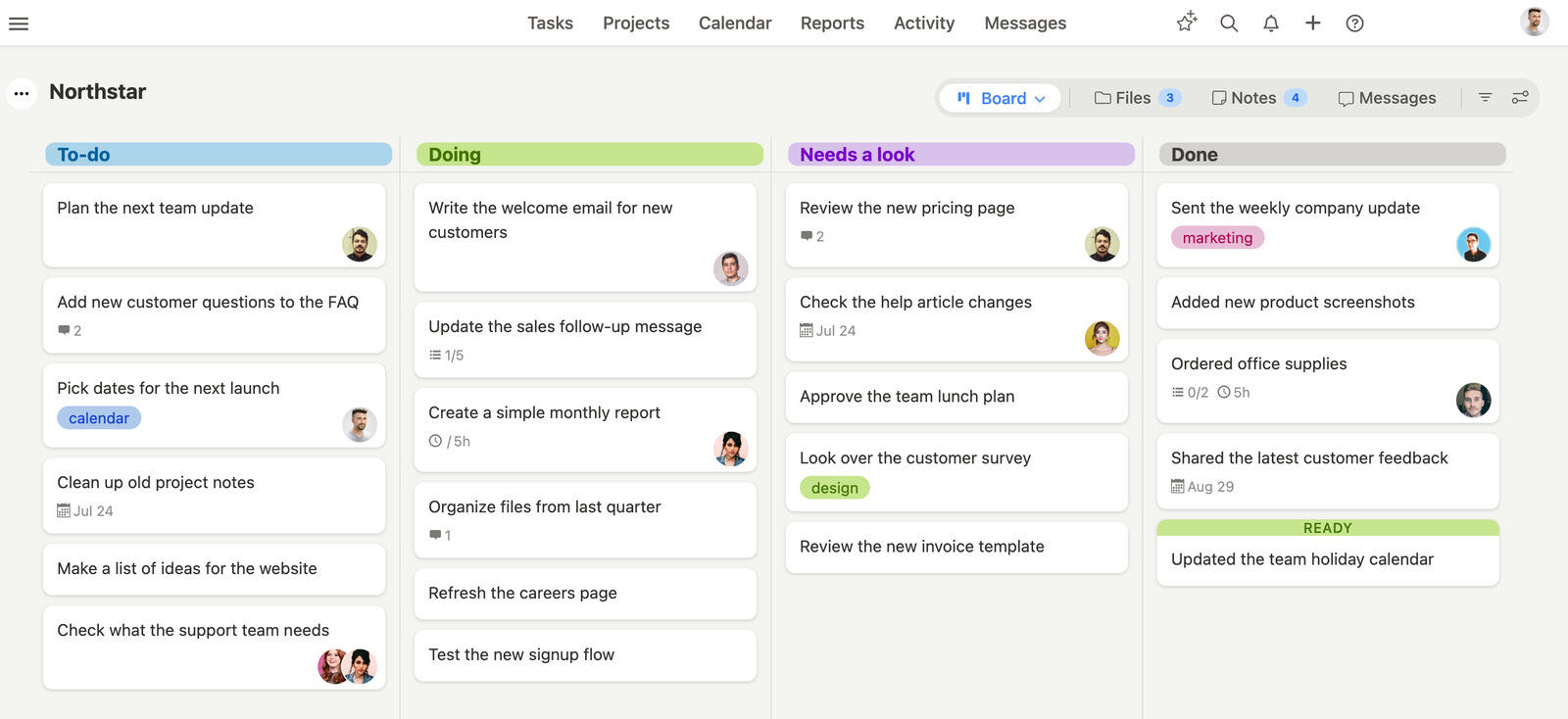
Breeze combines key features into a simple interface. It has flexible task boards, built-in time tracking and basic workflow automation. So teams can stop switching between multiple apps and have clarity when scheduling, assigning tasks or monitoring deadlines. Customizable boards in Breeze help structure ongoing projects while the minimal interface means less time learning new processes.
Unlike tools with steep learning curves, Breeze keeps things effective. Onboarding happens quickly so you can get to real work sooner. For teams that find Trello overly customizable or Todoist too limited, Breeze is a great alternative.
Trello is the one most teams here are really deciding about, since Todoist rarely stretches to project work — where Breeze and Trello differ covers what changes once boards need deadlines, time tracking, and reporting attached to them.
What users say about Breeze
"I like that I can have multiple cards, columns and swimlanes inside one project and customize them however I like."
Source: Capterra
Which tool should you choose?
These two aren't really the same category, and that should drive your choice. Todoist is a personal task manager that a small team can share; it's unbeatable for capturing and checking off individual to-dos, and its natural-language entry makes it stickier day to day. Trello is a lightweight team tool built around a shared visual board, better the moment work has stages, hand-offs, or several people watching the same project. A useful test: if you mostly track your own tasks, Todoist wins; if you're coordinating a group's work through stages, Trello does. The catch is that both stop short of deadlines-plus-time-tracking-plus-reporting territory, which is exactly where a fuller tool like Breeze — boards, timelines, time tracking, and automation together — becomes worth the switch.
Choose Trello if:
- Trello's Kanban boards work well for multi-step processes, while Todoist's lists feel limited for larger workflows
- Power-Ups in Trello connect to Google Drive and Slack, more integrations than Todoist
- Trello's interface is real-time, team-based collaboration, Todoist is individual task management
Choose Todoist if:
- List view is good for basic task management, but Trello's board view is too much for simple needs
- Reminders and priority flags handle deadlines without needing Power-Ups
- Cleaner design, less clutter than Trello's multi-column view
Choose Breeze if:
- Breeze helps teams up and running fast, with no onboarding required. Trello needs Power-Ups for customization and Todoist needs manual work for complex workflows, Breeze is clear and simple right from the start
- With its time tracking built-in , teams can track productivity within the tool. Trello and Todoist don't have native time tracking and need external tools
- Breeze has real-time chat to centralize team conversation. Trello's card comments and Todoist's limited collaboration options make Breeze the better choice for teams that need ongoing discussion in one place
Trello, Todoist and Breeze share a common goal: to help teams stay clear on tasks and projects. Trello uses a board format where cards move from one column to another, a dynamic view of progress. Todoist uses lists, perfect for daily task management. But each has its gaps—Trello might need multiple integrations to cover scheduling or time tracking, Todoist is too minimal for complex projects.
Breeze closes down these gaps by bringing key features together in one place. Instead of using multiple apps, teams can create boards, track hours and automate repetitive tasks all in one spot. This design eliminates extra steps and makes it easy to see which deadlines are coming up or which tasks are left undone. The clean interface allows for quick adoption—smaller teams save time by skipping elaborate setups, while larger teams can scale as needed.
Breeze focuses on the essentials to keep everyone aligned. There is no one-size-fits-all solution. Each team should evaluate its workflow, scalability, and familiarity with new tools to choose the platform that best supports its long-term goals.
FAQ
- Is Trello better than Todoist?
- Trello is better than Todoist for teams that want simple Kanban-based planning. Todoist is better than Trello for people and teams that want lightweight task planning.
- Which tool is easier to use, Trello or Todoist?
- Both are very easy to learn. Todoist is the quickest for personal task capture, while Trello is nearly as simple but adds a visual board that takes slightly more thought to organize.
- How do Trello and Todoist compare on pricing?
- Trello pricing: Free for basic use, with paid plans starting at $5 per user per month. Todoist pricing: Free, with premium features starting from $5 per user per month.
- What is a good alternative to Trello and Todoist?
- Breeze is a strong alternative if you want boards, timelines, time tracking, and automation in one simpler workspace.




