
 Why choose Breeze
 Marketing
 Creative
 Sales
Sales Remote work
 Managers
 Product teams
 Project management
 Task management
 Kanban tool
 Time tracking
 Project reporting
 Project calendars
 Project timeline
 Team workload
 Project automation
 Project customization
 Chat
Chat Web forms
 Project roadmap
 AI
AI What's new
 Articles & guides
 Help center
 Mobile apps
 Integrations
 Developers & API
 Free tools
Notion vs Trello

Disclosure: Breeze publishes this comparison and is one of the tools discussed here. We try to be candid about where Breeze isn't the right fit; weigh that bias when reading our recommendations.
Review process: We compared current vendor documentation, pricing pages, published product interfaces, and independent user reviews. Pricing and plan names were checked against vendor sites on July 16, 2026; vendors change packaging often, so confirm the current total for your team before buying.
Deciding between Notion and Trello depends on how your team approaches work. Trello thrives on simplicity and Kanban boards that make task tracking clear and accessible. It's a tool built for teams that value simple workflows and quick organization. Notion, by contrast, feels more like a blank canvas. It lets you create workspaces with tasks, documents, and databases together. For teams with unique processes or creative workflows, Notion's flexibility can be a significant advantage.
In this article, we'll explore what makes each tool distinct and help you determine which one aligns better with your needs. We'll also consider Breeze, an alternative for teams that want an effective project management tool without the clutter. Breeze offers essential features in a clean, approachable platform, making it perfect for teams of all sizes who want to stay organized without complexity.
Notion vs Trello at a glance
| Feature | Notion | Trello |
|---|---|---|
| Best for | Teams that combine documentation, planning, and lightweight project management | Teams that want simple Kanban-based planning |
| Pricing | Free for personal use, with team plans starting at $10 per user per month | Free for basic use, with paid plans starting at $5 per user per month |
| Rating | 4.7/5 on Capterra | 4.5/5 on Capterra |
| Standout strengths | Build beyond Kanban boards by creating wikis, databases, and project trackers all within one platform—perfect for teams managing diverse workflows; Use a variety of templates to kickstart projects, saving you time and effort, which Trello's card-based system may not offer | Trello is purpose-built for task tracking, a clear and structured approach compared to Notion's general-purpose workspace; Getting started with Trello is quick and effortless, thanks to its pre-built boards and templates, while Notion often requires time for customization |
| Main tradeoff | Turning its flexible building blocks into a consistent project system takes upfront setup | Simple by design — boards get unwieldy once projects need timelines or reporting |
Quick verdict: Notion vs Trello
Choose Notion if:
- Build beyond Kanban boards by creating wikis, databases, and project trackers all within one platform—perfect for teams managing diverse workflows
- Use a variety of templates to kickstart projects, saving you time and effort, which Trello's card-based system may not offer
- Combine notes, tasks, and documentation seamlessly, keeping all project-related content in a single, organized location
Choose Trello if:
- Trello is purpose-built for task tracking, a clear and structured approach compared to Notion's general-purpose workspace
- Getting started with Trello is quick and effortless, thanks to its pre-built boards and templates, while Notion often requires time for customization
- Trello provides a lightweight experience, avoiding the complexity of menus and features that can make Notion overwhelming for some users
Choose Breeze if:
- Breeze is made for quick adoption, letting teams manage projects without extensive setup. Unlike Notion, which requires significant configuration to build workflows, or Trello, which relies heavily on Power-Ups for additional functionality, Breeze keeps the process clear from day one
- Unlike Trello, which depends on third-party integrations, or Notion, which lacks native time-tracking entirely, Breeze includes built-in time tracking as a core feature. This functionality ensures teams can monitor productivity without added complexity
- Breeze has essential features like workflow automation , and real-time chat . While Notion excels in customization, it can feel complicated for teams managing projects. Similarly, Trello's simplicity can fall short for teams needing advanced tools. Breeze strikes the perfect balance
Key differences between Notion and Trello
Notion is a better fit for teams that combine documentation, planning, and lightweight project management. Trello is a better fit for teams that want simple Kanban-based planning.
The main difference comes down to how much structure, setup, and reporting your team needs. Notion usually has a moderate learning curve, while Trello usually has a lower learning curve.
Is Notion better than Trello?
Notion is better than Trello for teams that combine documentation, planning, and lightweight project management.
Trello is better than Notion for teams that want simple Kanban-based planning.
Breeze is a good alternative if you want boards, timelines, time tracking, and automation in one simpler workspace.
Narrowing the choice gets easier after looking at Notion alternatives and Trello alternatives.
The pattern tends to repeat, and Notion vs Asana covers an adjacent pair.
What is Notion?

- Pricing: Free for personal use, with team plans starting at $10 per user per month
- Rating: 4.7/5 on Capterra
Notion has a dynamic approach to workspace organization, making it a standout option for teams seeking flexibility beyond Trello's straightforward task management. With Notion, you're not confined to a single system—you can craft anything from detailed project plans to shared team wikis, giving you the freedom to structure workflows however you see fit. Trello, in contrast, is ideal for teams that thrive on visual simplicity and predefined structure.
For those looking to integrate notes, databases, and tasks into one platform, Notion provides an all-in-one solution that's hard to beat. While its flexibility is a strength, it requires more time to set up and explore compared to Trello's plug-and-play Kanban boards. However, the trade-off is a workspace that adapts to your evolving needs, making it an invaluable tool for complex projects.
What users say about Notion
"Notion is a very good application since it can help me organize my notes."
Source: Capterra
What is Trello?

- Pricing: Free for basic use, with paid plans starting at $5 per user per month
- Rating: 4.5/5 on Capterra
Trello's visual-first approach makes task management straightforward and accessible, standing in contrast to Notion's open-ended workspace. While Notion has endless customization and multi-purpose tools, Trello zeroes in on Kanban boards for task tracking. This specificity is an advantage for teams that prefer simplicity over flexibility—Trello removes guesswork and keeps workflows streamlined.
Unlike Notion, which requires users to create and structure their own workspaces, Trello is ready to use from the start. Its layout eliminates the need for tutorials or setup time. For teams that prioritize quick onboarding and simple navigation, Trello has immediate path to productivity.
What users say about Trello
"Overally, I highly regard Trello for its intuitive interface, flexible functionality and robust collaboration features."
Source: Capterra
Notion vs Trello features
Notion and Trello overlap on core project management, but they emphasize different strengths. The main differences usually come down to workflow depth, visibility, setup effort, and how much structure the team needs day to day.
| Area | Notion | Trello |
|---|---|---|
| Workflow style | Teams that combine documentation, planning, and lightweight project management | Teams that want simple Kanban-based planning |
| Top strengths | Build beyond Kanban boards by creating wikis, databases, and project trackers all within one platform—perfect for teams managing diverse workflows; Use a variety of templates to kickstart projects, saving you time and effort, which Trello's card-based system may not offer | Trello is purpose-built for task tracking, a clear and structured approach compared to Notion's general-purpose workspace; Getting started with Trello is quick and effortless, thanks to its pre-built boards and templates, while Notion often requires time for customization |
| Ease of use | Moderate learning curve | Lower learning curve |
| Main tradeoff | Turning its flexible building blocks into a consistent project system takes upfront setup | Simple by design — boards get unwieldy once projects need timelines or reporting |
Notion stands out when teams need to build beyond Kanban boards — wikis, databases, and project trackers in one platform — with a template library that kickstarts projects in ways Trello's card-based system doesn't match.
Trello stands out when teams want a purpose-built, visual task tracker that's clearer than Notion's general-purpose workspace and effortless to start, with pre-built boards and templates that skip the customization Notion often needs.
Notion vs Trello pricing
Pricing changes over time, so confirm the latest details on each vendor site before you commit.
| Plan detail | Notion | Trello |
|---|---|---|
| Pricing | Free for personal use, with team plans starting at $10 per user per month | Free for basic use, with paid plans starting at $5 per user per month |
| Rating | 4.7/5 on Capterra | 4.5/5 on Capterra |
Notion pricing: Free for personal use, with team plans starting at $10 per user per month.
Trello pricing: Free for basic use, with paid plans starting at $5 per user per month.
The better value depends on team size, feature needs, and how much workflow depth or reporting your team actually needs.
Notion vs Trello ease of use
Notion usually has a moderate learning curve.
Trello usually has a lower learning curve.
If your team values fast adoption and lower overhead, choose the simpler option. If you need more control, customization, or reporting, a steeper learning curve can still be worth it.
Notion pros and cons
Notion pros
- Build beyond Kanban boards by creating wikis, databases, and project trackers all within one platform—perfect for teams managing diverse workflows
- Use a variety of templates to kickstart projects, saving you time and effort, which Trello's card-based system may not offer
- Combine notes, tasks, and documentation seamlessly, keeping all project-related content in a single, organized location
- Collaborate in real time with multiple contributors editing the same page simultaneously—ideal for distributed teams working across time zones
- Easily integrate with tools like Google Calendar, Slack, and GitHub to centralize communication and streamline your processes
- Take advantage of Notion's free plan for personal use, with more capabilities than Trello's basic tier
Notion cons
- Turning a flexible workspace into a consistent project system takes upfront design
- No native time tracking, and reporting is thin next to dedicated PM tools
- Databases and mobile performance slow down on large, heavily linked workspaces
- Costs can rise as more teammates need paid access
Trello pros and cons
Trello pros
- Trello is purpose-built for task tracking, a clear and structured approach compared to Notion's general-purpose workspace
- Getting started with Trello is quick and effortless, thanks to its pre-built boards and templates, while Notion often requires time for customization
- Trello provides a lightweight experience, avoiding the complexity of menus and features that can make Notion overwhelming for some users
- The card-based system in Trello simplifies collaborative task tracking, keeping teams aligned without requiring extensive configuration
- Trello has a broader range of integrations with Power-Ups, connecting to tools like Google Drive, Slack, and Jira
- Its drag-and-drop interface ensures minimal onboarding time, making it accessible even for first-time users, unlike Notion, which may have a steeper learning curve
- Trello's free plan supports team collaboration without the limitations of Notion's personal-focused free tier
Trello cons
- The board-and-card model gets unwieldy for projects with dependencies or timelines
- No built-in Gantt, time tracking, or reporting without paid Power-Ups
- Automation runs and larger boards are limited on the free plan
- Better for tracking tasks than for planning or documenting them
When Notion is the better choice
- Build beyond Kanban boards by creating wikis, databases, and project trackers all within one platform—perfect for teams managing diverse workflows
- Use a variety of templates to kickstart projects, saving you time and effort, which Trello's card-based system may not offer
- Combine notes, tasks, and documentation seamlessly, keeping all project-related content in a single, organized location
When Trello is the better choice
- Trello is purpose-built for task tracking, a clear and structured approach compared to Notion's general-purpose workspace
- Getting started with Trello is quick and effortless, thanks to its pre-built boards and templates, while Notion often requires time for customization
- Trello provides a lightweight experience, avoiding the complexity of menus and features that can make Notion overwhelming for some users
Breeze as an alternative
While Notion and Trello are popular choices in the project management space, Breeze is a great alternative for teams prioritizing simplicity. With tools that streamline task organization, time tracking, and workflow management, Breeze supports teams aiming to stay efficient without the clutter of excessive features. It's a practical option for those seeking a balance between usability and essential functionality.
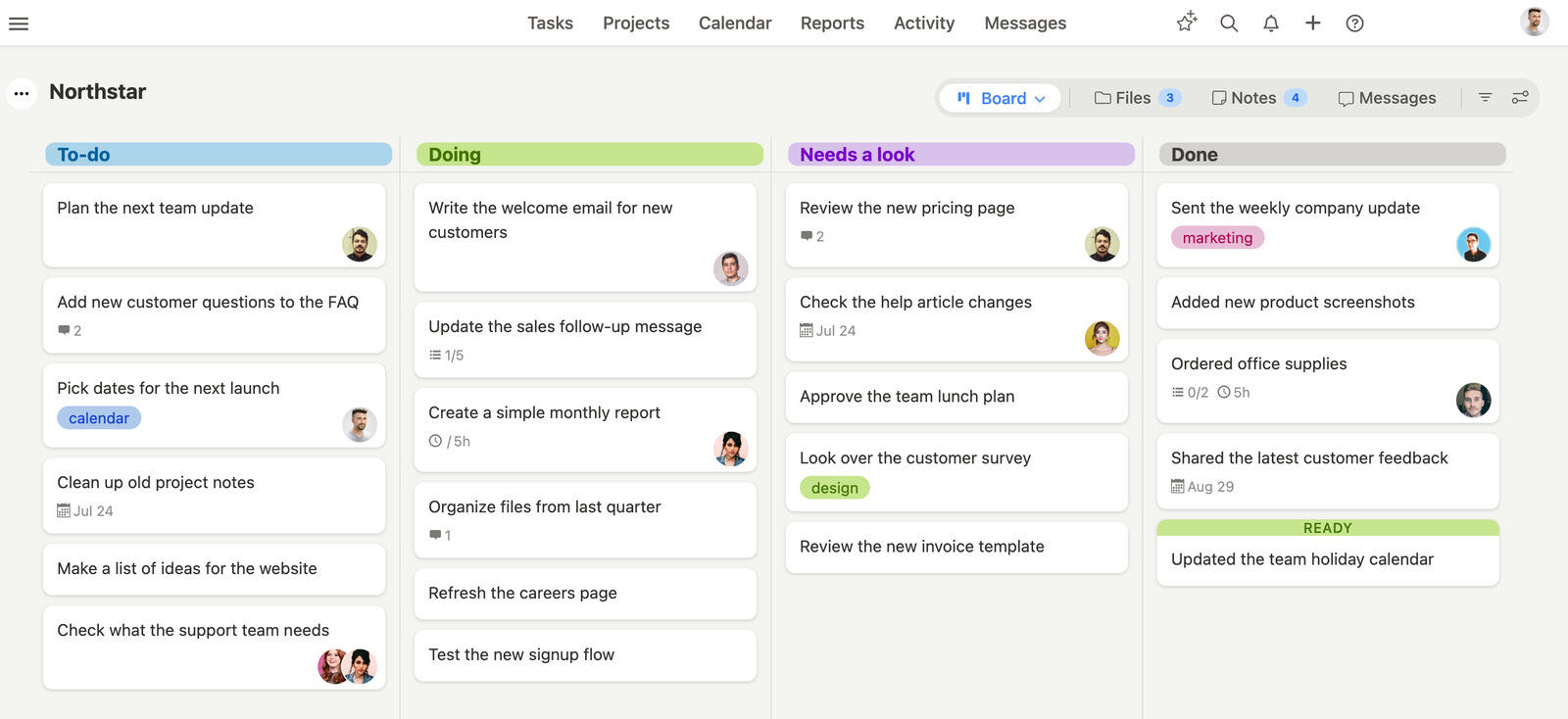
Breeze provides the essential tools teams need without added complexity. While Notion offers an expansive canvas for customization and Trello excels at visual organization, Breeze strikes a middle ground. It's a platform that enables teams to stay organized, track progress, and meet deadlines without distractions or lengthy onboarding.
With its intuitive design, Breeze allows users to manage tasks, timelines, and team collaboration effortlessly. For teams looking for a solution that prioritizes usability while covering the fundamentals of project management, Breeze is a refreshing alternative.
Middle ground is easy to claim and harder to show, so both are laid out in full — Breeze against Notion directly on the build-it-yourself trade-off, and the full Trello comparison on what boards alone leave out.
What users say about Breeze
"Our overall experience has been positive."
Source: Capterra
Which tool should you choose?
The honest split is documentation versus doing. Notion is the better home for teams whose work is knowledge — specs, wikis, and databases they want tasks to live beside — and who will spend the setup time to make it a real tracker. Trello wins when the work is a flow of discrete tasks and you want a board anyone can use in five minutes, no manual required. Moving from Trello to Notion is easy since a board is a small thing to leave behind; the reverse means losing structure. The catch is that both hit a ceiling once you need timelines, time tracking, and reporting together — that's the gap a purpose-built board tool like Breeze fills, though for pure docs Notion still wins and for the simplest boards Trello is hard to beat.
Choose Notion if:
- Build beyond Kanban boards by creating wikis, databases, and project trackers all within one platform—perfect for teams managing diverse workflows
- Use a variety of templates to kickstart projects, saving you time and effort, which Trello's card-based system may not offer
- Combine notes, tasks, and documentation seamlessly, keeping all project-related content in a single, organized location
Choose Trello if:
- Trello is purpose-built for task tracking, a clear and structured approach compared to Notion's general-purpose workspace
- Getting started with Trello is quick and effortless, thanks to its pre-built boards and templates, while Notion often requires time for customization
- Trello provides a lightweight experience, avoiding the complexity of menus and features that can make Notion overwhelming for some users
Choose Breeze if:
- Breeze is made for quick adoption, letting teams manage projects without extensive setup. Unlike Notion, which requires significant configuration to build workflows, or Trello, which relies heavily on Power-Ups for additional functionality, Breeze keeps the process clear from day one
- Unlike Trello, which depends on third-party integrations, or Notion, which lacks native time-tracking entirely, Breeze includes built-in time tracking as a core feature. This functionality ensures teams can monitor productivity without added complexity
- Breeze has essential features like workflow automation , and real-time chat . While Notion excels in customization, it can feel complicated for teams managing projects. Similarly, Trello's simplicity can fall short for teams needing advanced tools. Breeze strikes the perfect balance
Picking out the right tool comes down to what matters most for your team. Trello excels with its simple, visual task management, making it ideal for smaller teams or those new to project management. Notion, on the other hand, offers unmatched flexibility, allowing teams and individuals to tailor their workflows to suit diverse needs.
For teams looking for a simple to use project management tool with all the essential features Breeze is a solution worth exploring. Its built-in time tracking, workflow automation, and streamlined interface make it a practical choice for teams looking to stay organized and productive. Evaluate these options carefully, involve your team in the decision, and pick the project management tool that empowers you to work smarter, not harder.
FAQ
- Is Notion better than Trello?
- Notion is better than Trello for teams that combine documentation, planning, and lightweight project management. Trello is better than Notion for teams that want simple Kanban-based planning.
- Which tool is easier to use, Notion or Trello?
- Notion usually has a moderate learning curve, while Trello usually has a lower learning curve.
- How do Notion and Trello compare on pricing?
- Notion pricing: Free for personal use, with team plans starting at $10 per user per month. Trello pricing: Free for basic use, with paid plans starting at $5 per user per month.
- What is a good alternative to Notion and Trello?
- Breeze is a strong alternative if you want boards, timelines, time tracking, and automation in one simpler workspace.




