
 Why choose Breeze
 Marketing
 Creative
 Sales
Sales Remote work
 Managers
 Product teams
 Project management
 Task management
 Kanban tool
 Time tracking
 Project reporting
 Project calendars
 Project timeline
 Team workload
 Project automation
 Project customization
 Chat
Chat Web forms
 Project roadmap
 AI
AI What's new
 Articles & guides
 Help center
 Mobile apps
 Integrations
 Developers & API
 Free tools
Microsoft Planner vs Trello

Disclosure: Breeze publishes this comparison and is one of the tools discussed here. We try to be candid about where Breeze isn't the right fit; weigh that bias when reading our recommendations.
Review process: We compared current vendor documentation, pricing pages, published product interfaces, and independent user reviews. Pricing and plan names were checked against vendor sites on July 16, 2026; vendors change packaging often, so confirm the current total for your team before buying.
Microsoft Planner or Trello? It depends on your team's workflow and tools. Trello is all about simplicity, and Kanban boards for easy task tracking. Good for teams that value quick organization and simple interfaces. Microsoft Planner is deeply integrated with the Microsoft 365 suite so it is good for businesses already using Teams and SharePoint.
This article looks at the pros and cons of each to help you decide which is right for your team. We'll also check out Breeze. Many teams have switched to Breeze to stay productive and efficient while keeping things simple as Breeze avoids the complexity of bloated platforms.
Microsoft Planner vs Trello at a glance
| Feature | Microsoft Planner | Trello |
|---|---|---|
| Best for | Microsoft 365 teams that want simple shared task planning | Teams that want simple Kanban-based planning |
| Pricing | Basic Planner is bundled into Microsoft 365; standalone Planner Plan 1 is $10 per user per month | Free for basic use, with paid plans starting at $5 per user per month |
| Rating | 4.3/5 on Capterra | 4.5/5 on Capterra |
| Standout strengths | Built-in tasks, shared calendars, and file sharing that integrate directly with Teams, Outlook, and the rest of Microsoft 365 | Fast, visual Kanban boards and a big template gallery, plus Power-Ups for integrations with Google Drive, Slack, and more |
| Main tradeoff | Only really pays off for teams already committed to Microsoft 365 | Boards get unwieldy on complex projects; advanced features need paid Power-Ups |
Quick verdict: Microsoft Planner vs Trello
Choose Microsoft Planner if:
- Plan and track tasks with built in tools that integrate directly with the Microsoft 365 suite so everything is in one place
- Coordinate schedules and manage deadlines across teams with shared calendars tied to tasks
- Combine communication, file sharing and task management into one platform so you don't need external integrations
Choose Trello if:
- Kanban boards for a visual and structured way to track tasks, less setup than Microsoft Planner's feature rich interface
- Pre-configured templates to get started faster than Microsoft Planner's reliance on Microsoft 365 workflows
- A lightweight platform, with no complexity from Microsoft Planner's broader integrations
Choose Breeze if:
- With Breeze, your team can get started right away, avoiding the lengthy setups often required by Microsoft Planner's integrations or Trello's reliance on Power-Ups
- Unlike Trello, which requires third-party apps, or Microsoft Planner, which lacks built-in tracking, Breeze simplifies tracking progress within the platform itself
- Breeze focuses on tools like workflow automation and real-time chat, keeping functionality straightforward without unnecessary complexity
Key differences between Microsoft Planner and Trello
Microsoft Planner is a better fit for Microsoft 365 teams that want simple shared task planning. Trello is a better fit for teams that want simple Kanban-based planning.
The main difference comes down to how much your team already lives inside Microsoft 365. Both tools are easy to learn, but Trello's single-board, drag-and-drop layout is the quickest to grasp, while Planner is simplest for teams already working in Teams and Outlook.
Is Microsoft Planner better than Trello?
Microsoft Planner is better than Trello for Microsoft 365 teams that want simple shared task planning.
Trello is better than Microsoft Planner for teams that want simple Kanban-based planning.
Breeze is a good alternative if you want boards, timelines, time tracking, and automation in one simpler workspace.
For a broader shortlist, the roundups of Microsoft Planner alternatives and Trello alternatives go further.
Want to widen the lens a little? Microsoft Planner vs Jira compares a different but related duo.
What is Microsoft Planner?

- Pricing: Basic Planner is bundled into most Microsoft 365 business subscriptions; the standalone Planner Plan 1 is $10 per user per month.
- Rating: 4.3/5 on Capterra
Microsoft Planner has a structured and integrated approach to workspaces. It is a good choice for users of the Microsoft 365 ecosystem. Unlike Trello's visual simplicity through Kanban boards, Microsoft Planner has tools to create plans, assign tasks and coordinate across multiple projects. It's for teams who want task management to be integrated with communication and file sharing platforms like Teams and OneDrive.
For those who need a single platform to track tasks and collaborate within their existing Microsoft setup Microsoft Planner is a good solution. However while the integration is a strength the interface can take some time to get used to, especially for those looking for a simple out of the box tool like Trello. But Microsoft Planner's features and built in connections to Microsoft tools make it a solid choice for business teams.
What users say about Microsoft Planner
"Microsoft Planner is a valuable project management tool that excels in simplifying task and project management, particularly for small to mid-sized teams."
Source: Capterra
What is Trello?

- Pricing: Free for basic use, with paid plans starting at $5 per user per month
- Rating: 4.5/5 on Capterra
Trello's visual design makes task management easy, unlike Microsoft Planner's integrated but structured approach. With Kanban boards, Trello gives teams a way to organize tasks, track progress and manage workflows. Simple is good for smaller projects or teams that don't need a tool with lots of setups.
Microsoft Planner integrates with the Microsoft 365 suite but can be complex for non-Microsoft users. Drag and drop and pre-configured templates mean teams can get started quickly with minimal effort to adapt the tool to their needs. If ease and speed are your priority, Trello is a good option.
What users say about Trello
"Finally, it has imposed order on my chaos with regard to to-do lists."
Source: Capterra
Microsoft Planner vs Trello features
Microsoft Planner and Trello overlap on core project management, but they emphasize different strengths. The main differences usually come down to workflow depth, visibility, setup effort, and how much structure the team needs day to day.
| Area | Microsoft Planner | Trello |
|---|---|---|
| Workflow style | Microsoft 365 teams that want simple shared task planning | Teams that want simple Kanban-based planning |
| Top strengths | Plan and track tasks with built in tools that integrate directly with the Microsoft 365 suite so everything is in one place; Coordinate schedules and manage deadlines across teams with shared calendars tied to tasks | Kanban boards for a visual and structured way to track tasks, less setup than Microsoft Planner's feature rich interface; Pre-configured templates to get started faster than Microsoft Planner's reliance on Microsoft 365 workflows |
| Ease of use | Low learning curve for Microsoft 365 users | Very low learning curve |
| Main tradeoff | Only really pays off for teams already committed to Microsoft 365 | Boards get unwieldy on complex projects; advanced features need paid Power-Ups |
Microsoft Planner stands out for keeping task planning inside Microsoft 365 — built-in tasks, shared calendars, and file sharing that connect straight to Teams and Outlook, so there's nothing extra to wire up.
Trello stands out for its fast, visual Kanban boards and low setup: a large template gallery gets teams moving in minutes, and Power-Ups add integrations as needs grow.
Microsoft Planner vs Trello pricing
Pricing changes over time, so confirm the latest details on each vendor site before you commit.
| Plan detail | Microsoft Planner | Trello |
|---|---|---|
| Pricing | Basic Planner is bundled into Microsoft 365; standalone Planner Plan 1 is $10 per user per month | Free for basic use, with paid plans starting at $5 per user per month |
| Rating | 4.3/5 on Capterra | 4.5/5 on Capterra |
Microsoft Planner pricing: basic Planner is bundled into most Microsoft 365 business subscriptions, so many teams already have it; the standalone Planner Plan 1 is $10 per user per month.
Trello pricing: Free for basic use, with paid plans starting at $5 per user per month.
The better value depends on team size, feature needs, and how much workflow depth or reporting your team actually needs.
Microsoft Planner vs Trello ease of use
Microsoft Planner is simple to use, though it feels most natural to people already working across Teams, Outlook, and the rest of Microsoft 365.
Trello has the gentler on-ramp: a single board of cards and lists that almost anyone understands at a glance, no ecosystem required.
If your team values fast adoption and lower overhead, choose the simpler option. If you need more control, customization, or reporting, a steeper learning curve can still be worth it.
Microsoft Planner pros and cons
Microsoft Planner pros
- Plan and track tasks with built in tools that integrate directly with the Microsoft 365 suite so everything is in one place
- Coordinate schedules and manage deadlines across teams with shared calendars tied to tasks
- Combine communication, file sharing and task management into one platform so you don't need external integrations
- Use pre-built templates for project planning to save time and not start from scratch
- See project progress with clear dashboards that show deadlines and team responsibilities
- Affordable pricing is bundled with Microsoft 365, making it a cost-effective option for existing users
Microsoft Planner cons
- Really only makes sense for teams already committed to Microsoft 365
- Shallow feature set — no timelines, dependencies, or advanced reporting
- No native time tracking, and automation is minimal
- Limited value for anyone working outside the Microsoft ecosystem
Trello pros and cons
Trello pros
- Kanban boards for a visual and structured way to track tasks, less setup than Microsoft Planner's feature rich interface
- Pre-configured templates to get started faster than Microsoft Planner's reliance on Microsoft 365 workflows
- A lightweight platform, with no complexity from Microsoft Planner's broader integrations
- Collaboration is simpler with Trello's card based system, tasks and updates are centralized for better team alignment
- A wide range of Power-Ups to connect to tools like Google Drive, Slack and Jira
- Drag and drop interface so even first time users can get started quickly
Trello cons
- Boards get cluttered fast on large or multi-stage projects
- Calendar, timeline, and automation limits sit behind paid Power-Ups or higher tiers
- No built-in time tracking and only light native reporting
- Few views beyond the Kanban board compared with fuller platforms
When Microsoft Planner is the better choice
- Plan and track tasks with built in tools that integrate directly with the Microsoft 365 suite so everything is in one place
- Coordinate schedules and manage deadlines across teams with shared calendars tied to tasks
- Combine communication, file sharing and task management into one platform so you don't need external integrations
When Trello is the better choice
- Kanban boards for a visual and structured way to track tasks, less setup than Microsoft Planner's feature rich interface
- Pre-configured templates to get started faster than Microsoft Planner's reliance on Microsoft 365 workflows
- A lightweight platform, with no complexity from Microsoft Planner's broader integrations
Breeze as an alternative
While Microsoft Planner and Trello are well known tools in the project management space, Breeze is a great alternative for teams that want simplicity and effectiveness. Breeze is designed to improve workflows, and task management while having built in time tracking. It's perfect for teams that want clarity and functionality.
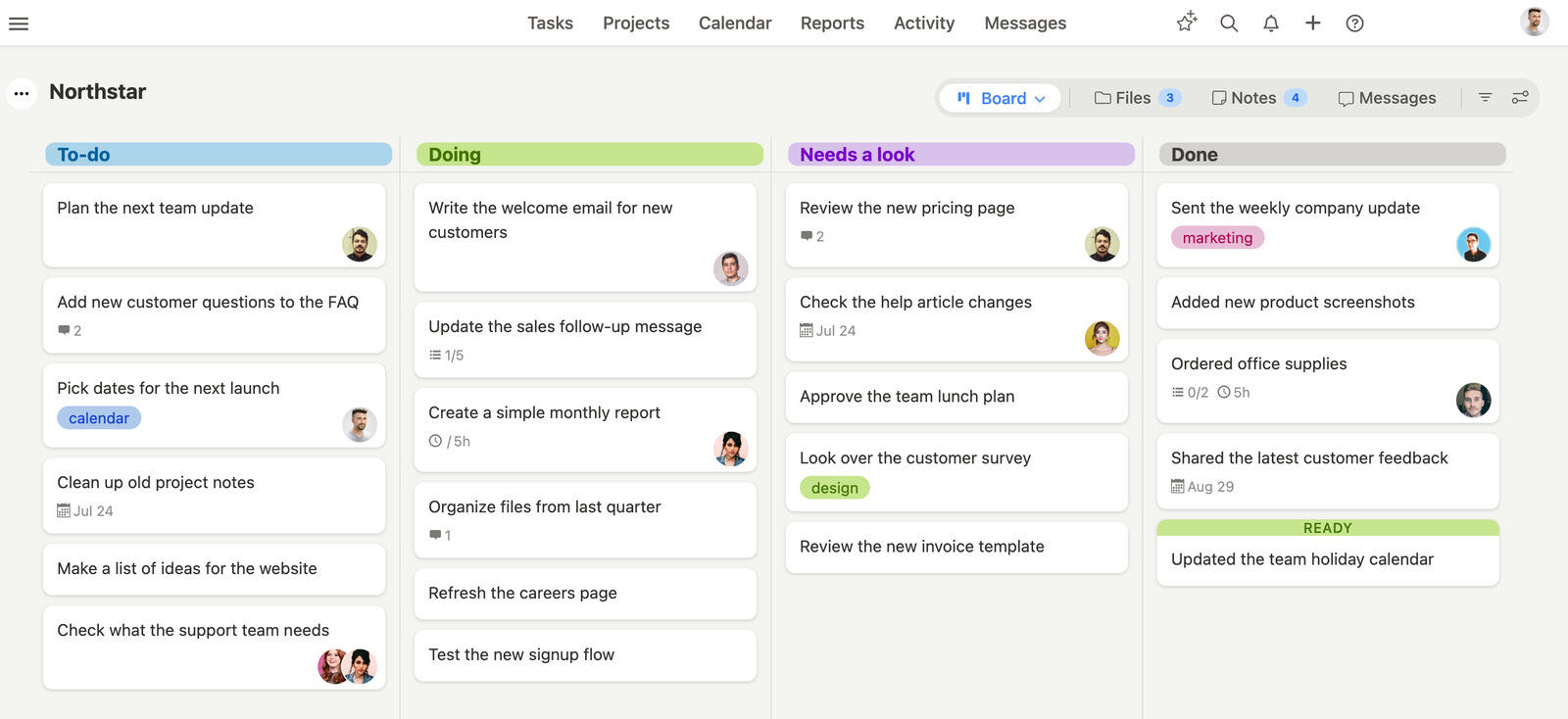
Breeze gives you the essential tools you need, and keeps it simple. On the other hand, Microsoft Planner is integrated into the Microsoft 365 ecosystem and Trello is great at visual task management. Breeze makes your work easier with features like custom boards and task prioritization. Teams can focus on progress without too much configuration or hidden costs.
Breeze has a simple interface. For teams that want to stay on track with a tool that's both usable and practical Breeze is a clean and distraction free solution for modern project management.
Trello is the closer of the two on day-to-day board work, and where Breeze lands against Trello covers the point at which visual task management starts needing reporting and time tracking behind it.
What users say about Breeze
"Breeze has made project management very easy."
Source: Capterra
Which tool should you choose?
The deciding question is almost entirely about Microsoft 365. If your company already pays for it and lives in Teams and Outlook, Planner is essentially free and keeps everything in one login — that convenience usually outweighs its thin feature set. If you're not on Microsoft 365, Planner makes little sense, and Trello's free plan and instant setup are the easier win. Both are lightweight enough that switching later is cheap; the harder decision is when your projects outgrow simple boards and you need timelines, dependencies, or reporting that neither tool really provides.
Choose Microsoft Planner if:
- Plan and track tasks with built in tools that integrate directly with the Microsoft 365 suite so everything is in one place
- Coordinate schedules and manage deadlines across teams with shared calendars tied to tasks
- Combine communication, file sharing and task management into one platform so you don't need external integrations
Choose Trello if:
- Kanban boards for a visual and structured way to track tasks, less setup than Microsoft Planner's feature rich interface
- Pre-configured templates to get started faster than Microsoft Planner's reliance on Microsoft 365 workflows
- A lightweight platform, with no complexity from Microsoft Planner's broader integrations
Choose Breeze if:
- With Breeze, your team can get started right away, avoiding the lengthy setups often required by Microsoft Planner's integrations or Trello's reliance on Power-Ups
- Unlike Trello, which requires third-party apps, or Microsoft Planner, which lacks built-in tracking, Breeze simplifies tracking progress within the platform itself
- Breeze focuses on tools like workflow automation and real-time chat, keeping functionality straightforward without unnecessary complexity
Success in project management isn't about which tool has more features—it's about how well it fits your team's workflow. Microsoft Planner is great in Microsoft organizations and Trello is good at visual task management, but the key is knowing your team's needs.
Think about how your team actually works, not how you wish they worked. Do they prefer quick visual updates or detailed task tracking? Are they comfortable learning new systems or do they need something that feels familiar? The best tool is one that becomes invisible in your daily workflow so your team can manage projects and keep assignments on schedule.
Before you make your final decision, run a small test project on your shortlisted platform. See how your team adapts and what features they naturally gravitate towards. Remember, it's not about changing how your team works—it's about finding a tool that amplifies their strengths and fills the gaps in their current workflow.
FAQ
- Is Microsoft Planner better than Trello?
- Microsoft Planner is better than Trello for Microsoft 365 teams that want simple shared task planning. Trello is better than Microsoft Planner for teams that want simple Kanban-based planning.
- Which tool is easier to use, Microsoft Planner or Trello?
- Both are easy to learn. Trello's single-board, drag-and-drop layout is the quickest to grasp, while Microsoft Planner is simple but assumes your team is already comfortable inside Microsoft 365.
- How do Microsoft Planner and Trello compare on pricing?
- Microsoft Planner pricing: basic Planner is bundled into most Microsoft 365 business subscriptions, and the standalone Planner Plan 1 is $10 per user per month. Trello pricing: Free for basic use, with paid plans starting at $5 per user per month.
- What is a good alternative to Microsoft Planner and Trello?
- Breeze is a strong alternative if you want boards, timelines, time tracking, and automation in one simpler workspace.




