
 Why choose Breeze
 Marketing
 Creative
 Sales
Sales Remote work
 Managers
 Product teams
 Project management
 Task management
 Kanban tool
 Time tracking
 Project reporting
 Project calendars
 Project timeline
 Team workload
 Project automation
 Project customization
 Chat
Chat Web forms
 Project roadmap
 AI
AI What's new
 Articles & guides
 Help center
 Mobile apps
 Integrations
 Developers & API
 Free tools
MeisterTask vs Trello

Disclosure: Breeze publishes this comparison and is one of the tools discussed here. We try to be candid about where Breeze isn't the right fit; weigh that bias when reading our recommendations.
Review process: We compared current vendor documentation, pricing pages, published product interfaces, and independent user reviews. Pricing and plan names were checked against vendor sites on July 16, 2026; vendors change packaging often, so confirm the current total for your team before buying.
Project management tools should simplify work, not complicate it. While Trello offers visual Kanban boards and MeisterTask integrates features seamlessly, teams often find themselves wrestling with tools that promise more than they deliver. If you're asking why choose Breeze, it's because it brings together task management, time tracking, and collaboration into an easy-to-use tool.
We'll compare MeisterTask and Trello, and their strengths and weaknesses. By understanding how each tool fits different workflows you can decide which one is best for your team. We'll also explore Breeze. The project management tool for teams that value simplicity and efficiency.
MeisterTask vs Trello at a glance
| Feature | MeisterTask | Trello |
|---|---|---|
| Best for | Teams that want simple visual task boards | Teams that want simple Kanban-based planning |
| Pricing | Free for basic use, with premium plans starting at $13.50 per user per month | Free for basic use, with paid plans starting at $5 per user per month |
| Rating | 4.7/5 on Capterra | 4.5/5 on Capterra |
| Standout strengths | MeisterTask has time tracking and task automation built-in, Trello requires Power-Ups for that; Modern design and user friendly interface for a smoother experience than Trello's old school design | Trello's Kanban boards are visual task management, so easier to organize projects than MeisterTask's minimal design; Power-Ups have more integrations with Google Drive, Slack and Jira than MeisterTask's bundled features |
| Main tradeoff | Fewer integrations and less enterprise depth than larger platforms | Boards get unwieldy on complex projects; advanced features need paid Power-Ups |
Quick verdict: MeisterTask vs Trello
Choose MeisterTask if:
- MeisterTask has time tracking and task automation built-in, Trello requires Power-Ups for that
- Modern design and user friendly interface for a smoother experience than Trello's old school design
- Integration with the MindMeister suite to go from brainstorming to task execution, Trello doesn't support that natively
Choose Trello if:
- Trello's Kanban boards are visual task management, so easier to organize projects than MeisterTask's minimal design
- Power-Ups have more integrations with Google Drive, Slack and Jira than MeisterTask's bundled features
- Trello's free plan is for smaller teams, while MeisterTask's free version is more limited
Choose Breeze if:
- Breeze includes time tracking natively, enabling teams to monitor productivity directly in the platform. Trello relies on Power-Ups for this functionality, and MeisterTask's time tracking, while present, lacks the same level of integration and usability
- Breeze offers customizable Kanban boards that adapt to your team's structure, combining simplicity and flexibility. While Trello's Kanban system is popular, it often requires additional Power-Ups for advanced use. MeisterTask's minimalistic approach focuses on design, which may not satisfy teams managing more complex workflows
- Breeze simplifies task automation with workflow automation , helping teams eliminate repetitive tasks. Trello supports automation via Power-Ups, and MeisterTask offers limited automation within its system
Key differences between MeisterTask and Trello
MeisterTask is a better fit for teams that want simple visual task boards. Trello is a better fit for teams that want simple Kanban-based planning.
The main difference comes down to how much structure, setup, and reporting your team needs. Both are easy to adopt, but Trello's stripped-back boards are the quickest to learn, while MeisterTask asks for a little more upfront setup in exchange for built-in automation and time tracking.
Is MeisterTask better than Trello?
MeisterTask is better than Trello for teams that want simple visual task boards.
Trello is better than MeisterTask for teams that want simple Kanban-based planning.
Breeze is a good alternative if you want boards, timelines, time tracking, and automation in one simpler workspace.
Teams that pass on it often shortlist a few other Trello alternatives instead.
Coming at it from the other side? MeisterTask alternatives compares the wider field, including options that include subtasks and timelines without a Business-plan upgrade.
For the personal-productivity side of the same question, MeisterTask vs Todoist covers boards against lists and which features each vendor puts behind a paywall.
What is MeisterTask?

- Pricing: Free for basic use, with premium plans starting at $13.50 per user per month
- Rating: 4.7/5 on Capterra
MeisterTask is known for its modern design and built-in features. Unlike Trello which relies on Power-Ups for extra functionality, MeisterTask has time tracking and automation built-in. So if you value integrated solutions over add-ons, MeisterTask is a great choice. Plus the clean design and easy navigation is perfect for teams who want a simple setup.
MeisterTask offers a balance of simplicity and functionality. The project based approach allows for easy workflow customization, good for teams managing diverse or complex tasks. MeisterTask also integrates with the whole MindMeister suite, so you have an ecosystem for brainstorming and task delegation. If you want a polished all-in-one solution without the need for many integrations, MeisterTask is a decent option.
What users say about MeisterTask
"I utilize it for professional SEO work and blogging, and I have found it immensely valuable in enhancing my organization."
Source: Capterra
What is Trello?

- Pricing: Free for basic use, with paid plans starting at $5 per user per month
- Rating: 4.5/5 on Capterra
Trello's visual approach makes task management easy. Using Kanban boards, teams can organize work by moving task cards across columns and get a clear view of progress. Trello stands out for its flexibility, with Power-Ups and integrations with Google Drive, Slack and Jira. That's why Trello is a favorite across many industries.
Compared to MeisterTask which has a nice interface and some built-in advanced features like time tracking, Trello has a bigger library of integrations and customization options. While MeisterTask's design might be perfect for teams that value simplicity, Trello is better for teams that need a scalable platform with many features.
What users say about Trello
"We are using Trello at our workspace to organize our work and we are seeing great results from this."
Source: Capterra
MeisterTask vs Trello features
MeisterTask and Trello overlap on core project management, but they emphasize different strengths. The main differences usually come down to workflow depth, visibility, setup effort, and how much structure the team needs day to day.
| Area | MeisterTask | Trello |
|---|---|---|
| Workflow style | Teams that want simple visual task boards | Teams that want simple Kanban-based planning |
| Top strengths | MeisterTask has time tracking and task automation built-in, Trello requires Power-Ups for that; Modern design and user friendly interface for a smoother experience than Trello's old school design | Trello's Kanban boards are visual task management, so easier to organize projects than MeisterTask's minimal design; Power-Ups have more integrations with Google Drive, Slack and Jira than MeisterTask's bundled features |
| Ease of use | Low learning curve, with a bit more structure | Very low learning curve |
| Main tradeoff | Fewer integrations and less enterprise depth than larger platforms | Boards get unwieldy on complex projects; advanced features need paid Power-Ups |
MeisterTask stands out for its built-in time tracking and task automation — capabilities Trello only gets through Power-Ups — wrapped in a modern, polished interface.
Trello stands out for its flexible Kanban boards and large Power-Up library, which adds integrations with Google Drive, Slack, and Jira that go well beyond MeisterTask's bundled features.
MeisterTask vs Trello pricing
Pricing changes over time, so confirm the latest details on each vendor site before you commit.
| Plan detail | MeisterTask | Trello |
|---|---|---|
| Pricing | Free for basic use, with premium plans starting at $13.50 per user per month | Free for basic use, with paid plans starting at $5 per user per month |
| Rating | 4.7/5 on Capterra | 4.5/5 on Capterra |
MeisterTask pricing: Free for basic use, with premium plans starting at $13.50 per user per month.
Trello pricing: Free for basic use, with paid plans starting at $5 per user per month.
The better value depends on team size, feature needs, and how much workflow depth or reporting your team actually needs.
MeisterTask vs Trello ease of use
MeisterTask is quick to learn, though its sections, checklists, and automation rules give newcomers a little more to explore.
Trello has the gentler on-ramp: a single board of cards and lists that most people understand at a glance.
If your team values fast adoption and lower overhead, choose the simpler option. If you need more control, customization, or reporting, a steeper learning curve can still be worth it.
MeisterTask pros and cons
MeisterTask pros
- MeisterTask has time tracking and task automation built-in, Trello requires Power-Ups for that
- Modern design and user friendly interface for a smoother experience than Trello's old school design
- Integration with the MindMeister suite to go from brainstorming to task execution, Trello doesn't support that natively
- MeisterTask's built-in functionality means no need for many add-ons, less costs and simpler workflows
- GDPR compliant and hosted in the EU, MeisterTask is a secure solution for European companies
- Task management and project progress are consolidated in MeisterTask without relying on Trello's mix of boards and Power-Ups
MeisterTask cons
- The free plan is limited — a small number of active projects and no automations or third-party integrations
- Fewer integrations than Trello's Power-Up marketplace or larger platforms
- Reporting and portfolio views are light for teams managing many projects at once
- Most useful when paired with the wider Meister/MindMeister ecosystem, which can feel limiting on its own
Trello pros and cons
Trello pros
- Trello's Kanban boards are visual task management, so easier to organize projects than MeisterTask's minimal design
- Power-Ups have more integrations with Google Drive, Slack and Jira than MeisterTask's bundled features
- Trello's free plan is for smaller teams, while MeisterTask's free version is more limited
- Trello has pre-built templates so teams can start projects fast without setup time, MeisterTask requires configuration
- Trello's drag-and-drop interface is easy to learn for teams new to project management tools
- A bigger user base means more resources and tutorials available than MeisterTask
Trello cons
- Boards get cluttered fast on large or multi-stage projects
- Calendar, timeline, automation limits, and other advanced features sit behind paid Power-Ups or higher tiers
- No built-in time tracking and only light native reporting
- Offers few views beyond the Kanban board compared with more configurable platforms
When MeisterTask is the better choice
- MeisterTask has time tracking and task automation built-in, Trello requires Power-Ups for that
- Modern design and user friendly interface for a smoother experience than Trello's old school design
- Integration with the MindMeister suite to go from brainstorming to task execution, Trello doesn't support that natively
When Trello is the better choice
- Trello's Kanban boards are visual task management, so easier to organize projects than MeisterTask's minimal design
- Power-Ups have more integrations with Google Drive, Slack and Jira than MeisterTask's bundled features
- Trello's free plan is for smaller teams, while MeisterTask's free version is more limited
Breeze as an alternative
MeisterTask and Trello are great project management tools, but Breeze offers an alternative that's simple and functional without sacrificing the essentials. Breeze has tools for organizing tasks, tracking time and managing workflows all in one clean and easy to use platform. Unlike tools that rely on add-ons or special integrations Breeze has everything in one place so it's perfect for teams that value clarity over clutter. Breeze is an all-in-one solution that gets out of the way. Teams can start now, meet deadlines and stay organized—perfect for teams of any size.
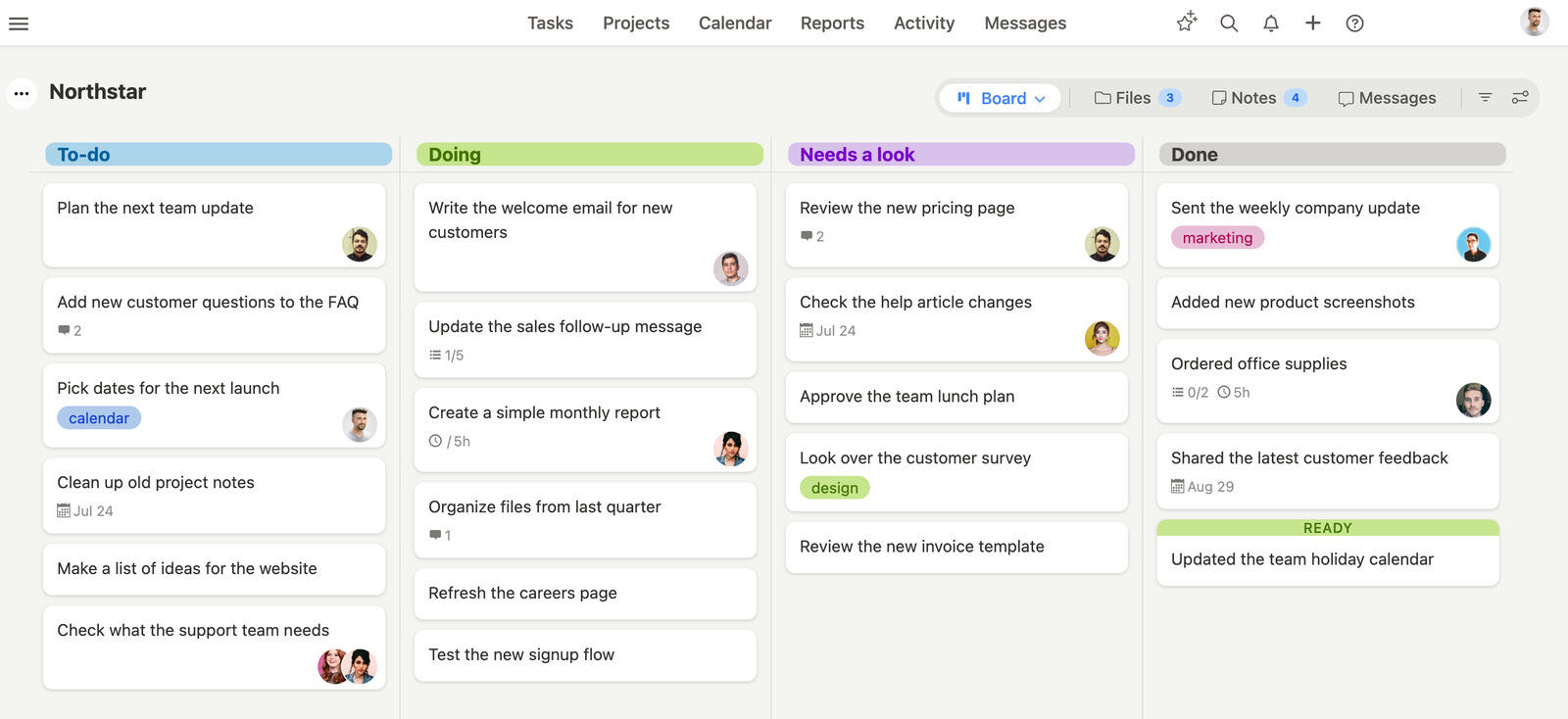
MeisterTask is known for its beautiful interface and integration with its productivity suite, great for teams that like visual organization. But sometimes simplicity comes at the cost of functionality, especially for teams working on complex or large projects. Trello is great at Kanban task tracking and has lots of customization through Power-Ups. While this can expand its capabilities it often adds complexity and requires extra effort to manage tools and workflows. Breeze avoids all that by having a balanced set of features that work out of the box.
Breeze makes project management easy with fast onboarding and simple tools. Teams can manage tasks, see timelines and collaborate without wading through settings or learning curves. Compared to MeisterTask's focus on looks or Trello's customization.
Trello is where that difference shows up most clearly in practice, since the Power-Up model is exactly what Breeze replaces with built-in features — Breeze compared with Trello goes through what you gain and what you give up in that trade.
What users say about Breeze
"I love the email notifications for comments on important tasks + email reminders on projects and tasks."
Source: Capterra
Which tool should you choose?
Honestly, these two rarely compete for the same team. Pick Trello if your work is genuinely board-shaped and you want the fastest possible start; its free plan carries small teams a long way, and you only pay once you need timelines or automation. Pick MeisterTask if you want time tracking and automation included from day one and you value a tidier, more opinionated interface — especially if your team already uses MindMeister. Switching between them is cheap since both are lightweight, so the real cost is retraining habits, not migrating data.
Choose MeisterTask if:
- MeisterTask has time tracking and task automation built-in, Trello requires Power-Ups for that
- Modern design and user friendly interface for a smoother experience than Trello's old school design
- Integration with the MindMeister suite to go from brainstorming to task execution, Trello doesn't support that natively
Choose Trello if:
- Trello's Kanban boards are visual task management, so easier to organize projects than MeisterTask's minimal design
- Power-Ups have more integrations with Google Drive, Slack and Jira than MeisterTask's bundled features
- Trello's free plan is for smaller teams, while MeisterTask's free version is more limited
Choose Breeze if:
- Breeze includes time tracking natively, enabling teams to monitor productivity directly in the platform. Trello relies on Power-Ups for this functionality, and MeisterTask's time tracking, while present, lacks the same level of integration and usability
- Breeze offers customizable Kanban boards that adapt to your team's structure, combining simplicity and flexibility. While Trello's Kanban system is popular, it often requires additional Power-Ups for advanced use. MeisterTask's minimalistic approach focuses on design, which may not satisfy teams managing more complex workflows
- Breeze simplifies task automation with workflow automation , helping teams eliminate repetitive tasks. Trello supports automation via Power-Ups, and MeisterTask offers limited automation within its system
When evaluating project management tool, prioritize features that directly solve your team's specific challenges. Instead of chasing every possible integration, identify your core workflow bottlenecks. Whether that's time tracking, task delegation, or communication gaps—and choose a tool that addresses those precise pain points.
Start with a small pilot project to test how a new tool impacts your team's productivity. Pay attention to adoption speed, ease of use, and whether it genuinely reduces administrative overhead. Remember, the best project management solution isn't about having the most features, but about helping your team work more effectively with less friction.
FAQ
- Is MeisterTask better than Trello?
- MeisterTask is better than Trello for teams that want simple visual task boards. Trello is better than MeisterTask for teams that want simple Kanban-based planning.
- Which tool is easier to use, MeisterTask or Trello?
- Both are easy to pick up. Trello's single-board simplicity makes it the faster to learn, while MeisterTask adds a little more structure with sections and built-in automation.
- How do MeisterTask and Trello compare on pricing?
- MeisterTask pricing: Free for basic use, with paid plans starting at $13.50 per user per month. Trello pricing: Free for basic use, with paid plans starting at $5 per user per month.
- What is a good alternative to MeisterTask and Trello?
- Breeze is a strong alternative if you want boards, timelines, time tracking, and automation in one simpler workspace.




