Why choose Breeze
 Marketing
 Creative
 Sales
Sales Remote work
 Managers
 Product teams
 Project management
 Task management
 Kanban tool
 Time tracking
 Project reporting
 Project calendars
 Project timeline
 Team workload
 Project automation
 Project customization
 Chat
Chat Web forms
 Project roadmap
 AI
AI What's new
 Articles & guides
 Help center
 Mobile apps
 Integrations
 Developers & API
 Free tools
How do you get started with remote work the right way?

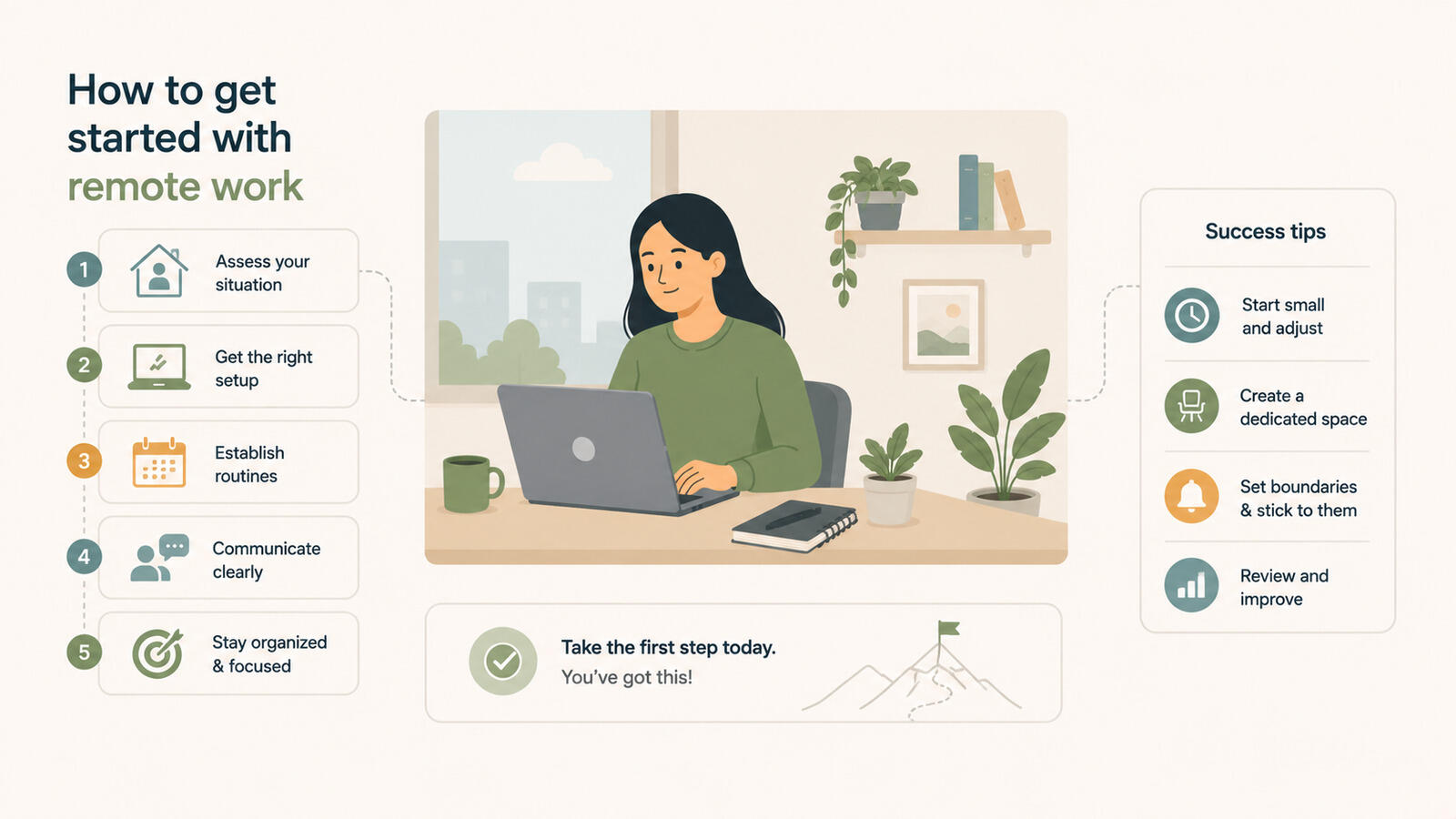
Getting started with remote work is mostly about three setups in the first month: a physical space that signals "working" to your brain, a digital setup that keeps you visible to teammates without burning you out, and a social rhythm that proves you are around. Most people who struggle do not fail because they cannot focus. They fail because nobody knows what they are doing all day, and they cannot tell when work has actually ended. The first 90 days decide whether remote sticks for you, and the fix is rarely a new app. It is usually a better routine.
What should you actually set up in your first weeks?
Set up the physical, digital, and social parts of remote work before you worry about productivity tricks. Almost every problem new remote workers run into in month one traces back to skipping one of these three.
The physical setup: a real workstation, not the couch
Pick one spot in your home that is only for work. It does not need to be a dedicated office. A corner of a bedroom, a side of the dining table that gets cleared at the end of the day, a small desk in a hallway. What matters is that your body learns the place. When you sit there, you work. When you leave, you stop. The couch and the bed are bad choices because they are already strongly associated with rest, and your brain will fight you on both ends.
Spend money on a chair first. Back pain after six weeks is one of the most common reasons people quietly drift back to the office. A decent monitor and a real keyboard come next.
The digital setup: notifications, one source of truth, and writing things down
Decide which channels deserve your attention and turn off the rest. Most new remote workers leave every notification on out of anxiety, then spend the day reacting to pings instead of doing the work that would make them visible in the first place. A reasonable starting point: chat notifications on during your working hours, email checked on a schedule, and everything else off.
Pick a single place where your tasks live and put everything there. If your team uses Breeze or another shared task board, that is your source of truth. If your team uses something else, you still need a personal layer so you always know what you owe people and by when. Trying to hold it in your head is the fastest way to drop something in your first month, which is exactly when you cannot afford to. Building effective to-do lists is a useful add-on for that personal layer.
Get comfortable writing things down. Remote work runs on text. GitLab's all-remote handbook is worth bookmarking even if you only ever skim it - it is the most thorough public source on what "writing first" looks like in practice. A short written update at the end of the day, a clear message instead of a quick meeting, a comment on a task instead of a chat that scrolls away. The people who thrive remotely tend to be the ones who can put a thought into three sentences without needing a call.
The social setup: working hours and proactive contact
Tell your team when you work. Then actually work then. Remote trust is built on predictability more than output in the first few weeks, because nobody knows your output yet. If your status says you start at nine, be on by nine. If you log off at six, log off at six. This sounds boring. It is also what separates people who get autonomy in month three from people who get micromanaged.
Reach out to teammates without being asked. Schedule a 20-minute intro with each person on your immediate team in the first two weeks. Async does not mean silent. It means the conversation does not have to happen right now, not that it should never happen.
What does a working remote setup look like at a glance?
A quick map of the three setups, what good looks like in each, and what trips people up.
| Area | What to set up | Good fit for | Common mistake |
|---|---|---|---|
| Physical | Dedicated spot, decent chair, real keyboard, defined "off" zone | Anyone working more than 20 hours a week remotely | Working from the couch or bed, then wondering why work bleeds into evenings |
| Digital | One task board as source of truth, tuned notifications, end-of-day note | People joining a remote team or going freelance | Leaving all pings on and treating chat as the to-do list |
| Social | Posted working hours, scheduled intros, daily light presence | New hires and anyone whose team has not met them yet | Going quiet for days, then panicking that nobody trusts them |
What trips up most people in the first three months?
The same handful of mistakes show up over and over with people new to remote work, and almost none of them are about discipline. They are about not having a model for what good remote work looks like day to day.
Working too many hours without noticing
The first failure mode is overwork. Microsoft's Work Trend Index has been tracking the "infinite workday" pattern for years - the day quietly stretches into evening pings and weekend triage if nobody puts a hard line on it. With no commute and no clear end of day, the workday quietly stretches. You start at 8:30 because you are already at your desk. You answer one more message at 7:15. Six weeks in, you are exhausted and cannot explain why, because you "only worked normal hours." Set a hard stop and close the laptop. If your team operates across time zones, this matters even more.
Going silent on team channels
The second failure mode is invisibility. New remote workers often head-down for days trying to prove themselves, then surface with a finished piece of work and expect applause. Instead they get suspicion, because for three days nobody saw any sign of life. The fix is small and constant: a one-line note in the morning about what you are working on, a heads-up when you hit something tricky, a short summary when something ships. A shared task board with visible status, the kind Breeze is built around, takes a lot of the pressure off this, because the work itself is visible without you having to narrate it constantly.
Treating async as a way to ignore people
The third failure mode is misreading async. Async communication means a teammate can answer in a few hours instead of right now. It does not mean you can take two days to respond to a direct question, ghost on a thread, or skip the occasional video call because typing is more comfortable. People who use async as cover for being unresponsive get a reputation fast, and that reputation is hard to shake.
Building no routine at all
The fourth failure mode is treating every day as a blank page. The people who last tend to have a boring routine. Same wake-up time. Same loose blocks for deep work, meetings, and shallow tasks. The flexibility is still there when you need it. You just do not spend it on deciding when to start work every morning. Staying motivated working from home gets easier once these routines settle in past the first quarter.
How do you know if remote work is actually working for you?
By the end of month three, you will have signal. Not certainty, but enough to decide whether to keep going or rethink. Buffer's annual remote survey has consistently shown that loneliness and an unclear end of day are the two pain points people most often report at this stage, so they are worth checking yourself against. The signs split fairly cleanly into two groups.
Signs it is working
You feel calmer than you used to, not just more flexible. Your evenings feel like evenings. You can name what you are working on this week without checking. You have at least two or three teammates you talk to in a low-stakes way, not just about deliverables. You are sleeping a normal amount. You finish most days knowing what you did. The work is visible to your team without you having to defend it.
This is the underrated test. Flexibility on its own is not the goal. Plenty of people get the flexibility and still feel worse, because they traded a structured day for a structureless one. If remote is suiting you, you should feel less friction, not just more freedom.
Signs it is not
You feel lonelier than you expected, and meeting people on weekends does not fix it. You cannot tell when the workday ends, and you have stopped trying. You go whole days without a real conversation and you feel it. Your team seems vaguely unsure what you do, and you feel vaguely unsure what they do. You miss the texture of an office, the small chats, the walking to lunch together. The flexibility is nice, but you are not sure it is worth what it costs you.
If most of that describes you at month three, remote may not be your shape, or at least not full-time remote. That is genuinely fine. Some of the best people in any field are wired for in-person work. The mistake is forcing it for another two years because remote is supposed to be the better life.
The middle case: mostly remote, sometimes not
Plenty of people land in a hybrid pattern by choice. A few days from home, one or two in a coworking space, an occasional in-person day with the team. If pure remote feels lonely but the office feels like a waste, this is often the right answer.
What should you actually do in week one?
A short, opinionated starting plan for anyone joining a remote team, going freelance, or shifting to a remote policy at an existing job.
Set up the workstation before the workflow
Spend the first day or two getting your physical space right. Chair, desk, monitor, light, a closed door if you can manage it. If you cannot manage a door, headphones and a clear signal to anyone in your home about when you are working. Do this before you tweak your task setup. A great workflow on a bad chair lasts about a month.
Pick your task source of truth and stick to it
Whatever your team uses, mirror your personal work in it. Breeze works well here for small teams because the task board, status, and time tracking are in one place, and it is light enough that you actually keep it updated. If your team uses something heavier, treat the shared tool as the team layer and keep a simple personal list, even just a text file, for your own day. The point is one place, checked first thing every morning.
Establish visibility habits in week one
Post your working hours somewhere your team can see them. Drop a short note in your team channel each morning about what you are working on, and another at the end of the day about what you did. Keep them brief. This is not a status report, it is a heartbeat. Two weeks of this and your team stops worrying about whether you are around, which is when you stop being micromanaged.
Schedule the social side on purpose
Book short intros with each person on your immediate team in the first two weeks. Find one or two people you actually like and keep talking to them informally. Join whatever non-work channel your team has. If your team does not have one, start one. Remote does not eliminate the social side of work, it just makes you responsible for arranging it. If those intros are mostly on video, the habits for running virtual meetings keep them sharp.
Choose remote if you want a calmer, more focused work life and you are willing to put structure around it yourself. Avoid full-time remote if you need ambient social energy to feel okay during the week. Move to hybrid if you tried both and the truth is somewhere in between.
Quick decision points before you commit
- How do I tell my team I am actually working without sounding defensive?
- Make the work itself visible. A shared task board with clear status, a short end-of-day note, and updates on tasks as they move. Visibility removes the need to explain.
- What if I cannot afford a dedicated workspace yet?
- Define the space behaviorally instead of physically. Same chair, same direction, same hours. Pack the laptop away at the end of the day so the space becomes "not work" again.
- How long should I give it before deciding remote is not for me?
- Three full months, with a real routine in place for at least the last two. Less than that and you are mostly measuring the awkwardness of any new job.
What to do next
The honest summary: the first three months of remote work are mostly about building a structure your old office used to give you for free. Get the workstation right, pick one task source of truth, and make yourself visible without overworking. Do that, and remote tends to be a genuinely better way to work.
Start with the physical setup this week and the visibility habits next week. If you want a lightweight task board to anchor the digital side, Breeze is built for small remote teams who need to see status, deadlines, and who is doing what without setting up a whole system to get there.